
Introduction
The ADF Hierarchy Viewer component provides a highly interactive way to visualise and interact with a set of data which contains relationships. In this post, we will use it to build an organisation chart which allows users to navigate around the structure, expand and close nodes, zoom, get more information. The component also provide several different layouts, like the basic hierarchy shown below, as well as various other hierarchical layouts, and star charts.
The organization chart (see image below) provides a hierarchy view for members in an organization or company. It retrieves user’s information from WebLogic identity store such as LDAP server.

The component provides two approaches for integration with your customized WebCenter application or WebCenter Spaces:
– Separated ADF Application
Deployed it to your WebCenter server as standalone ADF application and integrate with your customize application or WebCenter Spaces using iframe, hyperlink etc.
– Taskflow
Add it to your page by Composer.
Architecture

ADF Hierarchy Viewer: The ADF hierarchy viewer component displays hierarchical data as a set of linked nodes in a diagram. The nodes and links correspond to the elements and relationships to the data. The component supports pan and zoom operations, expanding and collapsing of the nodes, and rendering of simple ADF components within the nodes. A common use of the hierarchy viewer is to display an organization chart.
Java Bean: The property and behavior of the ADF Hierarchy view component or containing components can be bound to java bean property or method.
User and Role API for OPSS (Oracle Platform Security Service): User and role API provide access to a user’s attribute stored in an identity store (LDAP, RDBMS, custom). This API frees application developer from knowing the details of the identity store.
OPSS: OPSS provide a abstract layer in the form of standard based API that insulate developer from security and identity management implementation details.
Identity Store: it can be ldap directory, database or custom identity repository. Using OPSS, developer no need know the background identity store.
1. Create ADF Taskflow
Create a new Taskflow
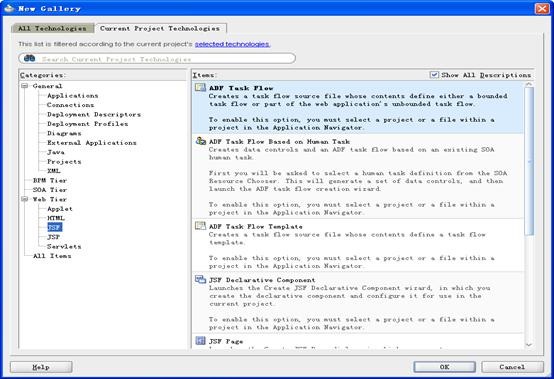

Drag and drop a view from component palette, name it. Double click it, system will generate a jsf page fragment
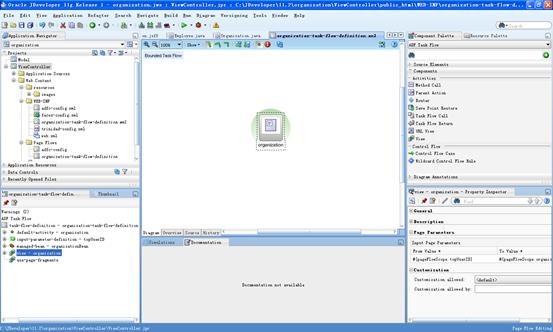

Define managed bean and input parameter as following picture shown

The Taskflow input parameter can be set in runtime on page edit mode. So user can dynamically change the top user of the whole organization.
2. Page Design
Page layout
Open the organization.jsff page and view the structure window as following picture shown

Dvt:hierarchyViewer
The ADF hierarchy viewer component displays hierarchical data as a set of linked nodes in a diagram. Detail information can be checked from following link:
http://download.oracle.com/docs/cd/E16764_01/apirefs.1111/e12418/tagdoc/dvt_hierarchyViewer.html
Dvt:node
The node component is used to stamp out nodes in the hierarchy.
The “zoom100”, “zoom75”, “zoom50”, and “zoom25” facets are used to specify the stamps for different zoom levels of the hierarchy. The “zoom100” facet is typically the most detailed, showing the most information, because the nodes are larger at 100% size. The “zoom25” facet is typically the least detailed, showing the least information, because the nodes are smaller at 25% size. Detail information can be checked from following link:
http://download.oracle.com/docs/cd/E12839_01/apirefs.1111/e12418/tagdoc/dvt_node.html
Node detail
Expand the zoom100 node facet

The panel card component is a container that shows one of multiple showDetailItems at a time, and provides navigation between its showDetailItems with an optional transition effect. Detail information can be referred from following link:
http://download.oracle.com/docs/cd/E14571_01/apirefs.1111/e12418/tagdoc/dvt_panelCard.html
Data binding
Hierarchy View binding
‘value’ property is bound with ‘employees’ property of organization bean. It is a TreeModel which contains employees list getting from background identity store. Each hierarchy node is bound to employee instance in this list.
‘Navigation up’ listener is bound to ‘doNavigateUp’ method of organization bean. This listener is triggered when navigating the tree.

– Node binding
Each hierarchy node is bound to employee instance in the employee list which is bound to hierarchy view component.
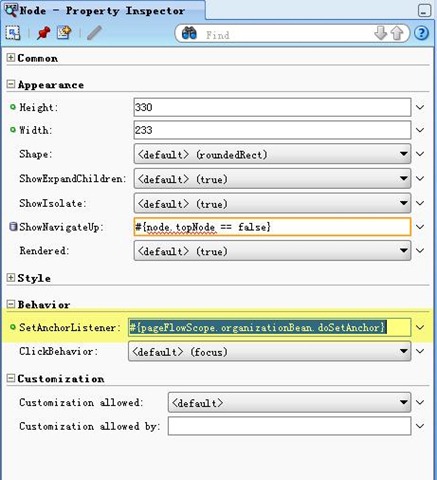
‘SetAnchorListener’ is bound to ‘doSetAnchor’ method of organization bean. This method make the selected node as the new anchor.
3. Java Bean implementation introduction
– Organization.java: ADF Managed bean class
It contains following accessor method ‘getEmployees()’ which returns a TreeModel instance which is bound with ADF Hierarchy view component’ ‘value’ property.
– Employee.java: Employee wrapper class to fetch the employee information getting from identity store.
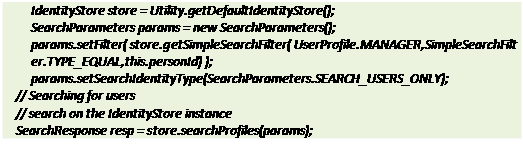
This class contains an accessor method ‘getChildEmployees()’ which return child employees list of current employee based on ‘manager’ property of the user entry in background identity store such as LDAP directory.
Inside this method, user and role API for OPSS is used to retrieve the employee list of current manager. The benefit of using this API is free developer knowing the detail background identity store and increasing the portability of the application. See following code as following:
The next post provides details about how to use the component.

 RedStack
Pingback: Using the Organisation Chart component | RedStack
Hi Joe,
Is there a way to export the hierarchy details to say, a pdf document?
Thanks.