Version Control

This article is part of a series on SOA Development and Delivery.

Let’s get started on our SOA Development and Delivery journey by talking about version control.  But before we delve right in, let’s take a moment to reflect on this axiom:

Axiom 1: Developing a SOA Composite Application is software development.

When we sit down to create a SOA Application, i.e. composites, user interfaces, services, etc., we are actually embarking on a software development exercise.  I think that some people don’t believe (or at least they don’t admit to themselves) that this is the case.  Why?  Well acknowledging that it is, in fact, software development implies a whole bunch of practices are necessary – like version control and testing for example.  And those are hard, right?

Well, they are certainly more work.  But its a bit like insurance – it is a cost you accept in the present to offset or prevent a much more significant potential cost/pain in the future.  In their quintessential book Continuous Delivery, Dave Farley and Jez Humble say:

“In software, when something is painful, the way to reduce the pain is to do it more frequently, not less.”

Putting in the extra effort upfront will save you from a lot more pain and effort later on.  Using version control fits into this category.  It can be a bit painful, but it is definitely worth it in the end.  Consider this axiom:

Axiom 2: Developing software without version control is like mixing chemicals without reading the labels – sooner or later, it is going to blow up in your face.

Why is this true?  Consider the following questions – how would you answer these if you are not using version control?

  • What was the content of (some BPEL file) on (some day in the past)?
  • Who changed (some endpoint URL) in (some BPEL file)?  When?  Why?
  • We found a problem in production, which version of the source matches this SAR we have in production?
  • Can I get a copy of that source, with no other changes or updates to any other files?
  • How come I can’t build this?  It must have worked before!
  • Where is the deployment script for this composite?
  • How did we set up the test environment that we used to test this composite?
  • Which version of the SOA configuration plans matches this version of the SAR?
  • Which version of the OSB project and the ADF UI matches this version of the composite?

The answer is, of course, that you can’t answer them.  At least not with any level of confidence.  I would go so far as to say that if  you don’t have your SOA applications under version control, you should stop whatever you are doing, and go set it up right now!  Sooner or later you are going to encounter a critical problem in your production environment that you simply cannot fix.

That leads us to one more axiom:

Axiom 3: If it is not in version control, it does not exist.

If you cannot retrieve a previous revision of an artifact, then it may as well not have ever existed at all – it is of approximately the same value to you either way.

Now, what do I mean by ‘using’ version control?  Well, it is more than just checking in your changes.  That is an excellent start, and it is much better than nothing at all, but really, you should be thinking about a few more advanced ways of using your version control system as well – like branching and tagging for example.  We will come back and discuss these in some depth later in this article.

For now, let’s cover some basics.

Which version control system to use?

There are a number excellent version control systems available, both free and commercial.  I have used most of them – rcs, SCCS, CVS, Subversion, ClearCase, Perforce, Mercurial, and git to name a few, and even some proprietary ones that exist only inside the organizations that use them or are included in a particular operating system (e.g. OpenVMS) or file system (e.g. zfs).

Today I mostly use Subversion, but I am going through a transition to git.  Let’s talk about these two in a little more detail.

Firstly, both of them are free, and both are widely used.  That means that there is good tool support, a large community of people creating helpful content about how to use them, and a pretty good chance that anyone you get working on your project will have some level of familiarity with them.  They both also have excellent, freely available books to help you get started: Version Control with Subversion and Pro Git.

The other thing that is very useful about these two, specifically in the context of Oracle SOA Suite development, is that they use an atomic commit which means that you can change a number of files and commit all of those changes as a single revision.  CVS, for example, does not allow you to do this because it versions each file individually.  This capability is great in a SOA environment, as many of the changes we need to make involve making changes to more than one file.  Having the project in a state where some, but not all, of those file changes are committed, is not useful.

JDeveloper supports Subversion quite well, although you do need to invest a little time to make sure you know how to drive it.  And support for git was added in JDeveloper 11.1.1.6.

There are three key things that are driving my personal migration from Subversion to git:

  • The increasing demand for distributed development, especially when multiple organizations are involved in the development lifecycle – git is one of the fleet of new distributed version control systems,
  • The ability to commit, branch, merge, etc., while offline (and away from the watchful eye of the continuous integration server), and
  • The availability of excellent tools (like GitLab) that provide easy visibility into the repository itself, and into the branching and merging over time.

I personally find the git workflow more complex than the Subversion one, but for me at least, the time has come to make the move.  I think that moving to distributed version control is pretty much inevitable in the modern world.

I think the most important thing to say about which version control system is the right one to use is this – any is better than none.  If you want me to recommend one, I would have to say git.

What should we put in version control?

Version control is for source artifacts, not derived artifacts like binaries, deployable packages, etc.  Source artifacts does not just mean source code – it means anything that is needed to recreate your production environment from scratch.  Craig Barr proposed an excellent list in this article which I am quoting here:

  • “OSB Configuration
  • SOA Projects
  • Customization Files
  • Composite Configuration Plans
  • WebLogic Deployment Plans
  • Build Scripts
  • Test Scripts
  • Deployment Scripts
  • Release Scripts
  • Start-up & Shutdown Scripts
  • “Health Check” Scripts
  • Application Server Configuration
  • Puppet Configuration
  • (Optionally) The Binaries
    Note: This is unnecessary and redundant if you follow good binary management which I’ll discuss in the next blog installment.
  • And so on….”

Personally, I do not agree with putting your binaries into your version control system.  I think that binaries belong in a separate repository, because they have quite different characteristics and management needs.  We’ll talk a lot more about this in a future post on binary management, but for now a couple of examples to illustrate the point:

Source Binaries
Tend to be relatively small files Tend to be relatively large files
Tend to change frequently Tend to never change after they are created
Usually we want to keep all revisions Often we only want to keep important and recent revisions
Are created by a person Are (or at least should be) created by some automated/programmatic process
Cannot easily be recreated it they are lost or damaged Can be easily recreated if they are lost or damaged (assuming you still have the source, etc.)

So what do you put into version control for SOA, OSB, ADF?

The simplest answer to this question is ‘whatever is left in the project after you have executed the clean action on the project in the IDE.’  Note that you would need to make sure you have disabled automatic builds in eclipse, otherwise it will just go ahead and build again.

We need to be careful about a couple of things here:

  • First, what is a project?  For SOA, we really need to be checking in at what JDeveloper calls the SOA Application level, not at the level of what JDeveloper calls a SOA Project.  The reason for this is quite straightforward – there are a number of circumstances under which it is not possible to build a SOA Project without having access to some of the information (files) in the SOA Application.  For example, the presence of Human Tasks and Business Rules in a composite (SOA Project) are such an occasion.  In both of these cases, you need to be able to access the adf-config.xml file in the SOA Application to get the necessary MDS configuration information to build the project.
  • There are some directories that your version control client may automatically hide, because their names start with a period (‘.’) – for example, there is a ‘.adf‘ directory.  These often contain important data and you need to make sure that you check them in.
  • Depending on what you have done in your project, the out of the box ‘clean’ action might not do a proper clean up of your project.  If you have created extra target directories, for example, you might need to make sure that those removed too.  A good example of this is when you use Maven to build a SOA project – it will create a target directory, in addition to the normal deploy directory.  You need to make sure that the mvn clean also removes the deploy directory and/or that the IDE also removes the target directory.

The same goes for ADF and OSB projects.  Given the flexibility provided by the tools, there is really no ‘one size fits all’ answer to this question, you need to invest the time to work out the correct answer for your own projects.

At the end of the day, there are two ways you can get this wrong:

  • You leave out some files that are needed.  This is a problem that you will need to go back and fix.
  • You include some extra files that are not needed.  This is probably not a big deal.  It could possibly result in some extra files being in your binaries.  That may or may not be a problem.

So if you are limited for time, better to opt for too much than too little.

How should we set up the repository?

A question that comes up fairly often, particularly with Subversion, is how to structure the repository.

There are two common approaches here – one is to have a single Subversion repository with all the projects in the same repository.  The other is to have one repository per project (or development group, or whatever unit).

There are of course advantages and disadvantages to each approach.  Commonly cited issues include: the amount of administration overhead, the time taken to perform backups (which is done by dumping the whole repository), issues with revision numbers (which are shared across the whole repository) and comments (knowing which ones are for a specific project), different security requirements, or code separation requirements for different projects, and different Subversion workflow requirements across projects.

In practice though, I think that these can be handled with approximately the same amount of effort regardless of the approach chosen, assuming a suitably experienced Subversion administrator.

I believe that the one repository approach is easier, and I would recommend taking that approach unless there is some specific reason not to.  The most likely reason is that some project team does not want their code stored with another team’s code due to some kind of confidentiality or licensing issue (perceived or real).

So, If you are using Subversion, I would recommend a single Subversion repository, shared by all projects for a SOA environment.

Inside the repository, you should create zero or more levels of directories that you use to organise projects into logical groups, then under these, create a directory for each project (i.e. SOA Application, etc.) and under that create the recommended Subversion trunk, tags, and branches directories.  This is also consistent with the approach recommended in Version Control with Subversion.  So your repository might look like this:

root
  - businessUnit1
    - project1
      - composites
        - GetCustomerDetails
          - trunk
          - tags
          - branches
        - ProcessOrder
          - trunk
          - tags
          - branches
      - ui-projects
        - ...
    - ...
  - businessUnit2
    - ...

git

With git, I am in the habit of creating a git repository for each project, as that is a more natural way to organise things in git.

Tagging

Tagging, in the context of a version control system, is essentially making a named copy at a given point in time.  (Though more than likely you will just be copying pointers, not all of the content.)

Why would you want to be able to go back to a given point in time?  There are two excellent reasons:

  • You have found a problem in an older version that is deployed in a production (or other) environment that you need to fix, so you need to get back the exact version of all of the source artifacts that were used to create that particular version, and
  • Things have gone very bad and you need to go back to a known good point in the past.

So, the first one tells us that you must tag whenever you are going to release.  You might also want to tag whenever you reach a significant or meaningful milestone.

The second reason can be addressed with tagging, but you might be better to use a branch in that case.  We will talk about branches in a moment.

What is a version anyway?

Often people ask about the relationship between the ‘versions’ in the version control system and the build system, and the runtime versions.  It is important to understand that there is not, and need not really be, any kind of direct relationship between them, other than for releases or release candidates.

Normally you are going to be building the latest version of the code – this is sometimes called the ‘head’, or ‘trunk’ or ‘tip’ – and executing tests against that.  So you don’t need to know which ‘version’ (‘revision’ is a more accurate word from the point of view of the version control system) it is – you can just refer to it as the latest version.  In Subversion, this is done by ending the URL with ‘/trunk‘.

The only other revisions that you are likely to build are the latest versions on a particular branch.  Again, this can be done without knowing the revision number.

You would not need to build any tagged/released version again – you could just go and get the binary from the binary repository.  Although you could easily build it again if you needed to by referring to the tag name in the URL.

And all of the other revisions are essentially old, discarded points in time that you have moved on from.

So you do need to know which tag relates to which binary version, and the easiest way to do this is to just use the binary version number in the tag.  So, for example, you might tag revision 126 as ‘VERSION-2.3‘.  If you needed to come back later and look at that version, you could just end your Subversion URL with /tags/VERSION-2.3.

That brings us to branching…

Branching

Keeping a log of all the changes over time is all very well and good, but projects don’t always follow a straight line.  What happens when you do find the problem in your old version 2.3, the one you have in production, but you have already done a heap of work on version 2.4?

This is one thing that branches are good for.  A branch lets you start a parallel stream of work from a given point in time (like a tag, but it can be from any revision).  Consider the following diagram:
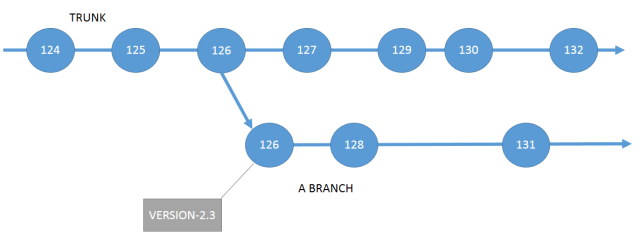
version-control

Here we can see that development of the next version can continue on the trunk, while another team work on fixing the production bug in version 2.3 in the branch.  The two have no effect on each other.  We can build either the trunk or the branch, depending on what we want to do.

When you finish fixing the bug, let’s say that is with revision 131.  You should tag that one too, so you have another tag to go back to in case you find a bug in that ‘fixed’ version.

The other useful thing about branches, is that you can merge them back into the trunk (or any other branch for that matter).  This provides an ideal way to isolate potentially dangerous work.  If you are trying something new, and you are not sure how it is going to work out, you can do that work in a branch.  If it proves to be ok, you can merge the changes in that branch back into the trunk at some point in the future.  But if it is not ok, you can just forget the branch and go on as if it never happened.

A note on merging

One really important thing to know is that you can merge backwards.  This lets you essentially get rid of a bad commit.  This is definitely something that you should learn how to do in your version control system.

When to create a version

Here is another meaningful question – how often should developers commit their changes to the trunk?

Later on we are going to talk about continuous integration.  The word ‘integration’ in ‘continuous integration’ refers to the process of merging changes into a trunk.  One of the foundation principles of continuous integration is that all developers must commit regularly to the trunk.  What does regularly mean?  Well no less frequently than once every day.

This drives some desirable behaviors.  How much meaningful work can a developer do in a day?  Not much right?  Right!  That’s the whole idea!  By forcing developers to work in small iterations, we are minimizing the size of potential integration issues that can occur.  Less code to integrate – less serious problems integrating.  Less serious problems, easier to fix.  Less problems in the codebase at any given point in time – better quality!  That is what continuous integration is aiming to achieve.

When we are using continuous integration, we build every time a developer commits to the trunk (or to a branch).  But now the question arises – do we really want to build all of the developer’s little intermediate commits, that we know are not going to work anyway, since they are work in progress?

There are two ways we are going to talk about (in future articles) to address this:

  • Many continuous integration servers support the notion of a pre-flight build.  This is a build that is triggered by the developer’s work in progress commit.  The sole purpose of this build is to see if the have broken anything.  It does not need to go all the way through the build process, running all of the integration tests, getting ready for release.  It is never going to be released.  This gives the developer the freedom to experiment and check the results without bogging down the continuous integration system wasting a whole bunch of time and energy on builds that don’t matter.
  • The other option comes with distributed version control.  Here the developer can commit as many times as they like, but the commits will not flow through to the main repository – the one the continuous integration server is watching – until the developer does a ‘push’. When the continuous integration server sees a whole bunch of new commits, it is (usually) smart enough to just pick up the newest one and build that.  This approach includes an implicit assumption that the developer is able to build and test the software on their own environment before pushing.

More about version control

At this point, it starts to become difficult to talk about some of the strategies I want to discuss before we have moved forward a few more steps and talked about a few more topics, especially continuous integration .  So let’s put version control on hold, and come back to it later.

Posted in Uncategorized | Tagged , , , , | 6 Comments

Building OSB projects with Maven and removing the eclipse dependency

In this earlier post, I talked about a way to automate the build and deployment for OSB, but I did not go so far as to get that working in Maven, though you certainly could.  But, OSB PS6 has added a new tool called configjar which lets you build a sbconfig.jar file without needing to have eclipse/OEPE/OSB IDE installed on the machine where you are doing the build.  You do still need OSB, but removing that IDE dependency is a big step forward.

You can find configjar sitting under your Oracle_OSB1/tools/configjar directory in your OSB PS6 installation.  There is a readme file there that tells you how to use it from ANT and WLST.  Here, I want to show you how to use it from Maven, and therefore Hudson, etc. too.

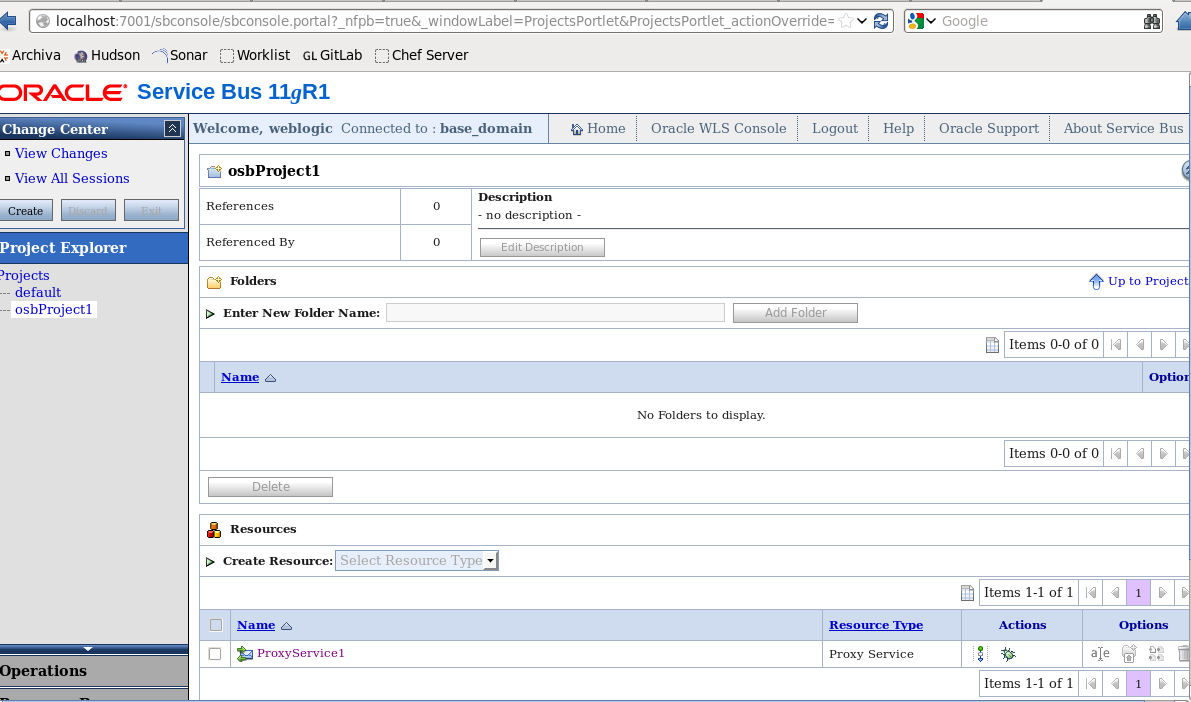
For this post, I went into the OSB IDE and created a simple project called osbProject1 which contains a single Proxy Service called (imaginatively) ProxyService1.  It is just a plain old ‘any’ proxy service with essentially no implementation at all.  But it is enough to do what we need to do.

By the way – I have OSB and the OSB IDE running on Oracle Linux as a 64-bit application – see how here.

The configjar tools supports building sbconfig.jar files for projects and/or resources.  So you should be able to use this same approach for pretty much anything you build in OSB, possibly excepting when you have custom extensions.

If we take a look in my osbProject1 direction in my eclipse workspace, we see that it contains just a single file, ProxyService1.proxy.

We are going to add a few more files:

  • A Maven POM to control the build (pom.xml)
  • A settings.xml file that we will pass to configjar
  • import.py and import.properties files like we had in that previous post

Let’s take a look at them now.  We will start with settings.xml.  This is a file we pass to configjar to tell it how to build the sbconfig.jar for us.  This is a relatively simple file.  Here is an example:

<?xml version="1.0" encoding="UTF-8" ?>
<p:configjarSettings xmlns:p="http://www.bea.com/alsb/tools/configjar/config">
  <p:source>
    <p:project dir="/home/oracle/workspace/osbProject1"/>
    <p:fileset>
      <p:exclude name="*/target/**" />
      <p:exclude name="*/security/**" />
      <p:exclude name="*/.settings/**" />
      <p:exclude name="*/import.*" />
      <p:exclude name="*/alsbdebug.xml" />
      <p:exclude name="*/configfwkdebug.xml" />
      <p:exclude name="*/pom.xml" />
      <p:exclude name="*/settings.xml" />
      <p:exclude name="*/osbProject1.jar" />
    </p:fileset>
  </p:source>
  <p:configjar jar="/home/oracle/workspace/osbProject1/osbProject1.jar">
    <p:projectLevel includeSystem="false">
      <p:project>osbProject1</p:project>
    </p:projectLevel>
  </p:configjar>
</p:configjarSettings>

In the source element, under project we have a dir attribute that points to the OSB project directory that was created by the OSB IDE, and we most likely check out of a version control system before starting our build.  All of those exclude elements are telling it to ignore these extra files we have added to the project, and the ones that it will generate.  Without those, your sbconfig.jar will be polluted with a bunch of unnecessary stuff.  These are all standard from project to project, except for the last one, which is the name of the sbconfig.jar itself.

The jar attribute on the configjar element names the output file.  Finally, we have the project element under projectLevel that names the projects we want to include in the sbconfig.jar that we build.  The other option is to select by resources.  You might want to go check out the OSB documentation to see how to do that.

Next, we have the import.py and import.properties files.  These are essentially the same as in the previous post so I wont repeat them. The only difference is that we need to update import.properties to contain the correct filename:

importJar=osbProject1.jar

Then we need a POM.  We are going to use the maven-antrun-plugin to execute configjar through ANT to generate the sbconfig.jar, and then the exec-maven-plugin to deploy it to our OSB server.  Here is the POM:

<project xmlns="http://maven.apache.org/POM/4.0.0"
xmlns:xsi="http://www.w3.org/2001/XMLSchema-instance"
xsi:schemaLocation="http://maven.apache.org/POM/4.0.0 http://maven.apache.org/maven-v4_0_0.xsd">
  <modelVersion>4.0.0</modelVersion>

  <groupId>com.redstack.osb</groupId>
  <artifactId>osbProject1</artifactId>
  <version>1.0-SNAPSHOT</version>

  <dependencies/>

  <properties>
    <osbHome>/ciroot/product_binaries/osb11.1.1.7/Oracle_OSB1</osbHome>
  </properties>

  <build>
    <plugins>
      <plugin>
        <groupId>org.apache.maven.plugins</groupId>
        <artifactId>maven-antrun-plugin</artifactId>
        <version>1.7</version>
        <executions>
          <execution>
            <id>deafult-cli</id>
            <phase>package</phase>
            <configuration>
              <target>
                <echo>
WARNING
-------
You must set the weblogic.home and osb.home environment variables
when you invoke Maven, e.g.:
mvn compile -Dweblogic.home=/osb11.1.1.7/wlserver_10.3
-Dosb.home=/osb11.1.1.7/Oracle_OSB1
                </echo>
                <taskdef name="configjar"
                  classname="com.bea.alsb.tools.configjar.ant.ConfigJarTask"
                  classpathref="maven.plugin.classpath"/>
                <configjar settingsFile="${basedir}/settings.xml"
                  debug="true">
                </configjar>
              </target>
            </configuration>
            <goals>
              <goal>run</goal>
            </goals>
          </execution>
        </executions>
        <dependencies>
          <dependency>
            <groupId>org.apache.ant</groupId>
            <artifactId>ant</artifactId>
            <version>1.7.1</version>
          </dependency>
          <dependency>
            <groupId>org.apache.ant</groupId>
            <artifactId>ant-launcher</artifactId>
            <version>1.7.1</version>
          </dependency>
          <dependency>
            <groupId>org.apache.ant</groupId>
            <artifactId>ant-nodeps</artifactId>
            <version>1.7.1</version>
          </dependency>
          <dependency>
            <groupId>org.apache.ant</groupId>
            <artifactId>ant-apache-bsf</artifactId>
            <version>1.7.1</version>
          </dependency>
          <dependency>
            <groupId>com.oracle.osb</groupId>
            <artifactId>configjar</artifactId>
            <version>11.1.1.7</version>
            <scope>system</scope>
            <systemPath>${osbHome}/tools/configjar/configjar.jar</systemPath>
          </dependency>
          <dependency>
            <groupId>com.oracle.osb</groupId>
            <artifactId>weblogic.server.modules_10.3.6.0</artifactId>
            <version>11.1.1.7</version>
            <scope>system</scope>
            <systemPath>${osbHome}/../modules/features/weblogic.server.modules_10.3.6.0.jar</systemPath>
          </dependency>
          <dependency>
            <groupId>com.oracle.osb</groupId>
            <artifactId>weblogic</artifactId>
            <version>11.1.1.7</version>
            <scope>system</scope>
            <systemPath>${osbHome}/../wlserver_10.3/server/lib/weblogic.jar</systemPath>
          </dependency>
          <dependency>
            <groupId>com.oracle.osb</groupId>
            <artifactId>oracle.http_client_11.1.1</artifactId>
            <version>11.1.1.7</version>
            <scope>system</scope>
            <systemPath>${osbHome}/../oracle_common/modules/oracle.http_client_11.1.1.jar</systemPath>
          </dependency>
          <dependency>
            <groupId>com.oracle.osb</groupId>
            <artifactId>xmlparserv2</artifactId>
            <version>11.1.1.7</version>
            <scope>system</scope>
            <systemPath>${osbHome}/../oracle_common/modules/oracle.xdk_11.1.0/xmlparserv2.jar</systemPath>
          </dependency>
          <dependency>
            <groupId>com.oracle.osb</groupId>
            <artifactId>orawsdl</artifactId>
            <version>11.1.1.7</version>
            <scope>system</scope>
            <systemPath>${osbHome}/../oracle_common/modules/oracle.webservices_11.1.1/orawsdl.jar</systemPath>
          </dependency>
          <dependency>
            <groupId>com.oracle.osb</groupId>
            <artifactId>wsm-dependencies</artifactId>
            <version>11.1.1.7</version>
            <scope>system</scope>
            <systemPath>${osbHome}/../oracle_common/modules/oracle.wsm.common_11.1.1/wsm-dependencies.jar</systemPath>
          </dependency>
          <dependency>
            <groupId>com.oracle.osb</groupId>
            <artifactId>osb.server.modules_11.1.1.7</artifactId>
            <version>11.1.1.7</version>
            <scope>system</scope>
            <systemPath>${osbHome}/modules/features/osb.server.modules_11.1.1.7.jar</systemPath>
          </dependency>
          <dependency>
            <groupId>com.oracle.osb</groupId>
            <artifactId>oracle.soa.common.adapters</artifactId>
            <version>11.1.1.7</version>
            <scope>system</scope>
            <systemPath>${osbHome}/soa/modules/oracle.soa.common.adapters_11.1.1/oracle.soa.common.adapters.jar</systemPath>
          </dependency>
          <dependency>
            <groupId>com.oracle.osb</groupId>
            <artifactId>log4j_1.2.8</artifactId>
            <version>11.1.1.7</version>
            <scope>system</scope>
            <systemPath>${osbHome}/lib/external/log4j_1.2.8.jar</systemPath>
          </dependency>
          <dependency>
            <groupId>com.oracle.osb</groupId>
            <artifactId>alsb</artifactId>
            <version>11.1.1.7</version>
            <scope>system</scope>
            <systemPath>${osbHome}/lib/alsb.jar</systemPath>
          </dependency>
        </dependencies>
      </plugin>
      <plugin>
        <groupId>org.codehaus.mojo</groupId>
        <artifactId>exec-maven-plugin</artifactId>
        <executions>
          <execution>
            <id>deploy</id>
            <phase>pre-integration-test</phase>
            <configuration>
              <executable>/bin/bash</executable>
              <arguments>
                <argument>${osbHome}/../oracle_common/common/bin/wlst.sh</argument>
                <argument>${basedir}/import.py</argument>
                <argument>${basedir}/import.properties</argument>
              </arguments>
            </configuration>
            <goals>
              <goal>exec</goal>
            </goals>
          </execution>
        </executions>
      </plugin>
    </plugins>
  </build>
</project>

Let’s take a look at the important parts of the POM that you will need to adjust to suit your environment:

  • We define a property called osbHome which is then used throughout the POM.  This needs to point to your Oracle_OSB1 directory.
  • In the plugin section for maven-antrun-plugin you can see that we have a taskdef to import the configjar task from the supplied configjar-ant.xml which comes with OSB.  We also have added a bunch of dependencies to this plugin so that it has the right OSB libraries in the classpath when it executes.  Note that they all have the scope set to system which means you don’t need to import them into a Maven repository first.  You can just specify a path to locate them.  Of course, this ties your build to that one machine effectively.  You can of course just go ahead and put those jars into a Maven repository and then use them normally, though since configjar depends on a local OSB install, there is not a lot of benefit right now.
  • Finally, in the plugin entry for exec-maven-plugin you can see that we execute wlst.sh and pass it our import.py script to do the deployment.

The configjar tool also requires two environment variables to be set, so you need to set these when you run Maven.  Here is an example:


mvn verify -Dweblogic.home=/ciroot/product_binaries/osb11.1.1.7/wlserver_10.3 -Dosb.home=/ciroot/product_binaries/osb11.1.1.7/Oracle_OSB1

This will build the sbconfig.jar and deploy it to OSB for us.  Here it is:

osb

Good luck!  Enjoy!  And a big thank you to Dimitri Laloue who helped me get configjar working.

Posted in Uncategorized | Tagged , , | 11 Comments

Installing OSB 11.1.1.7 (PS6) and its IDE on 64-bit Linux

Just a quick post to let you know that I have updated this older post with the details for OSB PS6 as well – still hear a lot of questions about how to set up the OSB IDE on 64-bit Linux.

Posted in Uncategorized | Tagged | Leave a comment

BPM PS6 video showing process lifecycle in more detail (30min)

If the five minute video I shared last week has whet your appetite for more, then this might be just what you are looking for!

The same international team that made that video – Andrew Dorman, Tanya Williams, Carlos Casares, Joakim Suarez and James Calise – have also created a thirty minute version that walks through in much more detail and shows you, from the perspective of various business stakeholders involved in process modeling, exactly how BPM PS6 supports the end to end process lifecycle. The video centres around a Retail Leasing use case, and follows how Joakim the Business Analyst, Pablo the Process Owner, and James the Process Analyst take the process from conception to runtime, solely through BPM Composer, without the need for IT or the use of JDeveloper.

  • Joakim, the Business Analyst, models the process, designs the user interaction forms, and creates business rules,
  • Pablo, the Process Owner, reviews the process documentation and tests the process using the new ‘Process Player’,
  • James, the Process Analyst, analyses the process and identifies potential bottle necks using ‘Process Simulation’.

Showcasing the business-focused advancements in PS6, the video illustrates the ease with which users can collaborate and quickly drive real business optimization.

Watch the video here:

Posted in Uncategorized | Tagged , , , , | 2 Comments

SOA Development and Delivery

Let’s start by talking about what I mean by that.  I don’t think that ‘SDLC’ is  the right term to describe the space that I want to talk about, but it is a term that people are familiar with, so I think it makes a reasonable place to start.  There are a lot of other terms that cover this space: governance, SDLC, development, version control, continuous integration, binary management, continuous inspection, continuous delivery, automation, virtualization, configuration management, devops, integration testing, and so on.

Also, by ‘SOA’ I really mean the broader set of technologies that we use to build ‘SOA Applications’ – whatever they are, and they are more than just composites.  Real applications have many components, e.g. user interface, integration, mediation, rules, code, processes, forms, service definitions, canonical data and service models, and so on.

I don’t know about you, but I can’t think up a nice concise way to say that I mean all of those things across all of those technologies, so I am just going to call it ‘SOA Development and Delivery’ and I hope you will know what I mean.

The State of the Art

Recently, I conducted a survey, and I have spoken individually with many folks from all around the world, about how they do SOA Development and Delivery today, and how they hope to do it in the future.  I think it would be fair to say that most SOA development today is not yet ‘industrialized’ – by that I mean that it is done by people of varying skill levels, working on a best effort basis, doing what they think is the right thing to do, and doing it the way they think is right.

By ‘industrialization’ I mean the development of standards, methods, processes, tools, and best practices, and the widespread automation of common tasks.  Doing the right thing, and doing it the right way.

I think that we stand of the verge of a point of inflection in our industry where we will see SOA development and delivery become industrialized.

My feeling is that today, if I can generalize, that in terms of SOA development, people:

  • have adopted some kind of iterative, or possibly agile, development approach,
  • generally make some basic use of a version control system to manage source artifacts,
  • sometimes write unit tests, but don’t always check coverage or information content of those tests,
  • often try to automate the build process on a project by project basis,
  • generally do not try to apply any kind of quality control or inspection of their code base,
  • are maybe playing with or thinking about trying continuous integration,
  • have not recognized the need for binary management, or have, but gave up because it is too hard with the current state of tools,
  • generally try to use configuration plans (or equivalent), but often build binaries that contain topological information that is specific to a particular environment,
  • maybe have a governance process that is sometimes updated and sometimes followed,
  • don’t have a good way to manage dependencies between components,
  • use virtualization in their development and test environments, though perhaps not in concert with any type of automation,
  • don’t have a good way to manage test and development data sets,
  • have not adopted devops practices, and
  • do not have a repeatable way to execute tests and deploy the application to different environments.

The effect of all of this is that:

  • it is hard to estimate and plan SOA development projects,
  • projects often overrun their constraints,
  • often the delivered application is of poor or uncertain quality, and
  • build and deployment processes are very manual, time consuming, and error prone.

Pain all around – architects and project managers planning, developers and build engineers building, operations running, and of course the poor business customer who has to use the thing!  Projects are delivered late, over budget, and erode the confidence of the business in the whole SOA promise and approach.  So naturally, I asked myself, why is this the case?  Well I think there are a number of contributing factors here:

  • the tools have not matured to a point that enables a lot of these things in a simple way,
  • there really aren’t any standards or reference architectures to follow,
  • some people don’t think of SOA development as ‘real’ development, and therefore don’t think these kind of practices apply to SOA development,
  • some of these are still maturing in the wild.

Conversely, it does not take a lot of time on Google to find a whole bunch of people who are interested in these areas and are clearly experimenting, prototyping, and sharing their experiences.  And talking with folks who are actively engaged in SOA development, the clear, consistent message I hear is that all of this stuff is ‘really important stuff’ and we, as an industry, need it.  It is also not hard to find consulting firms around the world that are developing capabilities and offerings in this space too.

So where do we go now?

Over a series of posts, I plan to share some thoughts and experiences on a range of topics, taken from those above, and also to share some practical examples of how to apply some of the state of the art tools and techniques from Java development to SOA development.  In particular, specifically in the context of SOA/MDS/BPM/OSB/ADF, I want to talk about:

  • version control,
  • dependency management,
  • build automation,
  • continuous integration,
  • continuous inspection,
  • continuous delivery,
  • unit testing,
  • integration testing,
  • binary management,
  • environment provisioning,
  • configuration management,
  • customization (of binary artifacts to particular environments),
  • the ‘correct’ use of MDS, and
  • the relationship of SOA development and delivery to governance.

And I am planning to talk about tools like Subversion/git/gitlab, Maven, Hudson, Archiva/Artifactory, Sonar, Chef and many others.

I hope you join me on this journey, and please let me know your thoughts.

Read next post in this series.

Posted in Uncategorized | Tagged , , , , , , , , , , , , , , , , | 10 Comments

Want a taste of BPM PS6?

If you want to see some of the new features of BPM PS6 in action, take a look at this video, which was put together by a team of Oracle technical folks from around the world.

Posted in Uncategorized | Tagged | 2 Comments

What’s new in BPM 11.1.1.7 (PatchSet 6)

Oracle has just released BPM 11.1.1.7 (also known as “PatchSet 6”).  This release adds a lot of new functionality so I wanted to share with you an overview of what’s new.

For the rest of this post, I will be assuming that you are familiar with the functionality in previous releases.  If you are new to BPM, you might want to read back over these two earlier posts first:

Overview

This release adds what I like to think of broadly as two major new sets of functionality:

  • First, it adds all of the tools needed for a business user to be able to use BPM extensively and without the need for a developer (assuming that all of the services and integration they need is in place) – browser based modeling, forms design, simulation, a ‘conference room pilot’/walkthrough capability, as well as enhancements to WorkSpace, BAM and Rules to make them easier for business users, and
  • Secondly, it adds cases as a new first class citizen.  This release has full support for case management in the runtime engine and in JDeveloper, and exposes APIs to allow you to build your own user interface for case management.

We’ll walk through these in a bit more detail in the remainder of this post.  There is also another small new feature that it worth mentioning – PS6 will add the ability to migrate a running process instance from one revision of the process model to another.  An ANT-based utility will be available that will allow you to find process instances that are eligible for migration, and to actually perform the revision migration for you.  More on this in a later post!

Composer – Process Modeling

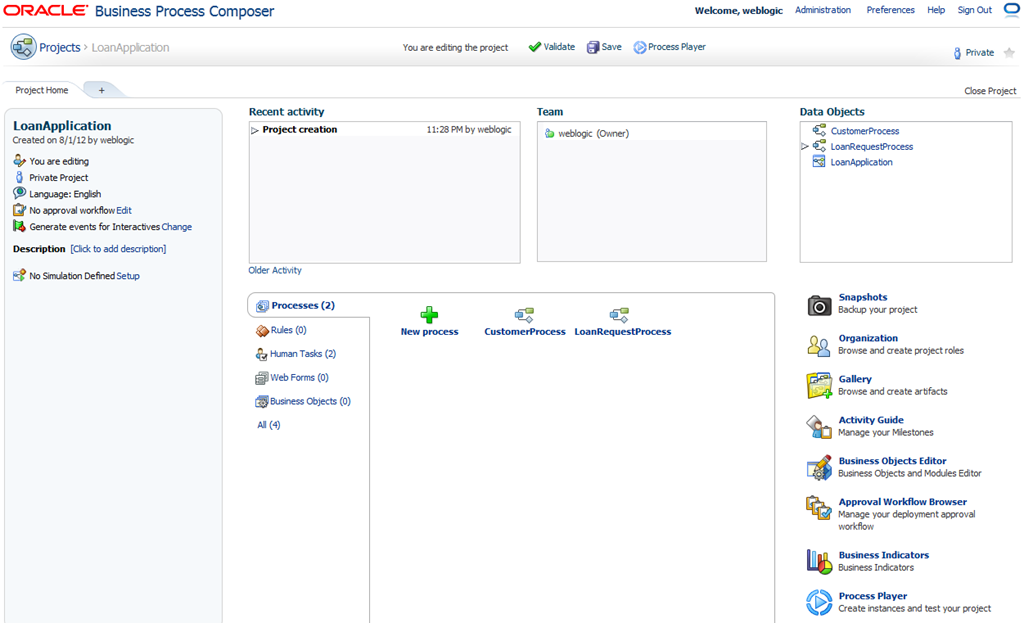
There are a number of enhancements to BPM Composer, the web based process modeling environment.  Here is the new project screen, let’s discuss some of the new things we see here:

image

  • We can now edit (create and update) not just processes, but also rules, human tasks, web forms, business objects, data objects, roles, business indicators and activity guides right here in composer.  ‘What are web forms?’ you say – we will come to that shortly.
  • We can define and run simulations in composer.
  • We have this new ‘Process Player’ which essentially lets us conduct a test run of a process – to show a business user what it would be like.

The process editor is updated and has a few new options including editing data objects, business indicators and viewing the collaboration diagram.

image

Here we can see the new data associations editor.

image

And with this release, we get the ability for business users to author and modify rules in Composer.  Here we can see a decision table being created in Composer.  You can also define bucket sets, globals, functions, and If/Then rules.

image

This is the Human Task editor.  Here you can see that we can define human tasks in Composer, including the data objects in the payload.  We can use the data association editor to map data from process data objects into the human task payload.  We can also set the outcomes, priority, deadlines, etc., and choose whether the presentation (task form) will be an ADF Form or a Web Form.

image

This is the Business Objects editor, where we can define and modify business objects directly in Composer, including simple and complex types, and we can also add documentation.

image

So, overall we can see that there is a lot of new functionality in Composer, to the extent really that a business analyst could pretty much model all of the process, data and user interface components right here in their browser, without needing any IT or developer support.

Of course, we still need developers to create the business services and publish them into the Business Catalog so that they are available for use in processes!

Web Forms

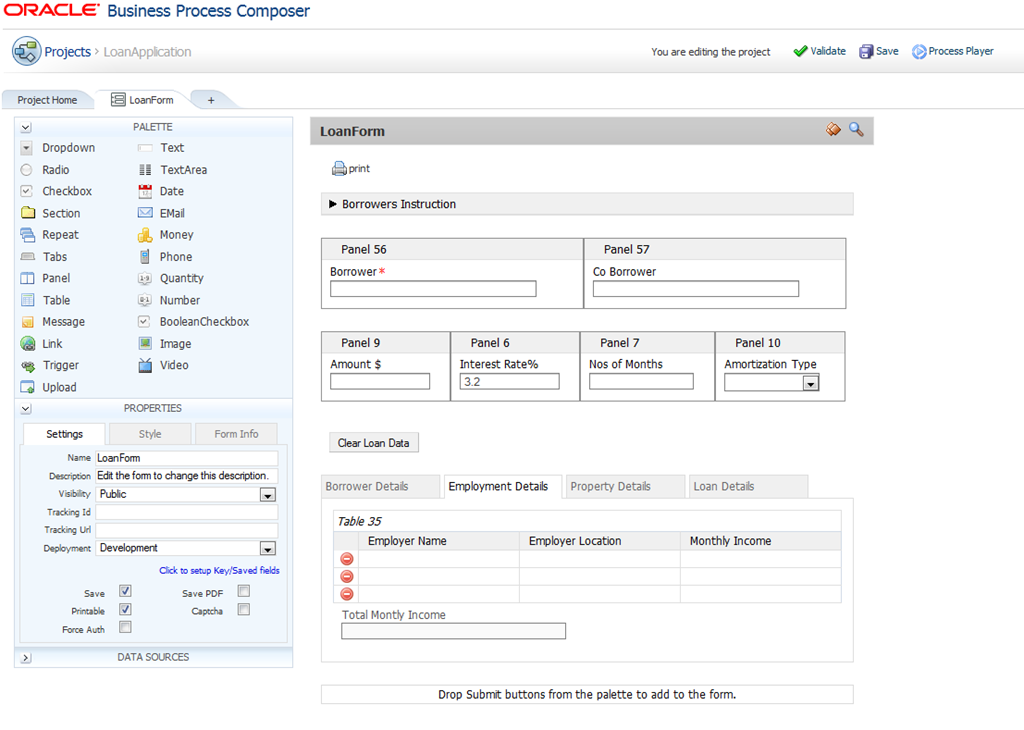
A major new feature in this release is Web Forms.  This feature gives business users the ability to design the user interface for human tasks right here in Composer.  You can of course still use ADF if you prefer, or any other web framework, to design the task forms.  You can choose on a task by task basis, and you can mix and match as needed.

Web Forms are designed in Composer using a simple drag and drop approach.  You drag form components from the palette and drop them on the form, then you can set properties to control things like names, visibility, sizes, colours, and so on.

image

You also have the ability to write ‘form rules’ which allow you to do things like set up validation of fields, or to show and hide fields based on previous selections, or to autofill parts of the form.

image

You can also call external services from here.  So if you wanted to call a web service to get a list of product codes in order to populate a form on the field for example, this can also be implemented in a ‘form rule’.

Simulation

Previously, simulation was only available in JDeveloper.  Now with PS6, we have the ability for a business user to define and run simulations in Composer.

A simulation is made up of two parts:

  • Simulation Models – which provide details for a single process model, like costs, times, resources, etc., and
  • Simulation Definitions – which group together all of the simulation models that you want to include in a particular simulation.

You can have as many different simulation models and definitions as you like, and simulation models can be reused across as many simulation definitions as you like.

When you create a simulation model, you have the option of setting the properties for all of the interactive (human) tasks and automatic tasks in the one go:

image

This is a great new feature – it used to be necessary in older versions to set these one by one for each activity, which could take a long time if you have a lot of activities!

You can also define resources, assign them to roles and give them costs and productivity and availability factors:

image

When you run a simulation, you can see details right on the process model.  This example is showing the average number of instances that passed through each activity in the process per time unit for example:

image

Simulation allows business users to test one or more processes in various circumstances to understand their behaviour, costs and resource utilisation.

Process Player

The Process Player is a new feature that is designed to allow a business user to have a test run through a process to see what it would look like.  It is intended that this feature would be used to conduct a ‘conference room pilot’ of a process – to allow business users to see how the process would actually look and run before it is actually deployed to the production environment.

Player allows you to visualise how a process is going to work.  When you start a Player session, you can map some users to each role in the process, and then start an instance of the process to see how it works.

image

As you step through the process, you will see the task forms and you can interact with them as if the process were really deployed.

image

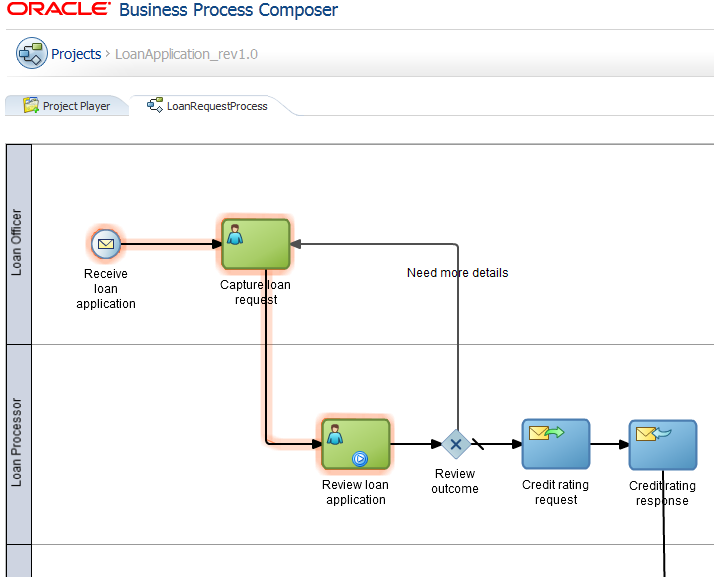
The process model is coloured in as you move through the process so that you can easily visualise where you are up to in the process – what has happened, and what will happen next.

image

This is intended to provide an easy way to ‘show’ and ‘explain’ the process to the business owners and stakeholders to validate it is correct before moving on to deploy it.

New Workspace

The BPM Workspace has been given a facelift to make it better looking and easier to use.  Here is what it looks like:

ps6-workspace

Some of the frequently requested features have been added in this release – for example easily customisable views (including the inbox), a ‘next task’ button, simplified wizards for task reassignment and delegation which display more user information, not just the userid, and a simplified vacation rules editor.

ps6-reassign

This new release also allows you to navigate from tasks to process instances easily.

Case Management

The other main new feature in this release is Case Management.   Cases are added as a new first class citizen – alongside BPMN, BPEL, Mediators, Rules, Human Tasks, etc.  In this release there is design time support for cases in JDeveloper, and an API to allow you to build your own Case Management applications/user interfaces.

Learn more about Case Management from this series of posts from my colleague Mark Foster:

Posted in Uncategorized | Tagged , , | Leave a comment

Log rotation for WebLogic Server (and friends)

If you have a number of WebLogic Server instances running, or applications that write a lot of information into the logs, you might find that your log files, and your stdout files start to eat up a lot of space very quickly.

This can be easily managed with log rolling utilities like logrotate for Linux or logadm for Solaris. These allow you to automate the process of removing old log entries, and they work by moving the log file contents out through a series of files. This means that you will have effectively controlled the amount of space used for logs, plus you have set a time period that logs are kept online before being archived or deleted.

Let’s look at an example to understand how it works:

logrotation

In this diagram we are looking at the log growth over time, with time being the vertical axis. So at the top we have a single log file – AdminServer.log – and it grows over time, as indicated by the blue bars at the top.

Then, when the first log rotation occurs (the top red dotted line), the content of AdminServer.log is moved into AdminServer.log.0, as indicated by the purple arrow, and AdminServer.log is emptied out, so as WebLogic Server continues to write into this file, we have a much smaller file now (the green one).

This process then repeats. At the next log rotation, the lower red dotted line, we get the contents of AdminServer.log.0 moved into AdminServer.log.1, the contents of AdminServer.log moved into AdminServer.log.0, and AdminServer.log emptied out again.

This continues until we get up to eight files, then the oldest one is deleted and the other seven move one to the right.

Here’s how to set it up:

First, you need to be starting the WebLogic Server instance in a way that the stdout is being appended to a file, (as opposed to just written to a file). To do this, you need to make sure you use the >> shell redirection, not >. To get stdout and stderr in the same file, you would use &>>.

Here’s an example:

/your/fmwhome/user_projects/domains/base_domain/startWebLogicServer.sh &>> /your/logs/adminserver.out &

This assumes that you have WebLogic installed in the Oracle Home /your/fmwhome and that you are storing your stdout/stderr log files in /your/logs.

Note: It is important that you use the append redirection (>>), otherwise your log files will not actually shrink in size after rotation, they will just keep growing, so that defeats the purpose of rotation in the first place.

Note: If you use the Node Manager to start WebLogic Server, it will automatically open the log files in append mode.

Next, you need to set up your log rolling utility – logrotate (on Linux) or logadm (on Solaris). Let’s look at each of these in turn.

logrotate (Linux)

The configuration for logrotate is kept in /etc/logrotate.conf. You need to add a stanza in there for each of the log files you want to rotate. Here is an example for the stdout file from above, and the server log file:

/your/fmwhome/user_projects/domains/base_domain/servers/AdminServer/logs/AdminServer.log {
  copytruncate
  daily
  rotate 8
}
/your/logs/adminserver.out {
  copytruncate
  daily
  rotate 8
}

Let’s explore these. The first line names the log file to rotate. Rotation is essentially going to move that log to a different file and create a new empty log. The line ‘rotate 8‘ tells logrotate to keep up to eight log files. The ‘daily’ means to roll them once a day, and the ‘copytruncate’ tells it which method to use – in this case to copy the file into a new file, then empty it out (as opposed to the other method which is to rename the file and create a new one – this method will not work with WebLogic Server or other JVM applications).

You can also force logrotate to run immediately, which is useful for checking you have everything set up correctly. This is done (as root) by issuing the command:

logrotate -f /etc/logrotate.conf

logrotate has many other options that allow you to specify different time periods, actions to take before and after log rotation, and size limits for when rotation should occur, to name a few. You should take a look at the logrotate documentation to see how to use it to best suit your scenario.

logadm (Solaris)

logadm provides essentially the same capabilities as logrotate, but the configuration is slightly different. To set up the same example as we saw above with logadm, we need to issue the following commands (as root):

logadm -w /your/fmwhome/user_projects/domains/base_domain/servers/AdminServer/logs/AdminServer.log -P 1d -c
logadm -w /your/logs/adminserver.out -P 1d -c

These commands will update the logadm configuration file (/etc/logadm.conf) with the necessary entries – the -w option means ‘write to configuration file’. It is not recommended to edit the file directly, but to use the logadm -w command to update it – to prevent errors.

After the -w, we see the name of the file to rotate, then -P 1d, which means period of one day – i.e. daily – and -c which tells logadm to use the copy and truncate method.

To force logadm to run immediately, you need to do two things. First, you need to tell it to assume the last run was some time in the past, this is done by issuing the same command (as root) with a timestamp on it, e.g.:

logadm -w /your/logs/adminserver.out -P 1d -c -p 'Mon Feb 25 02:00:00 2013'

This tells logadm to assume the last time it ran for this file was on that date, which is more than a day ago.  The last run timestamps are stored in /var/logadm/timestamps if you want to take a look.

You can then issue the following command (as root) to force logadm to run immediately:

logadm

Just like logrotate, logadm has a bunch of other options that let you control how often rotation is done, size limts, pre/post actions, etc. Take a look at the documentation to see what you need for your scenario.

Enjoy!

Posted in Uncategorized | Tagged , , , , , | Leave a comment

BPM 11g Performance Tuning Whitepaper published

I am happy to announce our new BPM 11g Performance Tuning whitepaper is now available on OTN (here).  This white paper captures real world best practices from actual performance tuning exercises across many real BPM implementations – that’s ‘best practices’ in the sense that these are the things that we have found over time and over many engagements to give the best results.

This whitepaper has been under development for quite a while now, and has been through a heap of reviews and revisions.  So it is great to finally get it out there, and hopefully you will find it useful!

Many people have contributed to this whitepaper – from reporting on tuning experiences, to writing, reviewing, and testing.  I would like to thank the following folks:

Vikas Anand, Deepak Arora, Partricio Barletta, Heidi Buelow, Christopher Karl Chan, Manoj Das, Andrew Dorman, Pete Farkas, Mark Foster, Simone Geib, Kim LiChong, Ralf Mueller, Bhagat Nainani, Sabha Parameswaran, Robert Patrick, David Read, Derek Sharpe, Sushil Shukla, Kavitha Srinivasan, Meera Srinivasan, Will Stallard and Shumin Zhao.

I sincerely hope that I have not forgotten anyone, but if I have, the error is entirely mine.

This whitepaper is meant to compliment the Performance and Tuning Guide in the Fusion Middleware documentation.  Readers should also consult the excellent whitepaper on purging SOA/BPM 11g databases by Michael Bousamra with Deepak Arora and Sai Sudarsan Pogaru which is available on OTN (here).

For those with an interest in BPM 10g, I remind you of our previously published BPM 10g Performance Tuning whitepaper, which continues to be available on OTN (here).

Posted in Uncategorized | Tagged , , | 1 Comment

Thinking of getting certified for SOA Suite?

If you are thinking of getting your Oracle SOA Suite certification, you may like to check out the new beta release of certification exam 1Z1-478 for the Oracle SOA Suite 11g Certified Implementation Specialist certification.  I was lucky enough to be able to write some of the questions for this exam.

You can find the beta exam here.

Posted in Uncategorized | Tagged , , , | Leave a comment