BPM – Disable DBMS job to refresh B2B Materialized View

If you are running BPM and you are not using B2B, you might want to disable the DBMS job that refreshes the B2B materialized view.  This job runs every minute by default.

To find the job, use a query like the one below.  Update the schema user to match the environment:

select
  job
, schema_user
, broken
, what
, interval
from
  dba_jobs
where
  schema_user = “DEV_SOAINFRA”

Look for the job which contains something like the following in the WHAT column.  Note that it may be different if a different schema prefix was used in the environment.

dbms_refresh.refresh('"DEV_SOAINFRA"."B2B_SYSTEM_MV"');

To remove the job, take note of the job number from the JOB column and then use a command like the following, substituting in the correct job number in place of 24:

begin
dbms_job.remove(24);
end;

Alternatively, alter the materialized view to be refreshed on demand, using a command similar to this:

alter materialized view dev_soainfra.b2b_system_mv refresh on demand;
Posted in Uncategorized | Tagged , | 1 Comment

Starting a cluster

Recently, I have been involved in a number of discussions with people who are setting up clusters of various Fusion Middleware products, often on an Exalogic machine.  These discussions have led me to feel that it would be worth sharing some views on the ‘right’ way to design a cluster for different products.  These views are by no means meant to be canonical, but I wanted to share them anyway as an example and a conversation starter.

I want to consider three products that are commonly clustered, and which have somewhat different requirements – SOA (or BPM), OSB and Coherence.  Let’s take each one in turn.

SOA and/or BPM

SOA and BPM support a domain with either exactly one (managed) server or exactly one cluster.  You cannot have two (or more) SOA/BPM clusters in a single WebLogic domain.  The SOA/BPM cluster is largely defined by the database schema, in particular the SOAINFRA schema, that each server is pointing too.  All servers/nodes in a cluster must be pointing to the same SOAINFRA schema.  And a SOAINFRA schema can only be used by nodes in a single cluster.

As an aside, if you were to point nodes from two SOA ‘clusters’ to the same SOAINFRA schema for some reason, you would basically end up with just one cluster – although it would be an unsupported configuration and a lot of things would break.

SOA/BPM clusters are usually created for one of two reasons – to add extra capacity, or to improve availability.  It is important to understand that SOA and BPM do not support dual site active/active deployment, i.e. you cannot have two clusters, each with their own SOAINFRA across two data centres with any kind of database level replication.  Within a single site though, all of the nodes are active and all share work between them.

To have a cluster, you need to have a load balancer in front of the SOA servers.  This could be a hardware or software load balancer.  It needs to be capable of distributing work across all of the nodes in the cluster.  Ideally, it should also be able to collect heartbeats or response times and use that information to route new sessions to servers which seem to be least busy.

When a BPEL or BPMN process is executing in a cluster, any time there is a point of asynchronicity, e.g. an invoke, onAlarm, onMessage, wait, catch event, receive task, explicit call to checkpoint(), etc., the process instance will be dehydrated.  It is possible, and even likely, that the process will be rehydrated later on a different node in the cluster.  The design of SOA/BPM means that any node can pick up any process instance and continue from where it last dehydrated. This makes it easy to dynamically resize the cluster, by adding and removing nodes, which will automatically take their share of the work.  It also makes handling the failure of a node in a cluster particularly straightforward, as the load balancer will notice that node has failed and stop routing it work.

You also need to make sure that all of your callbacks are using the (virtual) IP address of the load balancer, not of any particular server in the cluster.  This means that all callbacks can be handled by any node in the cluster.

As your SOA/BPM workload grows, you basically want to scale up your cluster by adding more nodes.  Any decision to split the cluster would most likely be based on separation of different business workloads, perhaps for reasons of maintainability – different release cycles, timing of patches, etc., rather than any technical reason to split the cluster.

I think the most important factor here is to realize that when you run multiple SOA clusters, they will each be in a different WebLogic domain, they will each have their own SOAINFRA (and other) schemas, they will have different addresses, and they will be running different workload, i.e. different composites.

It is really important to understand that it is not possible to have a particular process instance run part way on one cluster, and then complete on a different cluster – as the two clusters would have two totally separate SOAINFRA databases, and things like callbacks, process instance ID’s, messages, etc., would all be different.

So I think from the point of view of starting a clustered deployment, the simplest approach is to just build a single SOA cluster.  This will greatly reduce the administrative overhead of dealing with multiple clusters.

OSB

Now let’s consider OSB.  It is a little different to SOA/BPM.  It does not use a database to store state, as it is designed to handle stateless, short lived operations, so we don’t need to worry about sharing database schemas.

It turns out what we do need to worry about is how many artifacts we are deploying in the OSB cluster.  When you start up OSB, it goes through a process of ‘compiling’ all of the artifacts – that is the WSDLs, XSDs and all that – essentially into objects in memory.  If there are a lot of artifacts, or if they are particular complicated – they have a lot of attributes for example – or if they contain nested references, this ‘compilation’ can start to take a long time.  And the resulting data in memory can start to take up a lot of the heap.

A good rule of thumb is to say you probably want no more than 500 or so artifacts in a single OSB cluster.  Otherwise, the startup times become so long that outages to restart are prohibitively long.  Imagine if you had to wait an hour to start up your OSB cluster for example – would that be too long?  The amount of memory in the heap required to store all of these also grows, so you would end up with a whole bunch of memory hungry servers that take forever to start – not ideal at all.

So the best approach, in my opinion, is to split up your OSB workload into several OSB clusters – with each one having a reasonable amount of artifacts on it.  You can work out what is reasonable for you by looking at the startup time and the memory needs.

Now the next logical question is how do they talk to each other?  What if a proxy services on cluster A needs to talk to a business service on cluster B?  I have heard various approaches including departmental and enterprise service buses (hierarchical), and deploying all business services on all clusters, but splitting up the proxy services, or vice versa, and so on.

I think the best approach here is to have all request to OSB route through a load balancer, and use a simple set of rules on the load balancer to route to the correct cluster based on the service URL.  If you create small enough groups of services under different URL paths, this also makes it easy for you to relocate services between OSB clusters if necessary for any reason, without any impact to any of your service consumers.  This also makes it easy for services to talk to each other regardless of which cluster they are deployed on.

A good way to split things across the clusters, in my opinion, is to put critical things on their own clusters first, then basically divide up everything else across other clusters.  Having critical things on their own clusters helps you to manage their availability, patching, performance, etc., individually and prevents the situation of being unable to update something because it is in an environment shared with a critical component that cannot tolerate the update.

Coherence

Now we come to Coherence, which is different again.  As a general rule of thumb, it is ideal to have Coherence nodes have no more than 4GB of heap.  The data in Coherence clusters tends to stay around, so they are tuned differently to SOA/BPM (for example) where most of the data is short lived and rarely tenured.

For Coherence, having more nodes in the cluster is usually a good thing.  The other question is whether to split up Coherence clusters.  Again, I think the (most) right answer here is to make that decision in terms of separating logic business functionality when it makes sense.  Unless of course you get a really big cluster, then you might start to have some technical reasons to look at splitting it up.  But I only know of a couple of organizations who have Coherence clusters anywhere near big enough for that to be a concern.

A word about the Exalogic Enterprise Deployment Guide

A lot of Exalogic customers refer to the example topology in the Enterprise Deployment Guide.  That example is well suited to a large Java EE application deployed across a cluster of WebLogic Servers and Coherence nodes.  I think the EDG makes it pretty clear that this example is not meant to be for all scenarios, and I think when we consider SOA/BPM, OSB and Coherence, there are some compelling reasons why we might choose to go with a slightly different approach.

For example, if we just blindly followed that same approach for SOA and OSB clusters, we would probably end up with resource contention issues – not enough memory available and not enough cores available to run the number of JVMs we might come up with.

Recommended approach

Let’s pretend we have six machines on which to build our environment.  This could equally be six compute nodes in an Exalogic, or just six normal machines, it does not really matter for our purposes here.  For arguments sake, let’s say each one has 12 cores and 96GB of memory.

I think now is a good time for a picture!

Here are some important things to note about this approach:

  • It does not make a lot of sense to have more JVMs than cores because they will just end up competing with each other for system resources.  So in the approach above we have no more than 9 JVMs on any compute node (1 SOA, 1 AdminServer, 2 OSB, 4 Coherence and 1 NodeManager (not shown but running on every compute node).  We could probably fit more, but as we will see later memory is also an important consideration.  Also, keep in mind that the operating system is going to use some of those cores as well, so you can’t really afford to allocate them all to JVMs.
  • Let’s say we allocate 16GB of heap to each SOA and OSB managed server and 4GB to each Coherence server.  That means that with just these JVMs, we are potentially consuming 64GB of memory on each compute node.  This is two thirds of the available memory, a good rule of thumb high water mark.  Remember that there is also going to be other processes using memory, including the operating system, and of course, unless you are running JRockit, the JVM is going to have a permanent generation too, which will take up more memory.  Maybe 16GB is too high – you don’t have to use up all the memory you have of course, but I guess this is really going to depend on the nature of the workload, and as I said at the beginning, I am not trying to make a one size fits all recommendation here.
  • The AdminServers for the various clusters are striped across the compute nodes.  The cluster can of course survive the loss of the AdminServer and it can be restarted by a NodeManager on another compute node.  But it just makes good sense to put them on different machines, so that in the event of the failure of one compute node, you would only lose one or zero of them, not all of them at once.
  • All of the URLs that consumers use point to the load balancer – whether those consumers are on these compute nodes or external.  The load balancer decides where traffic is routed.  If we found that our payments and core services could no longer fit in a single OSB cluster, we could move one to the other cluster, or to a new cluster altogether without any impact on consumers.  All we would need to do is update the routing rule in the load balancer.
  • All clusters are stretched across all compute nodes.  The idea here is to be able to get the best possible use of the available resources.  Of course this could be tuned to suit the actual workload and nodes may be added or removed.  Some managed servers may not be running, but the point is that each cluster (product) has the ability to run across all nodes.  So if any node were lost, it would not matter, all nodes are essentially equal.

Let’s consider for a moment an alternative.  Suppose we rearranged the OSB clusters so that all of the managed servers in OSB Cluster A are on compute nodes CN01, CN02 and CN03, and all the managed server in OSB Cluster B are on the other three.  What would happen if we needed OSB Cluster A to have more capacity?  Or what would happen if we lost CN01, or, god forbid, CN01, CN02 and CN03 all at once?  OSB Cluster A would be under-resourced in the former case, or completely unavailable in the latter.  We could not easily just start up OSB Cluster A on the remaining nodes, or add another server on one of those nodes.  This would require some manual effort – reconfiguration at the least, and possibly redeployment as well.

I think a key measure of the quality of an architecture is its simplicity.  The simplest architectures are the best.  No need to make things any more complicated than they need to be.  Complex architectures just introduce more opportunity for error and more management cost and inflexibility.

Another good test is flexibility.  This approach does not impose any arbitrary limits on how you could deploy your applications.

Availability is another factor to consider, and I think the approach described provides the best possible availability across the whole system from the available hardware – and the best hardware utilization as well.

What about patching?

Patching is a very important consideration, that should not be backed away from when designing your architecture.  How do you patch a cluster like this?  Especially if you cannot afford a long outage.

My suggested approach here is to have two sets of binaries, the active and the standby binaries, for each cluster.  The clusters would be running on the active binaries.  When you need to apply a patch to your production environment, after you have completed testing of the patch in non-production environments, of course, you should apply the patch to the standby binaries, and therefore to those domains created from the standby binaries, the standby domains.

Now, both the active domain and the standby domain (in the case of SOA) should be pointing to the same SOAINFRA database.  You would never run them both at the same time of course.  When the patching is completed, shut down the active domain and start up the (newly patched) standby domain, which is pointing at the same SOAINFRA and therefore will start up as logically the same cluster.  Now it is the active cluster, and the other one is the standby.  If it goes bad, just swap back.  When you are ready, go patch the standby too, to keep them in sync.

[If there are any other ‘old mainframe guys’ reading this, you might note the similarity to the zones in SMP/E.]

Update:  It seems that this approach still has some challenges, when you think about the fact that many patches might require running a database schema update, or a script (like a WLST script for example) which may require you to start up the server(s).  So I think for now we really need to take full backups before applying patches so that we can roll back if needed.  Although even then we need to make sure that we don’t let any messages come through when we are testing the patched domain, otherwise, we might loose work if we need to roll back!

What about patches that change the database schema?  In this case you are going to have to schedule an outage to do the patching, so that you have the opportunity to backup the database before applying the patch.  Trying to do it by just swapping would deprive you of the ability to roll back the patch by just swapping domains again.

Another important consideration is that there may be some files that need to be shared/moved/copied between the active and standby domains.  It would be important to keep a tight grasp on all configuration changes to make sure that any changes made since the last swap are applied to the other domain when a swap occurs.  It might be a good idea to swap weekly, just to make sure there is a formalized process around this, and things don’t get lost.

Summary

Well, that’s it.  I would like to acknowledge that most of this was built up over the course of many conversations with many people.  I certainly do not claim that all of this is my own original ideas, but rather a summary of the position I now hold based on many conversations with a bunch of smart folks.  I would especially like to thank Robert Patrick for his ideas and many discussions on this topic.  Also a special mention to Jon Purdy for his input on Coherence

As I said in the beginning, this is just my views and I would certainly be very interested to hear your feedback and to continue the discussion.

Posted in Uncategorized | Tagged , , , , , | 9 Comments

How to know that a method was run, when you didn’t write that method

Recently, I was posed with a situation where I needed to ensure that a particular method was being run by an application, but that method was part of the framework (ADF in this case) not a method that I had written myself.  Since Java does not let me go and open up a framework class and add more code to it (like Scala’s ‘pimp my library’ pattern does), I could not really use the good old reliable System.out.println() approach to debugging – so what to do?

Asking around, I discovered something called a pointcut, a feature of aspect oriented programming.  This is a little out of my area of experience, but I like to think of it essentially as a mechanism that lets you define a piece of code to run when some particular thing happens.

So for example, I can say something like ‘whenever method X on object Y is executed, do Z’ which is great – that lets me solve my exact problem.

So let’s look at a simple example.  Let’s say for the sake of an example that I want to ensure that a particular ADF view is causing the method addPartialTriggerListeners() on object org.apache.myfaces.trinidadinternal.context.RequestContextImpl to be invoked.  This ought to be invoked when we have a partial page refresh on a view.

Let’s start by building a simple ADF application.

First, we will create a managed bean that we can use as a simple data source.  Here is the code:

package test;

import java.util.ArrayList;
import java.util.List;

import javax.faces.event.ValueChangeEvent;
import javax.faces.model.SelectItem;

public class TestBean {

    private List<SelectItem> suggestions = new ArrayList<SelectItem>();
    private String theValue;

    public TestBean() {
        super();
        System.out.println("TestBean init");

        //initialise list of choices
        suggestions.add(new SelectItem("Sydney"));
        suggestions.add(new SelectItem("Melbourne"));
        suggestions.add(new SelectItem("Singapore"));
        suggestions.add(new SelectItem("Tokyo"));
        suggestions.add(new SelectItem("Beijing"));
        suggestions.add(new SelectItem("San Francisco"));
        suggestions.add(new SelectItem("New York"));
        suggestions.add(new SelectItem("Houston"));
        suggestions.add(new SelectItem("Seattle"));
        suggestions.add(new SelectItem("London"));
        suggestions.add(new SelectItem("Paris"));
    }

    public List<SelectItem> getSuggestions() {
        return suggestions;
    }

    public void setSuggestions(List<SelectItem> suggestions) {}

    public String getTheValue() { return this.theValue; }

    public void setTheValue(String value) { this.theValue = value; }

    public void selectValueChangeListener(ValueChangeEvent valueChangeEvent) {
        theValue = (String) valueChangeEvent.getNewValue();
    }
}

Then we can create our view.  To make it easier, you can copy the source from here:

<?xml version='1.0' encoding='UTF-8'?>
<jsp:root xmlns:jsp="http://java.sun.com/JSP/Page" version="2.1"
          xmlns:f="http://java.sun.com/jsf/core"
          xmlns:h="http://java.sun.com/jsf/html"
          xmlns:af="http://xmlns.oracle.com/adf/faces/rich">
  <jsp:directive.page contentType="text/html;charset=UTF-8"/>
  <f:view>
    <af:document id="d1">
      <af:form id="f1">
        <af:outputText value="This is a test page" id="ot1">
          <span style='font-size:11.0pt;font-family:"Calibri","sans-serif";color:#1F497D'>3-5705908791</span>
        </af:outputText>
        <af:selectOneChoice label="Pick a city" id="soc1"
                            valueChangeListener="#{TestBean.selectValueChangeListener}"
                            autoSubmit="true">
          <f:selectItems value="#{TestBean.suggestions}" id="si1"/>
        </af:selectOneChoice>
        <af:outputText value="you choose #{TestBean.theValue}" id="ot2"
                       partialTriggers="soc1"/>
      </af:form>
    </af:document>
  </f:view>
</jsp:root>

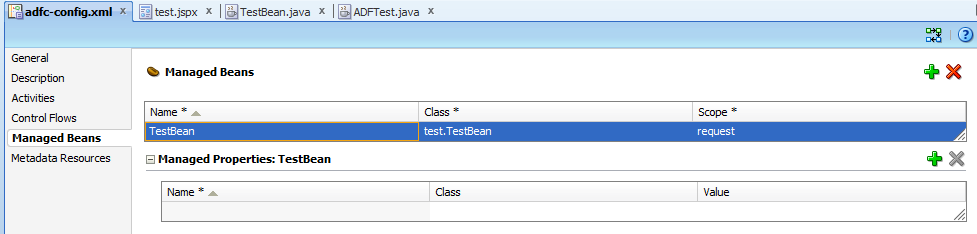
Now open up the adf-config.xml and add the managed bean as shown below:

Now you can deploy the ADF application to your WebLogic Server and make sure it works.

Next, we want to enable the WebLogic Diagnostic Framework on the managed server.  This is a one off activity.  You do this in the WebLogic Console, under the DiagnosticsDiagnostic Modules menu.

There should be a module definition there that was created when you installed WebLogic, if there is not, just go ahead and create one.  You just need to give it a name and then target it to the appropriate managed server.  Then open it up and go to the ConfigurationInstrumentation tab and click on the Enabled check box to turn it on.

Now we need to tell it what to monitor.  Go to the Deployments menu item and open up your ADF application that you just deployed.

Go to the ConfigurationInstrumentation tab and again check the Enabled check box for this application.  Then go back in there again and click on the Add Custom Monitor button (down the bottom).

Give your monitor a name, e.g. listener, and enter the pointcut as shown below (all on one line):

execution ( * 
org.apache.myfaces.trinidadinternal.context.RequestContextImpl 
addPartialTriggerListeners(...) )

Now click on the Save button and then open up your new monitor again.  Go down to the Actions section and make sure that the TraceAction is moved across to the Chosen list.  Also make sure that the Enabled check box is selected.  Now Save your monitor.

When you are prompted, create a new Plan for the application.

Then go and update your application (select it in Deployments and click on the Update button).

If this is the very first time you have turned on WLDF, you may need to restart your managed server as well.

Now go run your application and choose something from the drop down list.

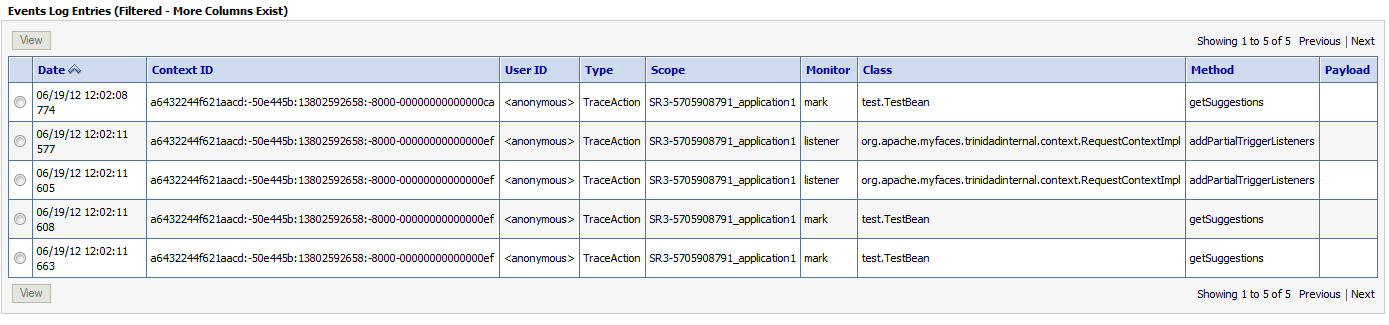
Now we can check to see if that method was run.   Go to the DiagnosticsLog Files menu and open the EventsDataArchive log.  You should see the output from your monitor right there, confirming that the method in question was in fact run.  The image below shows an example.  It also shows output from a second custom monitor.  If you are feeling adventureous, you may want to try to create that monitor too.

Well I am sure that this is only just scratching the surface of what WebLogic Diagnostic Framework can do, but I for one am inspired to go and learn more.  I hope you enjoyed this post!

Thanks to Robert Patrick and Sabha Parameswaran for teaching me about pointcuts!

Posted in Uncategorized | Tagged , , , , | 2 Comments

Using Oracle Service Registry in an automated (Maven) SOA/BPM build

Today, I feel very privileged to share with you a post from one of my readers, Phani Khrisna, who was kind enough to allow me to post this updated Maven POM which allows you to use resources in the Oracle Service Registry during the build.

Phani has also tidied up a small omission from earlier POMs, which a number of you have commented on.  This POM copies the SAR file into the target directory so that it will be published into the Maven repository as part of the build, rather than an almost empty file with the POM in it.  While we may not be able to use it as a dependency in another composite using just the Maven coordinates (like we can with Java artifacts for example), it at least makes it available to other developers.

<?xml version="1.0" encoding="windows-1252" ?>
<project xmlns="http://maven.apache.org/POM/4.0.0">
  <modelVersion>4.0.0</modelVersion>
  <groupId>org.phani..AgentDataService</groupId>
  <artifactId>GetAgentData</artifactId>
  <packaging>jar</packaging>
  <version>1.0-SNAPSHOT</version>
  <scm>
    <connection>scm:svn://x.x.x.x/repo/AgentService/trunk/SOAComposite</connection>
    <developerConnection>scm:svn://x.x.x.x/repo/AgentService/trunk/SOAComposite</developerConnection>
  </scm>
  <build>
    <sourceDirectory>src/</sourceDirectory>
    <plugins>
      <plugin>
        <groupId>org.codehaus.mojo</groupId>
        <artifactId>build-helper-maven-plugin</artifactId>
        <version>1.1</version>
        <executions>
          <execution>
            <id>add-source</id>
            <phase>generate-sources</phase>
            <goals>
              <goal>add-source</goal>
            </goals>
            <configuration>
              <sources>
                <source>SCA-INF/src</source>
              </sources>
            </configuration>
          </execution>
        </executions>
      </plugin>
      <plugin>
        <groupId>org.apache.maven.plugins</groupId>
        <artifactId>maven-compiler-plugin</artifactId>
        <version>2.0.2</version>
        <configuration>
          <source>1.6</source>
          <target>1.6</target>
        </configuration>
      </plugin>
      <plugin>
        <artifactId>maven-antrun-plugin</artifactId>
        <version>1.6</version>
        <executions>
          <execution>
            <id>sca-compile</id>
            <phase>compile</phase>
            <configuration>
              <target>
                <property name="parent" location=".." />
                <property name="scac.input" value="composite.xml" />
                <property name="oracle.soa.uddi.registry.inquiryUrl" value="http://gh123:7101/registry/uddi/inquiry" />
                <ant antfile="${scriptsdir}/ant-sca-compile.xml"
                     dir = "${scriptsdir}"
                     target="scac" />
              </target>
            </configuration>
            <goals>
              <goal>run</goal>
            </goals>
          </execution>
          <execution>
            <id>sca-package</id>
            <phase>package</phase>
            <configuration>
              <target>
                <property name="parent" location=".." />
                <property name="oracle.soa.uddi.registry.inquiryUrl" value="http://gh123:7101/registry/uddi/inquiry" />
                <property name="build.compiler" value="extJavac"/>
                <property name="compositeName" value="${project.artifactId}" />
                <property name="compositeDir" value="${basedir}" />
                <property name="revision" value="${project.version}" />
                <ant antfile="${scriptsdir}/ant-sca-package.xml"
                     dir = "${scriptsdir}"
                     target="package" />
              </target>
            </configuration>
            <goals>
              <goal>run</goal>
            </goals>
          </execution>
		  <execution>
            <id>sca-copy-jar</id>
            <phase>package</phase>
            <configuration>
              <target>
                 <copy file="${basedir}/deploy/sca_${project.artifactId}_rev${project.version}.jar" tofile="${basedir}/target/${project.artifactId}-${project.version}.jar"/>
              </target>
            </configuration>
            <goals>
              <goal>run</goal>
            </goals>
          </execution>
          <execution>
            <id>sca-deploy</id>
            <phase>deploy</phase>
            <configuration>
              <target>
                <property name="serverURL" value="http://gh345:7011" />
                <property name="user" value="weblogic" />
                <property name="password" value="password1" />
                <property name="sarLocation" value="${basedir}/deploy/sca_${project.artifactId}_rev${project.version}.jar" />
                <property name="overwrite" value="true" />
                <property name="forceDefault" value="true" />
                <property name="partition" value="default" />
                <ant antfile="${scriptsdir}/ant-sca-deploy.xml"
                     dir="${scriptsdir}"
                     target="deploy" />
              </target>
            </configuration>
            <goals>
              <goal>run</goal>
            </goals>
          </execution>
          <execution>
            <id>sca-test</id>
            <phase>deploy</phase>
            <configuration>
              <target>
                <property name="parent" location=".." />
                <property name="jndi.properties.input" value="sca-test.jndi.properties" />
                <property name="scatest.input" value="AgentData" />
                <property name="scatest.format" value="junit" />
                <property name="scatest.result" value="reports" />
                <ant antfile="${scriptsdir}/ant-sca-test.xml"
                     dir="${scriptsdir}"
                     target="test" />
              </target>
            </configuration>
            <goals>
              <goal>run</goal>
            </goals>
          </execution>
        </executions>
      </plugin>
    </plugins>
    <outputDirectory>SCA-INF\classes/</outputDirectory>
    <resources/>
  </build>
  <distributionManagement>
    <!-- use the following if you're not using a snapshot version. -->
    <!--<repository>
      <id>local</id>
      <name>local repository</name>
      <url>file:///C:/Documents and Settings/Phani/.m2/repository</url>
    </repository> -->
    <snapshotRepository>
      <id>artifactory</id>
      <name>artifactory-snapshots</name>
      <url>http://portalserver:8081/artifactory/libs-snapshot-local</url>
    </snapshotRepository>
  </distributionManagement>
</project>

</project>

Thank you Phani.  Enjoy!

Posted in Uncategorized | Tagged , , , , , , | 2 Comments

Identity Virtualization for BPM – or Using Multiple Directories

We often get questions about how to configure BPM to use multiple identity providers (directories, database, etc.) so that users of BPM Workspace (for example) can be authenticated against different providers.

A little known fact about BPM is that it includes identity virtualization support through libOVD.  It is not necessary to install a full blown OVD or to set up custom DB authenticators, etc.  You can just use libOVD.

My colleague Christopher Karl Chan from Denmark has a good introduction to this topic here which I would encourage you to read if you are looking at this kind of requirement.

Posted in Uncategorized | Tagged , , , , | Leave a comment

How to disable B2B

That’s a provocative title!  Let’s start by talking about why you might want to disable B2B!

If you are using BPM (or SOA) and you are not using any of the B2B functionality, then you might want to consider disabling B2B on your SOA managed servers.  There are a few good reasons for doing this:

  • You will save some memory,
  • You will reduce your managed server start (and restart) time, and
  • You avoid any potential problems that may be introduced by running unnecessary modules – think security.

So how do we do it?  There are two steps that you need to take.

First, log on the WebLogic Console and go to Deployments.  Find the b2b application and stop it.

The second step is a little more involved – we need to set the b2b.donot_initialize property to true.  But first, we need to define this property.

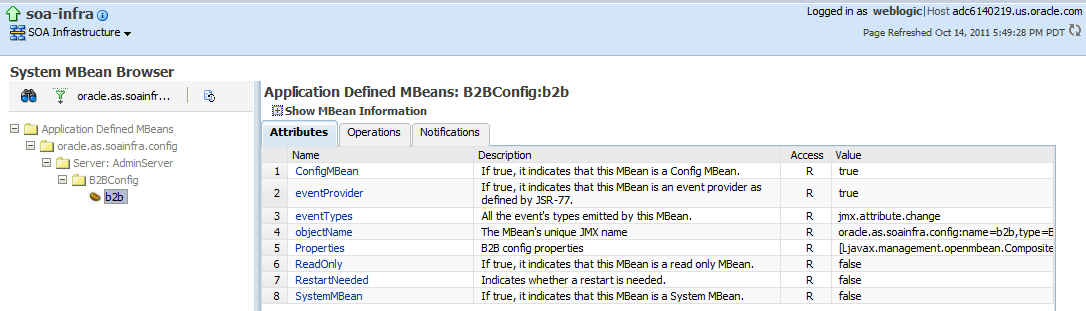
Log on the Enterprise Manager and navigate to soa-infra.  Then open the SOA Infrastructure menu, then SOA Administration, then B2B Server Properties.

Click on the More B2B Configuration Properties link.

Go to the Operations tab.

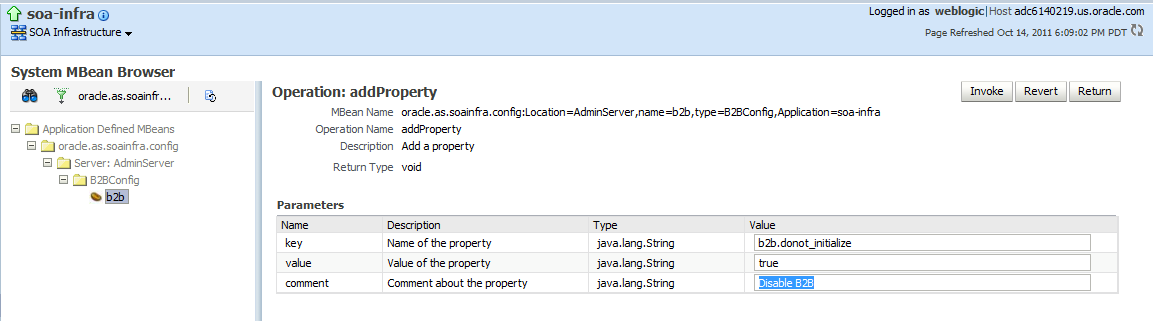
Click on the addProperty operation to define a new property.

In the key field, enter b2b.donot_initialize.  In the value field, enter true.  Add a comment if you wish.

Click on the Invoke button to add the property.

Now restart your managed servers.  Viola!

Posted in Uncategorized | Tagged , , , | 3 Comments

Testing Business Rules

Today I learned about a really neat utility that was developed by my colleague, Olivier Lediouris, which allows you to test Business Rules in a standalone/offline fashion – without the need to deploy them to a SOA/BPM server and build a whole composite around them.

Olivier describes it as:

A graphical user interface to test OBR without having to deploy anything anywhere.

You can find details and download the tool here.  If you are using Business Rules, I would highly recommend checking this out.

Posted in Uncategorized | Tagged , , , | Leave a comment

List all BPM Processes for a user

Hello again,

I have blogged (this time) on bpmtech on the above topic.

Happy coding.

Posted in Uncategorized | Leave a comment

Where our readers come from

Just a curiosity for those interested in such things – WordPress has just given us bloggers the ability to see where our readers are coming from.  Hopefully they will provide a widget so that we can put this on our site with up to date data, but for now, here is a snapshot of where our readers come from, covering all visits since the blog was set up until today:

Let us take this opportunity again to thank you all for visiting and we hope you found something useful here!

Posted in Uncategorized | 2 Comments

Using Oracle BPM Activity Guide APIs

We have recently heard of the usage of the ‘Process Driven UI’ pattern fairly often (particularly with Oracle BPM 11 banking customers). I hope to be able to write up more about this pattern in a later blog. But the crux of the pattern is: BPM processes drive what UI screen needs to be painted next. As you can imagine, latency is all too important a criterion along with back-end processing for successful implementation of that pattern.

For now, my endeavour was to use the Activity Guide APIs to generate the data seen on the workspace Activity Guide tab. This is hopefully useful for customers who want to write their custom UI equivalent to the default Activity Guide tab off the default BPM workspace.  The screenshot is below. Please notice that my BPM process has two milestones and one Human Task under each milestone.

Assuming you have gotten the workflow context etc., fastforwarding to the meat of the issue: Using the PS4FP Activity Guide APIs, one needs to:

  • Get all Activity Guide instances for a given user (API call: agQuerySvc.queryAGDisplayInfos)
  • Iterate through the list of AGDisplayInfos and get an AGInstanceId
  • For each AGInstance Id, get the agDisplayInfo (agQuerySvc.getAGDisplayInfoDetailsById)
  • For each AGInstance Id, get the corresponding milestone (agDisplayInfo.getMilestoneDisplayInfo)
  • For each Milestone, get the taskList in that milestone (milestoneDisplayInfo.getTaskDisplayInfo)
  • For each task, fetch details, say status and title in this example (taskDisp1.getTask)

I have used the standard workflow java sample in Authenticate.java and enhanced it for this purpose. That is an easy starting point!
Please note the following in that context:
1. The build.xml needs another few jar files other than the one that is packaged with workflow java samples
2. As usual, the wf_client_config has connection details.
3. The bpm project MultipleTasks Project has 2 human tasks have been created, 2 milestones and each of these tasks belong to 1 milestone. The Process.Owner role is granted to jstein after deployment.

While the AGAPIs for PS4FP have been documented, please note that there are a few documentation bugs currently being worked on, including on the sample therein.
Caveat: Some code refactoring in terms of moving some constants to different jar files is expected. And so, the jars referenced here are likely to change in PS5 and beyond.

I am going to try putting the source code: The BPM Process and the java code on java.net..(If for whatever reason I cant, I will be sure to blog source code here soon…)

Happy exploring AG APIs.

(Editing post for source code etc. below)


import java.util.Date;
import java.util.HashMap;
import java.util.Map;
import java.util.*;
import java.util.List;
import oracle.bpel.services.workflow.WorkflowException;
import oracle.bpel.services.workflow.client.IWorkflowServiceClient;
import oracle.bpel.services.workflow.client.IWorkflowServiceClientConstants;
import oracle.bpel.services.workflow.client.WorkflowServiceClientFactory;
import oracle.bpel.services.workflow.query.ITaskQueryService;
import oracle.bpel.services.workflow.task.impl.TaskUtil;
import oracle.bpel.services.workflow.task.model.Task;
import oracle.bpel.services.workflow.verification.IWorkflowContext;

import oracle.bpel.services.bpm.common.IBPMContext;

import oracle.bpel.services.workflow.IWorkflowConstants;
import oracle.bpel.services.workflow.task.model.Task;
import oracle.bpel.services.workflow.verification.IWorkflowContext;
import oracle.bpel.services.workflow.query.impl.TaskQueryService;
import oracle.bpel.services.workflow.client.WorkflowServiceClientContext;
import oracle.bpel.services.workflow.metadata.config.ResourceBundleInfo;
import oracle.bpel.services.workflow.activityguide.query.IAGQueryService;
import oracle.bpel.services.workflow.activityguide.query.impl.AGQueryUtil;
import oracle.bpel.services.workflow.activityguide.query.*;
//import oracle.bpel.services.workflow.activityguide.query.impl.AGQueryService;
import oracle.bpel.services.workflow.activityguide.query.model.AGDisplayInfo;
import oracle.bpel.services.workflow.activityguide.query.model.MilestoneDisplayInfo;
import oracle.bpel.services.workflow.activityguide.metadata.IAGMetadataService;
import oracle.bpel.services.workflow.activityguide.metadata.impl.AGMetadataService;
import com.oracle.bpel.activityguide.instance.model.MilestoneInstanceType;
import oracle.bpel.services.workflow.activityguide.query.model.TaskDisplayInfoType;
import sun.security.util.Password;

import oracle.bpel.services.workflow.repos.Ordering;
import oracle.bpel.services.workflow.repos.Predicate;
import oracle.bpel.services.workflow.repos.TableConstants;

import oracle.bpel.services.workflow.IWorkflowConstants;
import oracle.bpel.services.workflow.client.IWorkflowServiceClient;
import oracle.bpel.services.workflow.client.IWorkflowServiceClientConstants;
import oracle.bpel.services.workflow.client.WorkflowServiceClientFactory;
import oracle.bpel.services.workflow.repos.Ordering;
import oracle.bpel.services.workflow.repos.Predicate;
import oracle.bpel.services.workflow.repos.TableConstants;

import oracle.bpel.services.workflow.repos.PredicateConstants;

import oracle.bpel.services.workflow.task.model.Task;
import oracle.bpel.services.workflow.verification.IWorkflowContext;
import oracle.bpel.services.workflow.activityguide.query.model.AGDisplayInfo;
import oracle.bpel.services.workflow.activityguide.query.model.MilestoneDisplayInfoType;
import com.oracle.bpel.activityguide.instance.model.MilestoneInstanceTypeImpl;
import oracle.bpel.services.workflow.task.model.Task;
import oracle.bpel.services.workflow.task.model.TaskType;

public class Authenticate
{

private static IWorkflowContext ctx;
 private static ITaskQueryService querySvc ;
 private static IWorkflowServiceClient wfSvcClient;
 public static void main(String[] args) throws Exception {
 if (args.length != 3 || !("SOAP".equals(args[0]) || "REMOTE".equals(args[0]))) {
   System.out.print("Usage java Authenticate protocol(SOAP/REMOTE) user(jcooper) password(welcome1)");
   return;
 }
 authenticate(args[0], args[1], args[2]);
}

public static void authenticate(String protocol, String user, String password)
 throws WorkflowException {

System.out.println("Authenticating user " + user + ".....");

Map<IWorkflowServiceClientConstants.CONNECTION_PROPERTY, String> properties =
 new HashMap<IWorkflowServiceClientConstants.CONNECTION_PROPERTY, String>();
 //added below and commented out from wfclientconfig.xml
 properties.put(IWorkflowServiceClientConstants.CONNECTION_PROPERTY.EJB_SECURITY_PRINCIPAL, "weblogic");//weblogic username
 properties.put(IWorkflowServiceClientConstants.CONNECTION_PROPERTY.EJB_SECURITY_CREDENTIALS, "welcome1");//plain pwd

 // get the client
 //IWorkflowServiceClient wfSvcClient = WorkflowServiceClientFactory.getWorkflowServiceClient(protocol, properties, Util.getLogger());
 wfSvcClient = WorkflowServiceClientFactory.getWorkflowServiceClient(protocol, properties, Util.getLogger());
 querySvc = wfSvcClient.getTaskQueryService();
 // IWorkflowContext ctx = querySvc.authenticate(user, password.toCharArray(), "jazn.com");
 IWorkflowContext ctx = querySvc.authenticate(user, password.toCharArray(), "jazn.com");
 if (ctx == null)
 {
   System.out.println("ctx is null");
 } else {
   System.out.println("Authenticated successfully");
   System.out.println("Authenticated user info from IWorkflowContext:");
   System.out.println("Context created time: " + (new Date(ctx.getStartDateTime())));
   System.out.println("User: " + ctx.getUser());
   System.out.println("User Time Zone: " + ctx.getTimeZone().getDisplayName());
   System.out.println("User Locale: " + ctx.getLocale());
 }

 try{
   //calling testquery
   testQueryAGDisplayInfos();
 }
 catch (Exception eee){
   System.out.println("error");
   eee.printStackTrace();
 }

 }

private static void testQueryAGDisplayInfos()
 throws Exception
 {
   List agQueryColumns = new ArrayList();
   // agQueryColumns.add("MILESTONE_STATE");
   // agQueryColumns.add("DEFINITION_ID");
   //List agQueryColumns = new ArrayList();
   agQueryColumns.add("IDENTIFICATION_KEY");
   agQueryColumns.add("TITLE");
   agQueryColumns.add("CREATOR");
   agQueryColumns.add("CREATION_DATE");
   agQueryColumns.add("STATUS");
   IAGQueryService agQuerySvc = wfSvcClient.getAGQueryService();
   System.out.println("after AGQuerySVC");
   //Ordering order = new Ordering(TableConstants.WFTASK_INSTANCEID_COLUMN, false, true);

   // Query for all AG instances belonging to user say jstein
   List agDisplayInfoList =
   agQuerySvc.queryAGDisplayInfos(IAGQueryService.AG_PROCESS_TYPE_BPM, ctx,
   new ArrayList(),
   IAGQueryService.AGAssignmentFilter.ADMIN,
   null, //agPredicate,
   null, //ordering,
   0,
   0);

   List taskList=null;
   for (int a=0; a<agDisplayInfoList.size();a++)
   {
     String instanceId = ((AGDisplayInfo) agDisplayInfoList.get(a)).getInstanceId();
     //AGDisplayInfo agDisplayInfo = (AGDisplayInfo) agDisplayInfoList.get(a);
     AGDisplayInfo agDisplayInfo = agQuerySvc.getAGDisplayInfoDetailsById(IAGQueryService.AG_PROCESS_TYPE_BPM,
     ctx,
     new Long(instanceId), new ArrayList(),
     IAGQueryService.AGASSIGNMENT_FILTER_ADMIN);
     System.out.println("******for AGInstancID :"+instanceId+"********");

     System.out.println("AG title:" + agDisplayInfo.getTitle());

     System.out.println("milestone display info list size:" + agDisplayInfo.getMilestoneDisplayInfo().size());
     //MilestoneDisplayInfo msDisplayInfo = (MilestoneDisplayInfo)agDisplayInfo.getMilestoneDisplayInfo();

     for (int i=0; i< agDisplayInfo.getMilestoneDisplayInfo().size(); i++)
     {
       MilestoneDisplayInfo milestoneDisplayInfo = ((MilestoneDisplayInfo) agDisplayInfo.getMilestoneDisplayInfo().get(i));
       System.out.println("-----------------for milestone name :"+milestoneDisplayInfo.getTitle()+"---------");

       System.out.println("Milestone title: " + milestoneDisplayInfo.getTitle());
       System.out.println("Milestone Name: " + milestoneDisplayInfo.getName());

       List<TaskDisplayInfoType> taskDisplayInfoList = milestoneDisplayInfo.getTaskDisplayInfo();
       System.out.println("Total number of tasks: " + taskDisplayInfoList.size());
       for(int j=0; j< taskDisplayInfoList.size();j++)
       {

         TaskDisplayInfoType taskDisp1 = taskDisplayInfoList.get(j);
         TaskType task1 = taskDisp1.getTask();
         System.out.println("^^^^^^^^^^^^^^^^^^for task Id:"+task1.getSystemAttributes().getTaskNumber()+"^^^^^^^^^^^^^^^^^^");
         System.out.println("Task Status: "+task1.getSystemAttributes().getState());
         System.out.println("Task Title: "+task1.getTitle());

       } //taskDisplayInfoList

     } //MilestoneDisplayInfoList
   } //agDisplayInfoList
 } //method
} //class

Note: the classes in build.xml (for the most part the same as in the Workflow Java samples)


<path id="client.classpath">
 <pathelement path="${bea.home}/wlserver_10.3/server/lib/wlfullclient.jar"/>
 <pathelement path="${bea.home}/wlserver_10.3/server/lib/wlclient.jar"/>
 <pathelement path="${bea.home}/oracle_common/webservices/wsclient_extended.jar"/>
 <pathelement path="${bea.home}/Oracle_SOA1/soa/modules/oracle.soa.fabric_11.1.1/bpm-infra.jar"/>
 <pathelement path="${bea.home}/Oracle_SOA1/soa/modules/oracle.soa.fabric_11.1.1/fabric-runtime.jar"/>
 <pathelement path="${bea.home}/Oracle_SOA1/soa/modules/oracle.soa.workflow_11.1.1/bpm-services.jar"/>
 <pathelement path="${bea.home}/Oracle_SOA1/soa/modules/soa-startup.jar"/>
 <pathelement path="${bea.home}/Oracle_SOA1/soa/modules/oracle.soa.bpel_11.1.1/orabpel.jar"/>

<pathelement path="./config"/>
 </path>

Note: wf_client_config.xml


<?xml version="1.0" encoding="UTF-8" standalone="yes"?>
 <workflowServicesClientConfiguration xmlns="http://xmlns.oracle.com/bpel/services/client">
 <server default="true" name="default">
 <localClient>
 <participateInClientTransaction>false</participateInClientTransaction>
 </localClient>
 <remoteClient>
 <serverURL>t3://localhost:7001</serverURL>
 <!--userName>jstein</userName>
 <password encrypted="true">4tORP+F+3jNupTEwSeZj3A==</password-->
 <initialContextFactory>weblogic.jndi.WLInitialContextFactory</initialContextFactory>
 <participateInClientTransaction>false</participateInClientTransaction>
 </remoteClient>
 </server>
 </workflowServicesClientConfiguration>

Posted in Uncategorized | 1 Comment