Mobile worklist

Inspired by a comment from Flávio Fonseca, I decided to experiment with making the worklist render for a mobile device using JQuery Mobile.

Turns out it is pretty easy to do.  All I did was change the style sheets and the head.jspf and tail.jspf files to slightly alter the HTML around the pages.  I introduced a new variable to remember whether we are in mobile mode or not, and a couple of menu items to switch between the two.  The new MobileController is responsible for the flip/flop.

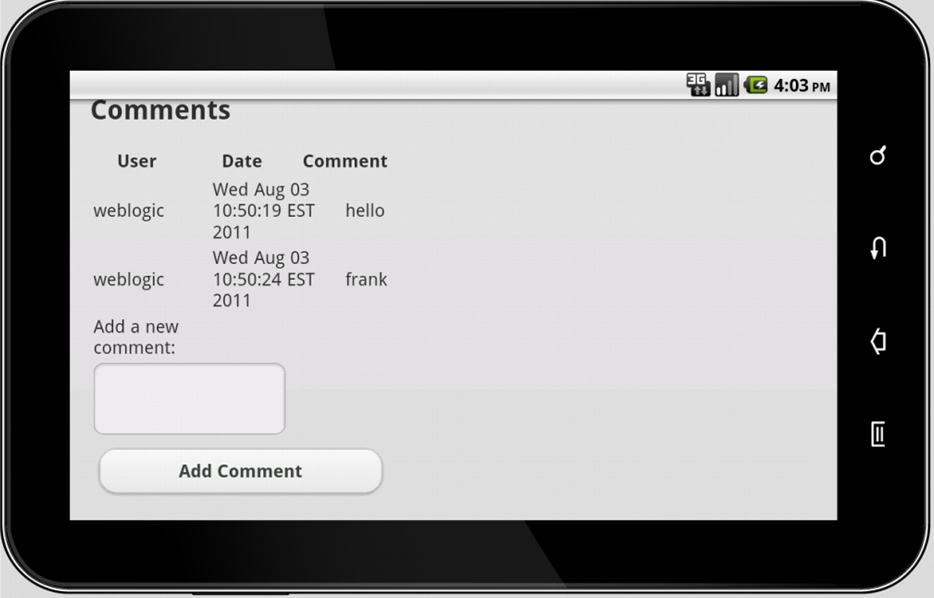
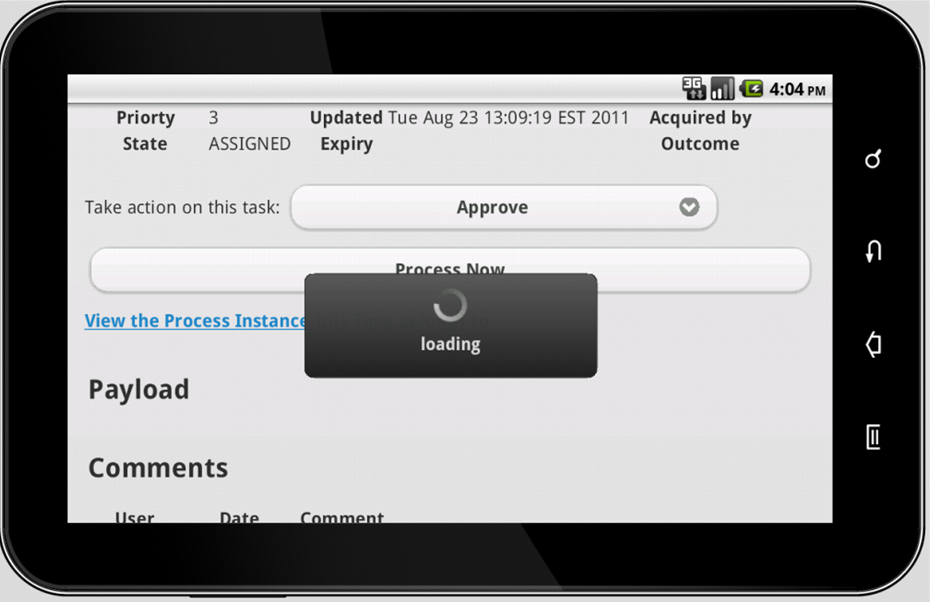
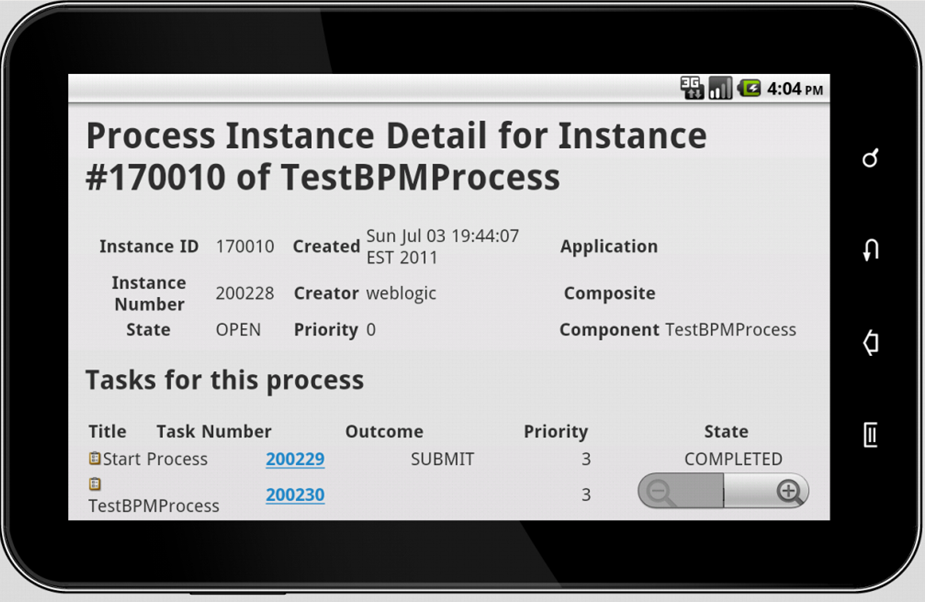
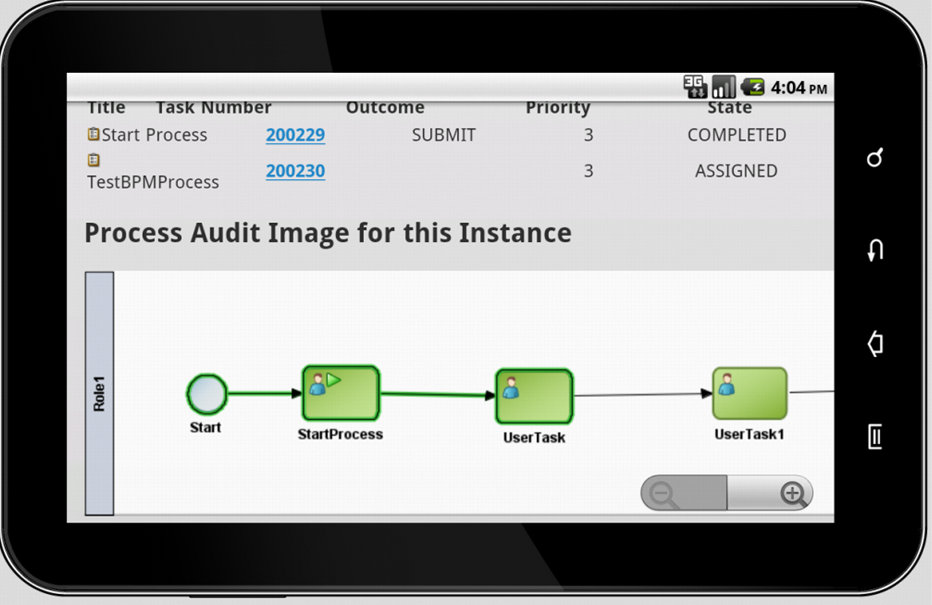
All the code is in Subversion if you want to take a look.  Here are a few screen shots from a 7″ Samsung Galaxy Tablet (Android 2.1) emulator.  I did not do anything to make it look nicer – note that the buttons/drop down select boxes are not really well formatted.  JQuery Mobile will make this look nice on a whole range of mobile devices including Android and iOS devices.

The Task List:

Task Details page:

Choosing an action to take on a task:

Comments on a task:

The ‘loading’ animation between pages:

The process instance details page:

The process audit image:

Enjoy!

Posted in Uncategorized | Tagged , , | 9 Comments

Introduction to the Sales Order Entry application

This post is part of a series on building a modern web-based interface for E-Business Suite using Oracle ADF with Oracle Service Bus providing services between EBS and the front end.

Our (imaginary) client wants a new, modern, web-based Sales Order Entry application.  It needs to integrate with Oracle E-Business Suite R12.  It also needs to have good performance.  It will be used in many branches, spread right across the country.  Some of these branches have fast dedicated connections, but some are using slower connection speeds.

The majority of customers who come to branches are account customers, who place an order against their account and will be invoiced after the time of sale.

The application will allow the creation and entry of Sales Orders.  All lookup fields, e.g. Customer Name, Address, Product Details, etc., are fetched from Oracle E-Business Suite and presented to the user in a “auto-suggest” drop down when they start typing in the fields.

User Interface

When a user connects to the Sales Order Entry system, they will be presented with the main screen (see below).

From this screen, the user can select to:

  • Create a new Sales Order,
  • Search for (and modify) an existing Sales Order, or
  • Lookup Product Details.

If the user selects Create a new Sales Order, they are sent to the Sales Order Entry screen (see below).  This screen is the heart of the application.  It is where the user will enter details of the Sales Order.

The top half of the screen is to do with the Sales Order Header.  It includes details about the customer, ship to and bill to addresses, the sales person, freight charges, delivery dates and so on.

The lower half of the screen contains the Lines that make up the Sales Order.  Users can add additional lines, or remove lines if they wish to.  Each line contains details about the product, quantity, pricing, requested and promised shipping details and so on.

Many of the fields on this screen will have “auto suggest” behaviour.  This means that suitable values will be suggested to the user in a drop down box as they type data into the field, as shown below.  As more data is typed into the field, the list of suggestions is dynamically adjusted.  This kind of behaviour is commonly seen on web sites today, for example Google use it on their main search page.

The user should complete the top half of the page, then select Save from the Order menu.  At this point, a Sales Order Header should be created in Oracle E-Business Suite.  The user will then add lines to the Sales Order.  When they are done, they will select Book from the Order menu.  At this point, the Sales Order Lines should be created in Oracle E-Business Suite and the Sales Order should be booked.

Integration with Oracle E-Business Suite

There are several points of integration with Oracle E-Business Suite required for this application.  These are listed below.   As part of the example, you will be figuring out how to go about doing this integration.

E-Business Suite Integration Requirements

Reference E-Business Suite object How used

1

Customer Account The customer field in the Sales Order Header is populated from the Customer Accounts.

2

Site The Ship To and Bill To fields in the Sales Order Header are populated from the Sites.

3

Sales Person The Sales Person field in the Sales Order Header is populated from the Sales People.

4

Item The Part Number, Unit of Measure and other fields are populated from the Item Master.

5

Price The Price is obtained from E-Business Suite to ensure all of the pricing rules, discounts, agreements, etc. are applied.   Note that the Price for an Item depends on the Customer and the Order Date.

6

Sales Order Header The details entered in the User Interface are used to create the Sales Order Header in E-Business Suite.  The order will be created and booked based on various actions in the User Interface.

7

Sales Order Line The details entered in the User Interface are used to create Sales Order Lines in E-Business Suite.

8

Organisation The Branch is populated from the Organisations.

Oracle Service Bus Requirements

There are two key requirements to be addressed by the Oracle Service Bus in this project:

  1. Hide the complexity of the E-Business Suite interfaces.
    Many of the interfaces that you will need to use are complex, have many input and output parameters, several layers of structure, and in some cases you may need to call more than one interface to get the data you need.  You should use the Oracle Service Bus to hide all of this complexity from the User Interface developer, and present nice, clean services to them for use in building the User Interface.
  2. Improve performance by caching frequently used data.
    Oracle Service Bus 11g introduced a feature called Service Result Caching which allows you to easily cache the results of a service call for later use.  You should use this feature to improve the performance of your services and therefore the User Interface as well.

What you will need to build the example

To build the example, you will need the following:

  • Oracle E-Business Suite R12.1 with the 12.1.3 patch installed and Integrated SOA Gateway enabled, plus some data.  We used and recommend the ‘Vision’ database that comes with the Rapid Install Wizard.
  • Oracle Service Bus 11.1.1.3 or later – we used 11.1.1.5.  This installation will include Oracle WebLogic Server and ADF.
  • Oracle JDeveloper 11.1.1.3 or later – we used 11.1.1.5 – for building the ADF application.

We ran all of this in a VM running Oracle Linux 5.5.  Everything is 64-bit.

The next post in this series (coming soon) will discuss how we find and expose the necessary functionality in E-Business Suite.

Acknowledgements

This example builds on work done by many people over a period of time.  I woudl like to acknowledge the contribution of the following people (in alphabetical order): Jasper Chu, John Graves, Victor Luo, Pieter Malan, Tanya Williams, Devon Winkworth, Joey Wong, Brenda Yin, Raymond Zhang and Rade Zheng.

Posted in Uncategorized | Tagged , , | Leave a comment

Introductory presentation on custom worklist

Last week, I did a presentation at the InSync11 conference which is organised by Oracle User Groups that provided an overview of the custom worklist sample.  I am sharing the presentation material here for those who may be interested but were not able to attend the conference.

Posted in Uncategorized | Tagged | 2 Comments

Installer cannot access the oraInventory

Ran into another interesting little challenge today.  While installing SOA Suite onto a machine which already had another, completely separate Oracle product installation on it (albeit under a different userid), the installer helpfully reported that it could not access /home/oracle/oraInventory.

To get around this, I went and copied the /etc/oraInst.loc file to /etc/fmwInst.loc and updated the contents to point to a new directory in my ‘fmw’ user’s home directory, and then ran the installer with the option to point to this new file:

runInstaller -invPtrLoc /etc/fmwInst.loc
Posted in Uncategorized | Tagged , , | Leave a comment

RCU cannot connect to database with SYS user

Today I found an interesting little issue when trying to use RCU to create schemas for a middleware installation.  RCU could not connect to the database with the SYS user.  I could connect with other users, like SYSTEM for example, and I had the password correct.

Turns out the database in question did not have an Oracle password file.  You can check this by using the following query, which should return a row for SYS:

SQL> select * FROM v$pwfile_users;

no rows selected

As it did not, the solution was the create the password file, as follows:

[oracle@ebs ~]$ orapwd file=/oracle/VIS/db/tech_st/11.1.0/dbs/orapwVIS
Posted in Uncategorized | Tagged | Leave a comment

Getting started with Continuous Integration for OSB

As a first step towards including Oracle Service Bus projects into our Continuous Integration environment, let’s look at how to script exporting some project(s) from Oracle Enterprise Pack for Eclipse (the IDE for OSB) and deploying those project(s) to an OSB server.  Later, we will include this into the Maven/Hudson environment we have been constructing in this series of posts on continuous integration.

Here is our script, right up front, then we will discuss it:

@echo Export project from eclipse
java ^
  -Dweblogic.home=c:\oracle\middleware\wlserver_10.3 ^
  -Dosb.home=c:\oracle\middleware\Oracle_OSB1 ^
  -Dosgi.bundlefile.limit=500 ^
  -Dharvester.home=c:\oracle\middleware\Oracle_OSB1\harvester ^
  -Dosgi.nl=en_US ^
  -Dsun.lang.ClassLoader.allowArraySyntax=true ^
  -jar c:\Oracle\OEPE\oepe_11gR1PS4\plugins\org.eclipse.equinox.launcher_1.1.1.R36x_v20101122_1400.jar ^
  -data c:\src\osb\notsvn ^
  -application com.bea.alsb.core.ConfigExport ^
  -configProject "OSB Configuration 1" ^
  -configJar c:\src\osb\test_sbconfig.jar ^
  -configSubProjects "OSB Project 1" ^
  -includeDependencies true

@echo Deploy 'import' to Service Bus
c:\oracle\middleware\oracle_common\common\bin\wlst import.py import.properties

First of all, if you have not seen them before, the ‘^’ is a continuation character in Windows CMD files, such as this one, so that we can spread a command over many lines in our script, but it is executed as if it were all typed in on a single line.

This script has not been made generic yet – it has a bunch of stuff hardcoded.  Let’s take a look.

First, we run java with a bunch of properties.  You will need to set weblogic.home, osb.home and harvester.home to suit your environment.  You can just include the others as they are.

Following the properties, you see we point to a JAR file, this allows us to run eclipse in headless mode.  The remainder of the parameters are passed to eclipse.  You can see we need to specify the location of the workspace to use (in data) – this can also be the Subversion trunk (or similar).  The application tells it to run the OSB exporter.

The other important parameters are configProject which names the OSB Configuration project in the workspace you want to use, configSubProjects which is a comma separated list of the OSB projects you want to export, and configJar which is the name of the JAR file you want to create.

If you want to know more about this command, take a look in the online help in your OSB IDE.  Look under the OSB help topic, then ‘Tasks,’ ‘Working with projects, folders, resources & configurations,’ ‘exporting resources,’ ‘using command line,’ and then the ANT topic.

When this command has run, we will have an OSB configuration JAR file (test_sbconfig.jar in this case) which is ready to import into (deploy to) an OSB server.

The second part is to perform the deployment (import).  We will do this using a WLST script from Oracle, import.py (see below).  This script also expects a properties file.  We need to set up some details in the properties file so the script knows what to do.

Let’s take a look at the properties file:

##################################################################
# OSB Admin Security Configuration                              #
##################################################################
adminUrl=t3://localhost:7001
importUser=weblogic
importPassword=welcome1

##################################################################
# OSB Jar to be exported, optional customization file           #
##################################################################
importJar=test_sbconfig.jar
#customizationFile=OSBCustomizationFile.xml

##################################################################
# Optional passphrase and project name                           #
##################################################################
#passphrase=osb
#project=default

You can see we have provided the URL for the Administration Server, and also the name of the OSB configuration JAR file (that we just created in the previous step).

Here is the import.py sciript that WLST will run:

from java.util import HashMap
from java.util import HashSet
from java.util import ArrayList
from java.io import FileInputStream

from com.bea.wli.sb.util import Refs
from com.bea.wli.config.customization import Customization
from com.bea.wli.sb.management.importexport import ALSBImportOperation

import sys

#=======================================================================================
# Entry function to deploy project configuration and resources
#        into a ALSB domain
#=======================================================================================

def importToALSBDomain(importConfigFile):
    try:
        SessionMBean = None
        print 'Loading Deployment config from :', importConfigFile
        exportConfigProp = loadProps(importConfigFile)
        adminUrl = exportConfigProp.get("adminUrl")
        importUser = exportConfigProp.get("importUser")
        importPassword = exportConfigProp.get("importPassword")

        importJar = exportConfigProp.get("importJar")
        customFile = exportConfigProp.get("customizationFile")

        passphrase = exportConfigProp.get("passphrase")
        project = exportConfigProp.get("project")

        connectToServer(importUser, importPassword, adminUrl)

        print 'Attempting to import :', importJar, "on ALSB Admin Server listening on :", adminUrl

        theBytes = readBinaryFile(importJar)
        print 'Read file', importJar
        sessionName = createSessionName()
        print 'Created session', sessionName
        SessionMBean = getSessionManagementMBean(sessionName)
        print 'SessionMBean started session'
        ALSBConfigurationMBean = findService(String("ALSBConfiguration.").concat(sessionName), "com.bea.wli.sb.management.configuration.ALSBConfigurationMBean")
        print "ALSBConfiguration MBean found", ALSBConfigurationMBean
        ALSBConfigurationMBean.uploadJarFile(theBytes)
        print 'Jar Uploaded'

        if project == None:
            print 'No project specified, additive deployment performed'
            alsbJarInfo = ALSBConfigurationMBean.getImportJarInfo()
            alsbImportPlan = alsbJarInfo.getDefaultImportPlan()
            alsbImportPlan.setPassphrase(passphrase)
            alsbImportPlan.setPreserveExistingEnvValues(true)
            importResult = ALSBConfigurationMBean.importUploaded(alsbImportPlan)
            SessionMBean.activateSession(sessionName, "Complete test import with customization using wlst")
        else:
            print 'ALSB project', project, 'will get overlaid'
            alsbJarInfo = ALSBConfigurationMBean.getImportJarInfo()
            alsbImportPlan = alsbJarInfo.getDefaultImportPlan()
            alsbImportPlan.setPassphrase(passphrase)
            operationMap=HashMap()
            operationMap = alsbImportPlan.getOperations()
            print
            print 'Default importPlan'
            printOpMap(operationMap)
            set = operationMap.entrySet()

            alsbImportPlan.setPreserveExistingEnvValues(true)

            #boolean
            abort = false
            #list of created ref
            createdRef = ArrayList()

            for entry in set:
                ref = entry.getKey()
                op = entry.getValue()
                #set different logic based on the resource type
                type = ref.getTypeId
                if type == Refs.SERVICE_ACCOUNT_TYPE or type == Refs.SERVICE_PROVIDER_TYPE:
                    if op.getOperation() == ALSBImportOperation.Operation.Create:
                        print 'Unable to import a service account or a service provider on a target system', ref
                        abort = true
                elif op.getOperation() == ALSBImportOperation.Operation.Create:
                    #keep the list of created resources
                    createdRef.add(ref)

            if abort == true :
                print 'This jar must be imported manually to resolve the service account and service provider dependencies'
                SessionMBean.discardSession(sessionName)
                raise

            print
            print 'Modified importPlan'
            printOpMap(operationMap)
            importResult = ALSBConfigurationMBean.importUploaded(alsbImportPlan)

            printDiagMap(importResult.getImportDiagnostics())

            if importResult.getFailed().isEmpty() == false:
                print 'One or more resources could not be imported properly'
                raise

            #customize if a customization file is specified
            #affects only the created resources
            if customFile != None :
                print 'Loading customization File', customFile
                print 'Customization applied to the created resources only', createdRef
                iStream = FileInputStream(customFile)
                customizationList = Customization.fromXML(iStream)
                filteredCustomizationList = ArrayList()
                setRef = HashSet(createdRef)

                # apply a filter to all the customizations to narrow the target to the created resources
                for customization in customizationList:
                    print customization
                    newcustomization = customization.clone(setRef)
                    filteredCustomizationList.add(newcustomization)

                ALSBConfigurationMBean.customize(filteredCustomizationList)

            SessionMBean.activateSession(sessionName, "Complete test import with customization using wlst")

        print "Deployment of : " + importJar + " successful"
    except:
        print "Unexpected error:", sys.exc_info()[0]
        if SessionMBean != None:
            SessionMBean.discardSession(sessionName)
        raise

#=======================================================================================
# Utility function to print the list of operations
#=======================================================================================
def printOpMap(map):
    set = map.entrySet()
    for entry in set:
        op = entry.getValue()
        print op.getOperation(),
        ref = entry.getKey()
        print ref
    print

#=======================================================================================
# Utility function to print the diagnostics
#=======================================================================================
def printDiagMap(map):
    set = map.entrySet()
    for entry in set:
        diag = entry.getValue().toString()
        print diag
    print

#=======================================================================================
# Utility function to load properties from a config file
#=======================================================================================

def loadProps(configPropFile):
    propInputStream = FileInputStream(configPropFile)
    configProps = Properties()
    configProps.load(propInputStream)
    return configProps

#=======================================================================================
# Connect to the Admin Server
#=======================================================================================

def connectToServer(username, password, url):
    connect(username, password, url)
    domainRuntime()

#=======================================================================================
# Utility function to read a binary file
#=======================================================================================
def readBinaryFile(fileName):
    file = open(fileName, 'rb')
    bytes = file.read()
    return bytes

#=======================================================================================
# Utility function to create an arbitrary session name
#=======================================================================================
def createSessionName():
    sessionName = String("SessionScript"+Long(System.currentTimeMillis()).toString())
    return sessionName

#=======================================================================================
# Utility function to load a session MBeans
#=======================================================================================
def getSessionManagementMBean(sessionName):
    SessionMBean = findService("SessionManagement", "com.bea.wli.sb.management.configuration.SessionManagementMBean")
    SessionMBean.createSession(sessionName)
    return SessionMBean

# IMPORT script init
try:
    # import the service bus configuration
    # argv[1] is the export config properties file
    importToALSBDomain(sys.argv[1])

except:
    print "Unexpected error: ", sys.exc_info()[0]
    dumpStack()
    raise

You need to put the original script, import.py and import.properties all in to the same directory.  Now you can run our original script and it will perform the export from eclipse and the deployment to OSB.

In a future post, we will be parameterizing this and folding it into our Hudson/Maven oriented continuous integration environment.

Posted in Uncategorized | Tagged , | 5 Comments

SOA Quickstart Guide

Our Product Management team have released an updated verison of the SOA Quickstart Guide, which is available here.

Posted in Uncategorized | Tagged | Leave a comment

Mastering BPM Webinar Series

On Thursdays starting August 18th and running to September 29, Oracle will be hosting a seven part webinar series on Mastering BPM 11g.

For more details see here.  If you would like to attend, please register here.

The September 15 webinar will feature our very own custom BPM worklist sample.

Agenda

Aug 18 – BPM Overview, Manoj Das, Sr. Director Product Management, BPM

Oracle Unified Business Process Management Suite 11g is a complete, unified, and scalable platform that facilitates the management of all types of processes. Learn about Oracle BPM core competencies and market differentiators.

Aug 25 – Mastering BPMN 2.0. Meera Srinivasan, Senior Principal Product Manager, BPM

Oracle BPM is the first solution to support the BPMN Version 2.0 specification standards. Learn about BPMN 2.0 artifacts and how you can leverage concepts such as gateways, reusable sub-processes, and exception handling.

Sep 1 – Ruling with Rules, Heidi Buelow, Senior Principal Product Manager, BPM

The Oracle Business Rules engine can provide agility and flexibility in managing business processes. Learn how BPM addresses rule-based routing and run-time modification of business rules by a business analyst.

Sep 8 – Empowering the Business User, Manoj Das, Sr. Director Product Management, BPM

Learn how Oracle Unified Business Process Management Suite 11g enables business users to be proactive in modeling, managing, and optimizing processes.

Sep 8 – Process Analytics-Intelligent Decision Making, Payal Srivastava, Senior Principal Product Manager, BPM

Hear about options to monitor and manage the performance of your BPM processes. Discover how to leverage the power of process analytics to adapt processes to trends and to optimize operational efficiency.

Sep 15 – BPM APIs, David Read, Senior Principal Product Manager, BPM and Mark Nelson, Consulting Solution Architect, The A-Team

Learn how to extend your BPM implementation using BPM APIs. See how a custom work list can be created using the APIs to suit project needs and to provide flexibility for customers.

Sep 22 – BPM Deployment and High Availability, David Read, Senior Principal Product Manager

Learn about best practices to consider in configuring and deploying Oracle BPM applications. This Webcast will also discuss high-availability concepts and architecture.

Posted in Uncategorized | Tagged , | Leave a comment

Extending Continuous Integration to include Human Task UI projects

If you have been following our series of posts on Continuous Integration, you will have seen that we have got SCA composites containing various components including BPEL, BPMN, Spring and Rules and also SCA Test working in a Hudson/Maven/Subversion continuous integration environment.  In this post, we will extend this to include ADF Human Task UI projects.

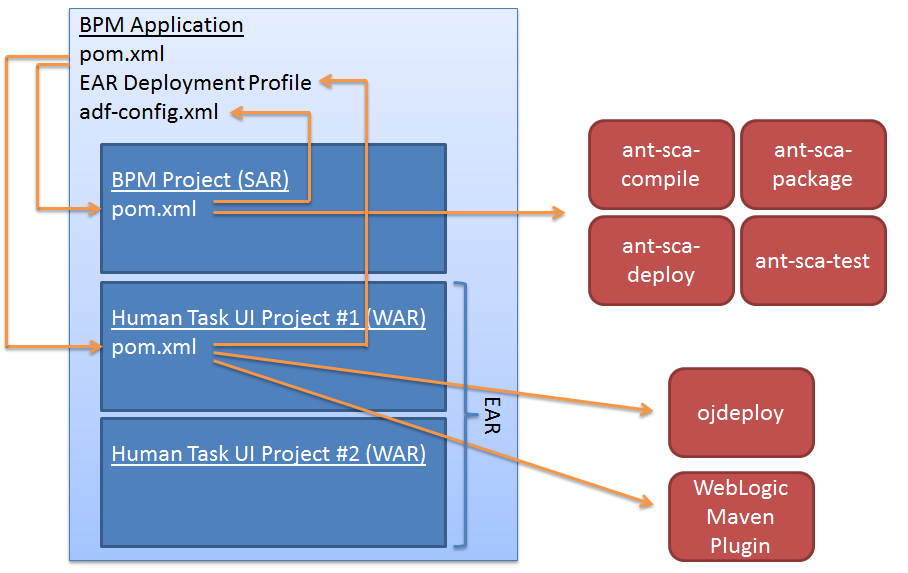
Before we dive in, let’s take a look at the overall structure so we can see how this all fits together.  There are a lot of arrows on this diagram, but don’t worry, its not as complicated as it looks.
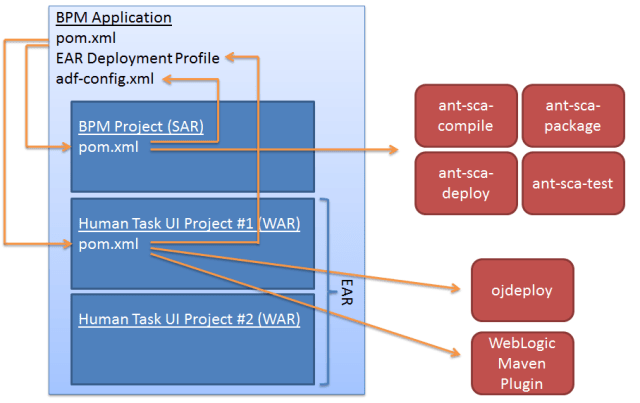
When we build a BPM or SOA application in JDeveloper, we put it in a ‘Project’ which is kept inside an ‘Application.’  The SOA/BPM project contains the composite, all of our WSDLs, XSDs, adapter configurations, and so on.  The application contains some metadata that is used during build and deployment, importantly for our purposes, it contains the adf-config.xml file which is used to identify which MDS we want to use (if any), and it contains the EAR deployment profile for the human task UI projects.

In addition to this, for every human task we create an ADF UI for, we will have another project to hold that UI.  In the example above, we have two such ADF Human Task UI projects in the application.

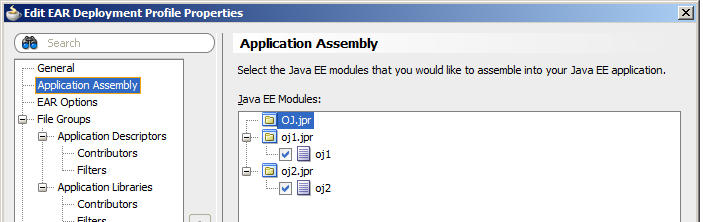
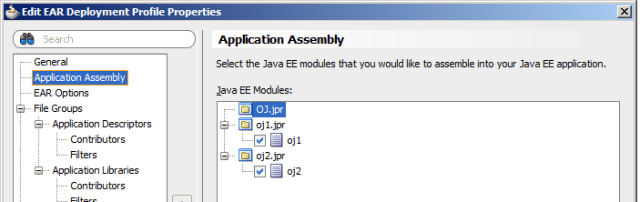
In this case, the EAR deployment profile in the application will include the two Human Task UI projects.  Here is an example of what this looks like.  In this example oj1 and oj2 are the Human Task UI projects.
So, in order to automate this build, we need to take two separate sets of actions:

  • We need to compile, package, deploy (and maybe test and paramterize) the composite (SAR)
  • We need to compile and package the Human Task UI projects into WARs and then package those WARs into an EAR and deploy that EAR

To orchestrate this, we will use the Maven Reactor function – which allows us to build multiple projects as part of the build.  The way this works is actually pretty simple.  First we have a top level Maven POM, which we will put in the application, as opposed to one of the projects.  You can see it on the diagram above.  In this POM, we point to the two ‘modules’ that make up the build, i.e. the two POMs in the composite project and the first Human Task UI project.  We only need one POM for all of the Human Task UI projects because we are packaging them all up into a single EAR for deployment.

The POM in the composite project will then be much like the ones we have seen earlier in this series of posts.  It will point to the ant-sca-compile, ant-sca-package, ant-sca-deploy, and ant-sca-test ANT tasks, and to the adf-config.xml for the MDS configuration.  I wont go over this, as it is covered in the previous posts.

The POM in the Human Task UI project is new and different, so we will look at it more closely.  It uses the ojdeploy utility that is included with JDeveloper to compile and package the Human Task UIs into WARs and then an EAR.  It then uses the WebLogic Maven Plugin (also covered previously) to deploy the EAR to WebLogic Server.

So, now that we have the overall picture of how this hangs together, let’s look into the details.

One important thing to note though!  The use of ojdeploy in the build means that the build server must have JDeveloper installed on it.

Here is an example of what the top level POM looks like:

<project xmlns="http://maven.apache.org/POM/4.0.0"
  xmlns:xsi="http://www.w3.org/2001/XMLSchema-instance"
  xsi:schemaLocation="http://maven.apache.org/POM/4.0.0 http://maven.apache.org/maven-v4_0_0.xsd">
  <modelVersion>4.0.0</modelVersion>

  <groupId>OJ</groupId>
  <artifactId>TOP</artifactId>
  <version>1.0-SNAPSHOT</version>
  <packaging>pom</packaging>

  <scm>
    <connection>scm:svn:https://administrator@bpm.mark.oracle.com/svn/OJ/trunk</connection>
    <developerConnection>scm:svn:https://administrator@bpm.mark.oracle.com/svn/OJ/trunk</developerConnection>
  </scm>

  <modules>
    <!-- FIRST WE HANDLE THE COMPOSITE -->
    <module>OJ</module>
    <!-- THEN THE TASK UI PROJECTS -->
    <module>oj1</module>

  </modules>

  <build>
    <plugins>
      <!-- AGGREGATE JUNIT TEST RESULTS -->
      <plugin>
        <groupId>org.apache.maven.plugins</groupId>
        <artifactId>maven-surefire-report-plugin</artifactId>
        <version>2.4.2</version>
        <configuration>
          <aggregate>true</aggregate>
        </configuration>
      </plugin>
    </plugins>
  </build>

  <distributionManagement>
    <!-- use the following if you're not using a snapshot version. -->
    <repository>
      <id>local</id>
      <name>local repository</name>
      <url>file:///c:/users/administrator/.m2/repository</url>
    </repository>
    <!-- use the following if you ARE using a snapshot version. -->
    <snapshotRepository>
      <id>localSnapshot</id>
      <name>local snapshot repository</name>
      <url>file:///c:/users/administrator/.m2/repository</url>
    </snapshotRepository>
  </distributionManagement>

</project>

There are two interesting things to note here.  First the modules section, which identifies the two project-level POMs .  The names of the modulse must be the same as the names of directories at the same level as this POM which contains the POM for the project.  Conveniently, JDeveloper keeps the projects in a subdirectory of the application directory, so this is nice and easy for us to do.  When you create the application (top) level POM, make sure you put it in the application directory, not a project directory.

In our example, it is in c:\JDeveloper\mywork\OJ and the project level POMs are in c:\JDeveloper\mywork\OJ\OJ and c:\JDeveloper\mywork\OJ\oj1 for the composite and Human Task UIs respectively.

The second thing to note is the configuration for maven-surefire-report-plugin.  This allows us to aggregate the test results (if any) from all of the modules.  This means that the SCA Test results will be available in the Hudson console.  It means we dont need to use the ‘freestyle’ project like we did in the SCA Test post, we can use the Maven2 project type.

Here is the POM for the composite project:

<project xmlns="http://maven.apache.org/POM/4.0.0"
  xmlns:xsi="http://www.w3.org/2001/XMLSchema-instance"
  xsi:schemaLocation="http://maven.apache.org/POM/4.0.0 http://maven.apache.org/maven-v4_0_0.xsd">
  <modelVersion>4.0.0</modelVersion>

  <groupId>OJ</groupId>
  <artifactId>OJ</artifactId>
  <version>1.0-SNAPSHOT</version>

  <parent>
    <groupId>OJ</groupId>
    <artifactId>TOP</artifactId>
    <version>1.0-SNAPSHOT</version>
  </parent>

  <dependencies>
  </dependencies>

  <build>
    <plugins>
      <plugin>
        <artifactId>maven-antrun-plugin</artifactId>
        <version>1.6</version>
        <executions>
          <execution>
            <id>sca-compile</id>
            <phase>compile</phase>
            <configuration>
              <target>
                <property name="scac.input" value="${basedir}/composite.xml" />
                <property name="scac.application.home" value="${basedir}/.." />
                <ant antfile="c:/Oracle/Middleware/Oracle_SOA1/bin/ant-sca-compile.xml"
                     dir="c:/Oracle/Middleware/Oracle_SOA1/bin"
                     target="scac" />
              </target>
            </configuration>
            <goals>
              <goal>run</goal>
            </goals>
          </execution>
          <execution>
            <id>sca-package</id>
            <phase>package</phase>
            <configuration>
              <target>
                <property name="build.compiler" value="extJavac"/>
                <property name="compositeName" value="${project.artifactId}" />
                <property name="compositeDir" value="${basedir}" />
                <property name="revision" value="${project.version}" />
                <property name="scac.application.home" value="${basedir}/.." />
                <ant antfile="c:/Oracle/Middleware/Oracle_SOA1/bin/ant-sca-package.xml"
                     dir="c:/Oracle/Middleware/Oracle_SOA1/bin"
                     target="package" />
              </target>
            </configuration>
            <goals>
              <goal>run</goal>
            </goals>
          </execution>
          <execution>
            <id>sca-deploy</id>
            <phase>deploy</phase>
            <configuration>
              <target>
                <property name="serverURL" value="http://bpm.mark.oracle.com:7001" />
                <property name="user" value="weblogic" />
                <property name="password" value="welcome1" />
                <property name="sarLocation" value="${basedir}/deploy/sca_${project.artifactId}_rev${project.version}.jar" />
                <property name="overwrite" value="true" />
                <property name="forceDefault" value="true" />
                <property name="partition" value="default" />
                <!-- <property name="configplan" value="${basedir}/OJ_cfgplan.xml" /> -->
                <ant antfile="c:/Oracle/Middleware/Oracle_SOA1/bin/ant-sca-deploy.xml"
                     dir="c:/Oracle/Middleware/Oracle_SOA1/bin"
                     target="deploy" />
              </target>
            </configuration>
            <goals>
              <goal>run</goal>
            </goals>
          </execution>
           <execution>
            <id>sca-test</id>
            <phase>deploy</phase>
            <configuration>
              <target>
                <property name="jndi.properties.input" value="c:/Oracle/Middleware/sca-test.jndi.properties" />
                <property name="scatest.input" value="OJ" />
                <property name="scatest.format" value="junit" />
                <property name="scatest.result" value="reports" />
                <ant antfile="c:/Oracle/Middleware/Oracle_SOA1/bin/ant-sca-test.xml"
                     dir="c:/Oracle/Middleware/Oracle_SOA1/bin"
                     target="test" />
              </target>
            </configuration>
            <goals>
              <goal>run</goal>
            </goals>
          </execution>
        </executions>
      </plugin>
    </plugins>
  </build>

</project>

This is the same as the POMs we have already seen, with one exception: I have added a parent section that points back to the top level POM.  I also commented out the SOA configuration plan line in there, of course you can add one if you have one.

Now, here is the POM for the Human Task UI projects:

<project xmlns="http://maven.apache.org/POM/4.0.0"
         xmlns:xsi="http://www.w3.org/2001/XMLSchema-instance"
         xsi:schemaLocation="http://maven.apache.org/POM/4.0.0 http://maven.apache.org/maven-v4_0_0.xsd">
  <modelVersion>4.0.0</modelVersion>

  <groupId>OJ</groupId>
  <artifactId>oj1</artifactId>
  <version>1.0-SNAPSHOT</version>
  <packaging>ear</packaging>

  <parent>
    <groupId>OJ</groupId>
    <artifactId>TOP</artifactId>
    <version>1.0-SNAPSHOT</version>
  </parent>

  <build>
    <plugins>
      <!-- USE OJDEPLOY TO MAKE THE EAR -->
     <plugin>
        <groupId>org.codehaus.mojo</groupId>
        <artifactId>exec-maven-plugin</artifactId>
        <configuration>
          <executable>c:/oracle/middleware/jdeveloper/jdev/bin/ojdeploy</executable>
          <arguments>
            <argument>-workspace</argument>
            <argument>${basedir}/${project.artifactId}.jws</argument>
            <argument>-profile</argument>
            <argument>${basedir}/deploy/${project.artifactId}.ear</argument>
            <argument>-clean</argument>
          </arguments>
        </configuration>
        <executions>
          <execution>
            <id>ojdeploy</id>
            <phase>deploy</phase>
            <goals>
              <goal>exec</goal>
            </goals>
          </execution>
        </executions>
      </plugin>
      <!-- WEBLOGIC MAVEN PLUGIN CONFIG - TO DEPLOY THE EAR -->
      <plugin>
        <groupId>com.oracle.weblogic</groupId>
        <artifactId>weblogic-maven-plugin</artifactId>
        <version>10.3.4</version>
        <configuration>
          <adminurl>t3://bpm.mark.oracle.com:7001</adminurl>
          <user>weblogic</user>
          <password>welcome1</password>
          <name>${project.artifactId}</name>
          <remote>true</remote>
          <upload>true</upload>
          <targets>AdminServer</targets>
        </configuration>
        <executions>
          <execution>
            <id>deploy</id>
            <phase>deploy</phase>
            <goals>
              <goal>deploy</goal>
            </goals>
            <configuration>
              <source>deploy/${project.artifactId}.ear</source>
            </configuration>
          </execution>
        </executions>
      </plugin>
    </plugins>
  </build>
</project>

Again, this has a parent section that points back to the top level POM.  Then we use the exec-maven-plugin to execute the ojdeploy utility.  You can see the configuration that passes in the necessary information.  The command that gets executed will look like this:

c:\oracle\middleware\jdeveloper\jdev\bin\ojdeploy
  -workspace c:\jdeveloper\mywork\oj\oj.jws
  -profile oj1
  -clean

In this command, the workspace parameter points to the JDeveloper Workspace (JWS) file for the application (not project).  The profile parameter is the name of the deployment profile in the application (not porject) that is used to build the EAR – we looked at this earlier.  The clean option tells it to delete any previous output and rebuild the whole thing.

Special thanks to Ali Mukadam who tested this and helped me find and correct a problem with my POM which meant that ojdeploy was not being executed.

Running this will cause all of the Human Task UI projects that are included in the deployment profile’s assembly (which should be all of them) into WARs, it will then package all of those WARs into an EAR.  It actually injects some ADF metadata that is needed at runtime in there, which is why we need to use ojdeploy rather than just building the WARs and EAR ourselves using normal Maven functionality – believe me, I tried 🙂

Once that is done, we use the WebLogic Maven Plugin to deploy the EAR to WebLogic.  Again, we have seen the use of this plugin before (here for example), so I wont go over it.

Now that we have all this in place (and your adf-config.xml set up for MDS – see here) you need to check the application (not the project(s), the application) into Subversion.  You do this using the Version… option in the Application menu.  Then you can set up your job in Hudson (as we have done before) using the Maven2 project type and point it to your Subversion root and the top level POM.

Here is example output from a successful build for reference:


Started by user anonymous
Updating https://bpm.mark.oracle.com/svn/OJ/trunk revision: Aug 10, 2011 11:31:32 AM depth:infinity ignoreExternals: false
At revision 5
no change for https://bpm.mark.oracle.com/svn/OJ/trunk since the previous build
Found mavenVersion 2.2.1 from file jar:file:/c:/apache-maven-2.2.1/lib/maven-2.2.1-uber.jar!/META-INF/maven/org.apache.maven/maven-core/pom.properties
Parsing POMs
[workspace] $ c:\java\jdk1.6.0_25/bin/java -classpath c:\Oracle\Middleware\oracle_common\modules\oracle.mds_11.1.1\oramds.jar -cp C:\hudson\plugins\maven-plugin\WEB-INF\lib\maven-agent-2.0.1.jar;c:\apache-maven-2.2.1\boot\classworlds-1.1.jar hudson.maven.agent.Main c:\apache-maven-2.2.1 C:\hudson\war\WEB-INF\lib\hudson-remoting-2.0.1.jar C:\hudson\plugins\maven-plugin\WEB-INF\lib\maven-interceptor-2.0.1.jar 51707 C:\hudson\plugins\maven-plugin\WEB-INF\lib\maven2.1-interceptor-1.2.jar
<===[HUDSON REMOTING CAPACITY]===>���channel started
Executing Maven:  -B -f C:\hudson\jobs\OJ\workspace\pom.xml clean deploy
[INFO] Scanning for projects...
[INFO] Reactor build order:
[INFO]   Unnamed - OJ:TOP:pom:1.0-SNAPSHOT
[INFO]   Unnamed - OJ:OJ:jar:1.0-SNAPSHOT
[INFO]   Unnamed - OJ:oj1:ear:1.0-SNAPSHOT
[INFO] ------------------------------------------------------------------------
[INFO] Building Unnamed - OJ:TOP:pom:1.0-SNAPSHOT
[INFO]    task-segment: [clean, deploy]
[INFO] ------------------------------------------------------------------------
[INFO] [clean:clean {execution: default-clean}]
[INFO] [site:attach-descriptor {execution: default-attach-descriptor}]
[INFO] [install:install {execution: default-install}]
[INFO] Installing C:\hudson\jobs\OJ\workspace\pom.xml to C:\.m2\repository\OJ\TOP\1.0-SNAPSHOT\TOP-1.0-SNAPSHOT.pom
[INFO] [deploy:deploy {execution: default-deploy}]
[INFO] Retrieving previous build number from localSnapshot
Uploading: file:///c:/users/administrator/.m2/repository/OJ/TOP/1.0-SNAPSHOT/TOP-1.0-20110810.013138-4.pom
1K uploaded  (TOP-1.0-20110810.013138-4.pom)
[INFO] Retrieving previous metadata from localSnapshot
[INFO] Uploading repository metadata for: 'snapshot OJ:TOP:1.0-SNAPSHOT'
[INFO] Retrieving previous metadata from localSnapshot
[INFO] Uploading repository metadata for: 'artifact OJ:TOP'
[HUDSON] Archiving C:\hudson\jobs\OJ\workspace\pom.xml to C:\hudson\jobs\OJ\modules\OJ$TOP\builds\2011-08-10_11-31-33\archive\OJ\TOP\1.0-SNAPSHOT\pom.xml
[HUDSON] Archiving C:\.m2\repository\OJ\TOP\1.0-SNAPSHOT\TOP-1.0-SNAPSHOT.pom to C:\hudson\jobs\OJ\modules\OJ$TOP\builds\2011-08-10_11-31-33\archive\OJ\TOP\1.0-20110810.013138-4\TOP-1.0-SNAPSHOT.pom
[INFO] ------------------------------------------------------------------------
[INFO] Building Unnamed - OJ:OJ:jar:1.0-SNAPSHOT
[INFO]    task-segment: [clean, deploy]
[INFO] ------------------------------------------------------------------------
[INFO] [clean:clean {execution: default-clean}]
[INFO] Deleting directory C:\hudson\jobs\OJ\workspace\OJ\target
[INFO] [resources:resources {execution: default-resources}]
[WARNING] Using platform encoding (Cp1252 actually) to copy filtered resources, i.e. build is platform dependent!
[INFO] skip non existing resourceDirectory C:\hudson\jobs\OJ\workspace\OJ\src\main\resources
[INFO] [compiler:compile {execution: default-compile}]
[INFO] No sources to compile
[INFO] [antrun:run {execution: sca-compile}]
[INFO] Executing tasks

main:

scac:
Validating composite "C:\hudson\jobs\OJ\workspace\OJ/composite.xml"
     [scac] warning: in oj1.task: Task title not specified
     [scac] warning: in oj1.task: Error assignee not specified
     [scac] warning: in oj1.task: Payload not specified
     [scac] warning: in oj2.task: Task title not specified
     [scac] warning: in oj2.task: Error assignee not specified
     [scac] warning: in oj2.task: Payload not specified
[INFO] Executed tasks
[INFO] [resources:testResources {execution: default-testResources}]
[WARNING] Using platform encoding (Cp1252 actually) to copy filtered resources, i.e. build is platform dependent!
[INFO] skip non existing resourceDirectory C:\hudson\jobs\OJ\workspace\OJ\src\test\resources
[INFO] [compiler:testCompile {execution: default-testCompile}]
[INFO] No sources to compile
[INFO] [surefire:test {execution: default-test}]
[INFO] No tests to run.
[HUDSON] Recording test results
[INFO] [jar:jar {execution: default-jar}]
[WARNING] JAR will be empty - no content was marked for inclusion!
[INFO] Building jar: C:\hudson\jobs\OJ\workspace\OJ\target\OJ-1.0-SNAPSHOT.jar
[INFO] [antrun:run {execution: sca-package}]
[INFO] Executing tasks

main:
     [echo] oracle.home = c:\Oracle\Middleware\Oracle_SOA1\bin/..
    [input] skipping input as property compositeDir has already been set.
    [input] skipping input as property compositeName has already been set.
    [input] skipping input as property revision has already been set.

clean:
     [echo] deleting C:\hudson\jobs\OJ\workspace\OJ/deploy/sca_OJ_rev1.0-SNAPSHOT.jar
   [delete] Deleting: C:\hudson\jobs\OJ\workspace\OJ\deploy\sca_OJ_rev1.0-SNAPSHOT.jar

init:

scac-validate:
     [echo] Running scac-validate in C:\hudson\jobs\OJ\workspace\OJ/composite.xml
     [echo] oracle.home = c:\Oracle\Middleware\Oracle_SOA1\bin/..
    [input] skipping input as property compositeDir has already been set.
    [input] skipping input as property compositeName has already been set.
    [input] skipping input as property revision has already been set.

scac:
Validating composite "C:\hudson\jobs\OJ\workspace\OJ/composite.xml"
     [scac] warning: in oj1.task: Task title not specified
     [scac] warning: in oj1.task: Error assignee not specified
     [scac] warning: in oj1.task: Payload not specified
     [scac] warning: in oj2.task: Task title not specified
     [scac] warning: in oj2.task: Error assignee not specified
     [scac] warning: in oj2.task: Payload not specified

package:
     [echo] oracle.home = c:\Oracle\Middleware\Oracle_SOA1\bin/..
    [input] skipping input as property compositeDir has already been set.
    [input] skipping input as property compositeName has already been set.
    [input] skipping input as property revision has already been set.

compile-source:
    [mkdir] Created dir: C:\hudson\jobs\OJ\workspace\OJ\dist
     [copy] Copying 26 files to C:\hudson\jobs\OJ\workspace\OJ\dist
     [copy] Warning: C:\hudson\jobs\OJ\workspace\OJ\src does not exist.
     [copy] Copying 3 files to C:\hudson\jobs\OJ\workspace\OJ\dist\SCA-INF\classes
      [jar] Building jar: C:\hudson\jobs\OJ\workspace\OJ\deploy\sca_OJ_rev1.0-SNAPSHOT.jar
   [delete] Deleting directory C:\hudson\jobs\OJ\workspace\OJ\dist
[INFO] Executed tasks
[INFO] [oracle-sca-advisor:analyze {execution: sca-advisor}]
[INFO] ------------------------------------------------------------------------
[INFO] ORACLE SCA ADVISOR - ANALYZE
[INFO] ------------------------------------------------------------------------
[INFO]
[INFO] Beginning analysis of composite C:\hudson\jobs\OJ\workspace\OJ/composite.xml
[INFO] Scanning...

[INFO] Checking at least one service is defined...
[INFO] Checking at least one component is defined...
[INFO] Checking at least one wire is defined...
[INFO] Checking whether references are using concrete WSDLs...
[INFO] Oracle SCA Advisor Finished
[INFO]
[INFO] [install:install {execution: default-install}]
[INFO] Installing C:\hudson\jobs\OJ\workspace\OJ\target\OJ-1.0-SNAPSHOT.jar to C:\.m2\repository\OJ\OJ\1.0-SNAPSHOT\OJ-1.0-SNAPSHOT.jar
[INFO] [deploy:deploy {execution: default-deploy}]
[INFO] Retrieving previous build number from localSnapshot
Uploading: file:///c:/users/administrator/.m2/repository/OJ/OJ/1.0-SNAPSHOT/OJ-1.0-20110810.013138-3.jar
1K uploaded  (OJ-1.0-20110810.013138-3.jar)
[INFO] Retrieving previous metadata from localSnapshot
[INFO] Uploading repository metadata for: 'snapshot OJ:OJ:1.0-SNAPSHOT'
[INFO] Retrieving previous metadata from localSnapshot
[INFO] Uploading repository metadata for: 'artifact OJ:OJ'
[INFO] Uploading project information for OJ 1.0-20110810.013138-3
[INFO] [antrun:run {execution: sca-deploy}]
[INFO] Executing tasks

main:
     [echo] oracle.home = c:\Oracle\Middleware\Oracle_SOA1\bin/..

deploy:
    [input] skipping input as property serverURL has already been set.
    [input] skipping input as property sarLocation has already been set.
setting user/password..., user=weblogic
Processing sar=C:\hudson\jobs\OJ\workspace\OJ/deploy/sca_OJ_rev1.0-SNAPSHOT.jar
Adding sar file - C:\hudson\jobs\OJ\workspace\OJ\deploy\sca_OJ_rev1.0-SNAPSHOT.jar
INFO: Creating HTTP connection to host:bpm.mark.oracle.com, port:7001
INFO: Received HTTP response from the server, response code=200
---->Deploying composite success.
[INFO] Executed tasks
[INFO] [antrun:run {execution: sca-test}]
[INFO] Executing tasks

main:
     [echo] Running scatest using oracle.home = c:\Oracle\Middleware\Oracle_SOA1\bin/..

test:
     [echo] Classpth = c:\Oracle\Middleware\Oracle_SOA1\soa\modules\oracle.soa.fabric_11.1.1\fabric-ext.jar;c:\Oracle\Middleware\Oracle_SOA1\soa\modules\oracle.soa.fabric_11.1.1\fabric-runtime.jar;c:\Oracle\Middleware\Oracle_SOA1\soa\modules\oracle.soa.fabric_11.1.1\oracle-soa-client-api.jar;c:\Oracle\Middleware\oracle_common\soa\modules\oracle.soa.mgmt_11.1.1\soa-infra-mgmt.jar;c:\Oracle\Middleware\Oracle_SOA1\soa\modules\oracle.soa.bpel_11.1.1\orabpel-common.jar;c:\Oracle\Middleware\Oracle_SOA1\soa\modules\oracle.soa.bpel_11.1.1\orabpel.jar;c:\Oracle\Middleware\wlserver_10.3\server\lib\weblogic.jar;c:\Oracle\Middleware\oracle_common\modules\oracle.jps_11.1.1\jps-api.jar;c:\Oracle\Middleware\oracle_common\modules\oracle.jps_11.1.1\jps-common.jar;c:\Oracle\Middleware\oracle_common\modules\oracle.jps_11.1.1\jps-internal.jar;c:\Oracle\Middleware\oracle_common\modules\oracle.jrf_11.1.1\jrf-api.jar;c:\Oracle\Middleware\oracle_common\soa\modules\oracle.soa.mgmt_11.1.1\soa-client-stubs-was.jar;c:\Oracle\Middleware\Oracle_SOA1\bin\${was.home}\runtimes\com.ibm.ws.ejb.thinclient_7.0.0.jar;c:\Oracle\Middleware\Oracle_SOA1\bin\${was.home}\runtimes\com.ibm.ws.orb_7.0.0.jar;c:\Oracle\Middleware\Oracle_SOA1\bin\${was.home}\plugins\com.ibm.ws.runtime.jar;c:\Oracle\Middleware\Oracle_SOA1\bin\${was.home}\runtimes\com.ibm.ws.admin.client_7.0.0.jar
     [echo] Running scatest using oracle.home = c:\Oracle\Middleware\Oracle_SOA1\bin/.. OJ
     [echo] Using context = build.properties
     [echo] Using path = c:\Oracle\Middleware\Oracle_SOA1\soa\modules\oracle.soa.fabric_11.1.1\fabric-ext.jar;c:\Oracle\Middleware\Oracle_SOA1\soa\modules\oracle.soa.fabric_11.1.1\fabric-runtime.jar;c:\Oracle\Middleware\Oracle_SOA1\soa\modules\oracle.soa.fabric_11.1.1\oracle-soa-client-api.jar;c:\Oracle\Middleware\oracle_common\soa\modules\oracle.soa.mgmt_11.1.1\soa-infra-mgmt.jar;c:\Oracle\Middleware\Oracle_SOA1\soa\modules\oracle.soa.bpel_11.1.1\orabpel-common.jar;c:\Oracle\Middleware\Oracle_SOA1\soa\modules\oracle.soa.bpel_11.1.1\orabpel.jar;c:\Oracle\Middleware\wlserver_10.3\server\lib\weblogic.jar;c:\Oracle\Middleware\oracle_common\modules\oracle.jps_11.1.1\jps-api.jar;c:\Oracle\Middleware\oracle_common\modules\oracle.jps_11.1.1\jps-common.jar;c:\Oracle\Middleware\oracle_common\modules\oracle.jps_11.1.1\jps-internal.jar;c:\Oracle\Middleware\oracle_common\modules\oracle.jrf_11.1.1\jrf-api.jar;c:\Oracle\Middleware\oracle_common\soa\modules\oracle.soa.mgmt_11.1.1\soa-client-stubs-was.jar;c:\Oracle\Middleware\Oracle_SOA1\bin\${was.home}\runtimes\com.ibm.ws.ejb.thinclient_7.0.0.jar;c:\Oracle\Middleware\Oracle_SOA1\bin\${was.home}\runtimes\com.ibm.ws.orb_7.0.0.jar;c:\Oracle\Middleware\Oracle_SOA1\bin\${was.home}\plugins\com.ibm.ws.runtime.jar;c:\Oracle\Middleware\Oracle_SOA1\bin\${was.home}\runtimes\com.ibm.ws.admin.client_7.0.0.jar
    [input] skipping input as property scatest.input has already been set.
    [input] skipping input as property jndi.properties.input has already been set.
  [scatest] Junit formatting
  [scatest] <testsuite name="sca.default-OJ.codeCoverages" errors="0" failures="0" tests="0" time="0.0"/>
  [scatest] C:\hudson\jobs\OJ\workspace\reports\BPEL-sca.default-OJ.codeCoverages.xml
[INFO] Executed tasks
[HUDSON] Archiving C:\hudson\jobs\OJ\workspace\OJ\pom.xml to C:\hudson\jobs\OJ\modules\OJ$OJ\builds\2011-08-10_11-31-33\archive\OJ\OJ\1.0-SNAPSHOT\pom.xml
[HUDSON] Archiving C:\hudson\jobs\OJ\workspace\OJ\target\OJ-1.0-SNAPSHOT.jar to C:\hudson\jobs\OJ\modules\OJ$OJ\builds\2011-08-10_11-31-33\archive\OJ\OJ\1.0-20110810.013138-3\OJ-1.0-SNAPSHOT.jar
[INFO] ------------------------------------------------------------------------
[INFO] Building Unnamed - OJ:oj1:ear:1.0-SNAPSHOT
[INFO]    task-segment: [clean, deploy]
[INFO] ------------------------------------------------------------------------
[INFO] artifact org.codehaus.mojo:exec-maven-plugin: checking for updates from central
Downloading: http://repo1.maven.org/maven2/org/codehaus/mojo/exec-maven-plugin/1.2/exec-maven-plugin-1.2.pom

Downloading: http://repo1.maven.org/maven2/org/codehaus/mojo/mojo-parent/24/mojo-parent-24.pom

Downloading: http://repo1.maven.org/maven2/org/codehaus/mojo/exec-maven-plugin/1.2/exec-maven-plugin-1.2.jar

[INFO] [clean:clean {execution: default-clean}]
[INFO] [ear:generate-application-xml {execution: default-generate-application-xml}]
[INFO] Generating application.xml
[INFO] [resources:resources {execution: default-resources}]
[WARNING] Using platform encoding (Cp1252 actually) to copy filtered resources, i.e. build is platform dependent!
[INFO] skip non existing resourceDirectory C:\hudson\jobs\OJ\workspace\oj1\src\main\resources
[INFO] [ear:ear {execution: default-ear}]
[INFO] Could not find manifest file: C:\hudson\jobs\OJ\workspace\oj1\src\main\application\META-INF\MANIFEST.MF - Generating one
[INFO] Building jar: C:\hudson\jobs\OJ\workspace\oj1\target\oj1-1.0-SNAPSHOT.ear
[INFO] [install:install {execution: default-install}]
[INFO] Installing C:\hudson\jobs\OJ\workspace\oj1\target\oj1-1.0-SNAPSHOT.ear to C:\.m2\repository\OJ\oj1\1.0-SNAPSHOT\oj1-1.0-SNAPSHOT.ear
[INFO] [deploy:deploy {execution: default-deploy}]
[INFO] Retrieving previous build number from localSnapshot
[INFO] repository metadata for: 'snapshot OJ:oj1:1.0-SNAPSHOT' could not be found on repository: localSnapshot, so will be created
Uploading: file:///c:/users/administrator/.m2/repository/OJ/oj1/1.0-SNAPSHOT/oj1-1.0-20110810.013138-1.ear
2K uploaded  (oj1-1.0-20110810.013138-1.ear)
[INFO] Retrieving previous metadata from localSnapshot
[INFO] repository metadata for: 'artifact OJ:oj1' could not be found on repository: localSnapshot, so will be created
[INFO] Uploading repository metadata for: 'artifact OJ:oj1'
[INFO] Uploading project information for oj1 1.0-20110810.013138-1
[INFO] Retrieving previous metadata from localSnapshot
[INFO] repository metadata for: 'snapshot OJ:oj1:1.0-SNAPSHOT' could not be found on repository: localSnapshot, so will be created
[INFO] Uploading repository metadata for: 'snapshot OJ:oj1:1.0-SNAPSHOT'
[INFO] [null:deploy {execution: deploy}]
weblogic.Deployer invoked with options:  -noexit -adminurl t3://bpm.mark.oracle.com:7001 -user weblogic -deploy -name oj1 -source deploy/oj1.ear -targets AdminServer -upload -remote
<Aug 10, 2011 11:32:17 AM EST> <Info> <J2EE Deployment SPI> <BEA-260121> <Initiating deploy operation for application, oj1 [archive: deploy\oj1.ear], to AdminServer .>
Task 0 initiated: [Deployer:149026]deploy application oj1 on AdminServer.
Task 0 completed: [Deployer:149026]deploy application oj1 on AdminServer.
Target state: deploy completed on Server AdminServer

[HUDSON] Archiving C:\hudson\jobs\OJ\workspace\oj1\pom.xml to C:\hudson\jobs\OJ\modules\OJ$oj1\builds\2011-08-10_11-31-33\archive\OJ\oj1\1.0-SNAPSHOT\pom.xml
[HUDSON] Archiving C:\hudson\jobs\OJ\workspace\oj1\target\oj1-1.0-SNAPSHOT.ear to C:\hudson\jobs\OJ\modules\OJ$oj1\builds\2011-08-10_11-31-33\archive\OJ\oj1\1.0-20110810.013138-1\oj1-1.0-SNAPSHOT.ear
[INFO]
[INFO]
[INFO] ------------------------------------------------------------------------
[INFO] Reactor Summary:
[INFO] ------------------------------------------------------------------------
[INFO] Unnamed - OJ:TOP:pom:1.0-SNAPSHOT ..................... SUCCESS [2.494s]
[INFO] Unnamed - OJ:OJ:jar:1.0-SNAPSHOT ...................... SUCCESS [28.258s]
[INFO] Unnamed - OJ:oj1:ear:1.0-SNAPSHOT ..................... SUCCESS [40.726s]
[INFO] ------------------------------------------------------------------------
[INFO] ------------------------------------------------------------------------
[INFO] BUILD SUCCESSFUL
[INFO] ------------------------------------------------------------------------
[INFO] Total time: 1 minute 12 seconds
[INFO] Finished at: Wed Aug 10 11:32:47 EST 2011
[INFO] Final Memory: 42M/633M
[INFO] ------------------------------------------------------------------------
channel stopped
Finished: SUCCESS

After running the build, everything is deployed in the right place, just as if youdid a deployment from JDeveloper.  Enjoy!

Posted in Uncategorized | Tagged , , , , , | 3 Comments

Adding attachment support to the worklist

I have just posted a new version of the worklist sample which adds the ability to add an attachment to a task.  Let’s take a look how we add and view (download) task attachments.

First, let’s review the addAttachment method in the MTaskList class.  Here is the code (as always, there are more comments in Subversion):

  public static void addAttachment(String user, String taskNumber, MultipartFile attachment) {
    MLog.log("MTaskList", "Entering addAttachment()");

    try {

      // login
      ctx = ContextCache.getContextCache().get(user);

      // get task details
      Task task = getTaskQueryService().getTaskDetailsByNumber(ctx, Integer.parseInt(taskNumber));

      // add the attachment
      getTaskService();
      MLog.log("MTaskList", "Adding attachment to task " + task.getSystemAttributes().getTaskNumber());

      AttachmentType xAttachment = new ObjectFactory().createAttachment();
      xAttachment.setName(attachment.getOriginalFilename());
      xAttachment.setInputStream(attachment.getInputStream());
      xAttachment.setMimeType(attachment.getContentType());
      xAttachment.setDescription(attachment.getOriginalFilename());

      getTaskService().addAttachment(ctx, task.getSystemAttributes().getTaskId(), xAttachment);

      MLog.log("MTaskList", "Leaving addAttachment()");

    } catch (Exception e) {
      e.printStackTrace();
    }

  }

In this code, you can see that we need to get an instance of AttachmentType from the ObjectFactory by calling its createAttachment() method.  We can then fill in the appropriate details – name, MIME type, description, and set the actual content of the attachment.  We need to have our data in an InputStream inside a MultipartFile.  The Spring framework and our controller will handle this for us, let’s take a look at it now.

Here is the code for the AddAttachmentController:

  public AddAttachmentController() {
    setCommandClass(FileUpload.class);
    setCommandName("addattachment.do");
  }

  @Override
  protected ModelAndView onSubmit(HttpServletRequest request, HttpServletResponse response,
      Object command, BindException errors) throws Exception {
    MLog.log("AddAttachmentController", "Entering onSubmit()");
    // cast the uploaded object to our domain class
    FileUpload file = (FileUpload) command;

    // get the file out of the domain object
    MultipartFile multipartFile = file.getFile();

    // check if there is any data in the file
    if (multipartFile != null) {
      MLog.log("AddAttachmentController", "We seem to have a file");
    } else {
      MLog.log("AddAttachmentController", "We do not seem to have a file");
    }

    // handle the attachment here
    String taskNumber = request.getParameter("x_tasknumber");
    MTaskList.addAttachment(request.getRemoteUser(), taskNumber, multipartFile);

    // send the user back to the task detail page (where they were)
    return (new TaskDetailController()).handleRequest(request, response);
  }

We are using the Spring Multipart File Upload capability to get our file from the user into our application.  To do this, we need to define special class which will hold our uploaded file.  This is the FileUpload class shown below.  Notice how the controller calls two special methods to identify this class and the command name (“addattachment.do”).

Next, since we are using a Spring Form here, instead of a POST, we need to implement and override the onSubmit() method.  This is different to what we have seen in our other controllers.  Note that the binary data is passed in to this method by the Spring Form framework as Object command. The first thing we need to do is to cast this to our FileUpload class.  We can then call the getFile() method on this to get the actual MultipartFile.  This is what we pass to our addAttachment method which we saw earlier.  It contains the binary data and also metadata about the file.

Finally, we use the Controller-chaining method to pass the user back to the Task Detail page (where they just came from) which will reload and will now show the attachment we just uploaded.  This is done by returning the output of the handleRequest method on a new instance of the controller for that page, to which we have passed our request and response objects.

public class FileUpload {

  private MultipartFile file;

  public MultipartFile getFile() { return file; }
  public void setFile(MultipartFile file) { this.file = file; }

}

So that covers uploading attachments, now let’s take a look at how we download attachments.  Here is the code for our DownloadAttachmentController:

public class DownloadAttachmentController extends SimpleSuccessFailureController {

  private static final int IO_BUFFER_SIZE = 1;

  public ModelAndView handleRequest(HttpServletRequest request, HttpServletResponse response)
      throws Exception {
    MLog.log("DownloadAttachmentController", "Entering handleRequest()");
    // get parameters from request
    String xTasknumber = request.getParameter("x_tasknumber");
    String xFile = request.getParameter("x_file");
    String xVersion = request.getParameter("x_version");

    MLog.log("DownloadAttachmentController", "Attachment details: tasknumber=" + xTasknumber +
             " file=" + xFile + " version=" + xVersion);

    // TODO move this BPM API specific stuff out of the controller into the domain
    IWorkflowContext ctx = ContextCache.getContextCache().get(request.getRemoteUser());

    // get the task id
    String taskid = MTaskList.getTaskIdFromNumber(xTasknumber, request.getRemoteUser());

    // get the inputStream from the attachment
    InputStream in = WorkflowAttachmentUtil.getAttachment(
        ctx,                                                         // context
        MTaskList.getServerURL(),                                    // SOA URL
        taskid,                                                      // task id
        Integer.parseInt(xVersion),                                  // attachment version
        xFile,                                                       // file name
        null);                                                       // logger

    // set up the response
    response.setContentType("application/octet-stream");             // file.getContentType()
    response.setHeader("Content-Disposition", "attachment; filename=" + xFile);

    ServletOutputStream out = response.getOutputStream();
    copy(in, out);
    out.flush();
    out.close();
    return null;
  }

  private static void copy(InputStream in, OutputStream out) throws IOException {
    byte[] b = new byte[IO_BUFFER_SIZE];
    int read;
    while ((read = in.read(b)) != -1) {
      out.write(b, 0, read);
    }
  }

}

I have been a bit naughty here and broken my own separation rule.  I have some BPM API specific code in the controller here.  I will move that into the domain package where it belongs, but for now, let’s take a look at how it works.

It is similar to many of the previous examples.  We extract the parameters from the request object, then we get the context and lookup the taskId, we have seen all of this before, so I will not cover it again.  Next, we need to call the WorkflowAttachmentUtil.getAttachment() method.  This WorkflowAttachmentUtil is a helper class that we can use to get the attachment.  This gives us the binary data from the attachment in an InputStream.  This API may change in the future.

Now we use another little Spring trick to send this to the browser.  Here is that part of the code again.  Basically, we are setting the content type in the response manually to application/octet-stream which means any kind of binary data.  Then we set a Content-Disposition header that tells the browser it needs to download this attachment and what the filename is.  Most browsers will work out how to do the right thing based on this information.  Next we just copy the binary data from the InputStream straight into the ServletOutputStream and return null.

    response.setContentType("application/octet-stream");
    response.setHeader("Content-Disposition", "attachment; filename=" + xFile);

    ServletOutputStream out = response.getOutputStream();
    copy(in, out);
    out.flush();
    out.close();
    return null;

Finally, let’s take a look at the taskdetail.jsp view which invokes all of this functionality.  Here is the appropriate section of that view:

        <h2 class="td-h2">Attachments</h2>
        <table width="50%" class="tl-table">
          <tr>
            <th class="tl-head" width="150">User</th>
            <th class="tl-head" width="200">Date</th>
            <th class="tl-head">Name</th>
          </tr>
        </table>
        <table width="50%">
          <c:forEach items="${model.task.attachments}" var="attachment">
            <tr>
              <td class="tl-row" width="150">${attachment.updatedBy}</td>
              <td class="tl-row" width="200">${attachment.updatedDate.time}</td>
              <td class="tl-row">
                <a href="downloadattachment.do?x_tasknumber=${model.task.number}&x_file=${attachment.name}&x_version=${attachment.version}"
                   target="_blank">${attachment.name}</a>
              </td>
            </tr>
          </c:forEach>
          <tr><td>Add a new attachment:</td></tr>
          <tr>
            <td colspan="3"><form action="addattachment.do" method="POST" enctype="multipart/form-data">
              <input type="file" name="file"/>
              <input type="hidden" name="x_tasknumber" value="${model.task.number}"/>
              <input type="submit" value="Add Attachment"/>
            </form></td>
          </tr>
        </table>

The first part, which handles the download is pretty straight forward and very similar to previous examples we have seen, so I wont go into detail.  Note though that the download link points to downloadattachment.do and has a target=”_blank” so that the browser will perform the download in a new tab/window and leave the one running our application alone.

The second part is the upload.  The interesting part here is the form tag.  Note that we specify enctype=”multipart/form-data” and also, and most importantly, that the input of type=”file” is named file, which matches the name of the property in the FileUpload class.  This is the one that will create the file upload functionality for us.

<form action="addattachment.do" method="POST" enctype="multipart/form-data">
<input type="file" name="file"/>

Well, that’s it for attachments, for now at least.  Enjoy!

Posted in Uncategorized | Tagged , , | Leave a comment