Adding Process Instance Audit Images to the Worklist

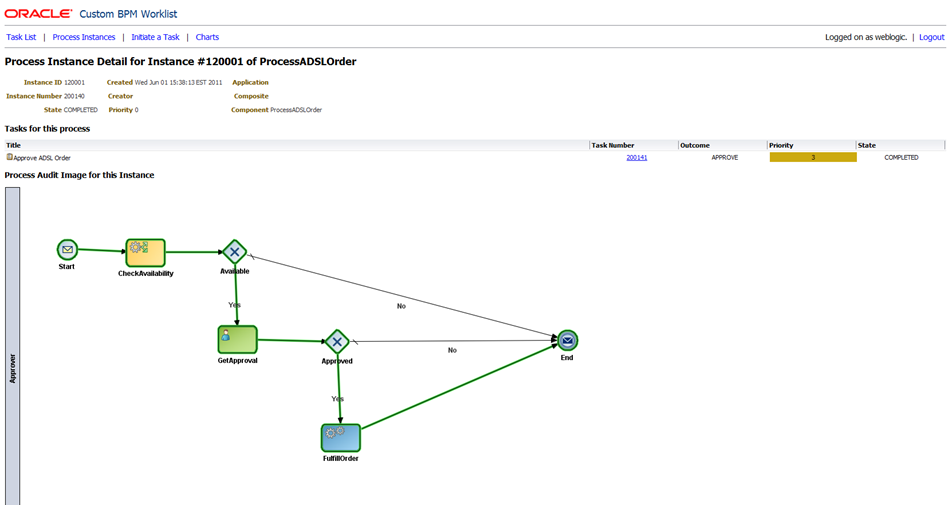
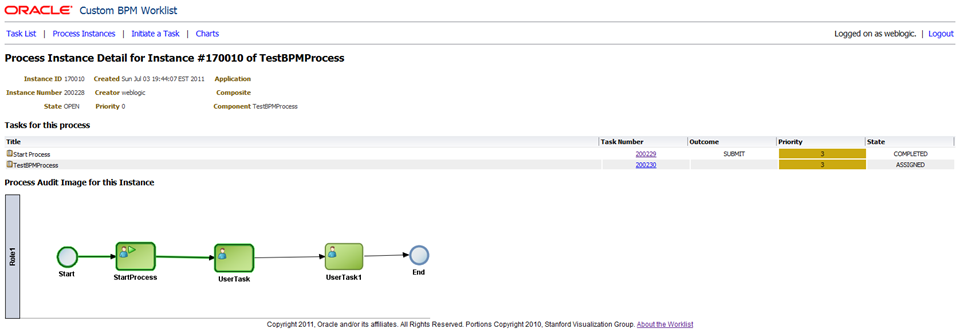
I have just uploaded another update for the custom BPM worklist sample, the second one this week!  This update adds the ‘process instance audit image’ to the ‘process instance detail’ page.  That means the a picture of the actual process model with the path that this instance of the process has followed (so far) highlighted in green.

Here are a couple of examples so you can see what I mean:

And another:

As always, you can download the source code from Subversion and the Javadoc and WARs from the main worklist page.

This update adds some interesting new API usage, which we will discuss in this article.  It also requires the addition of some more libraries into your Maven repository to allow you to build with the necessary dependencies.  There are getting to be enough of these now, that I thought it was time to write a script to save you some work.  You can download the script from here (for Windows) or here (Unix-like).  Warning:  The scripts are not ‘thoroughly tested’ so please check the results carefully.  Please leave a comment if you have problems with them.

You will also need one more JAR file that I am making available for download here.  This file contains a utility class that you will need to use to get the image.  We do not currently have a working API in the product (i.e. as of 11.1.1.5) to get the process instance audit image.  This JAR file contains a utility class from Oracle that will allow you to get the image, and its API is fairly similar to what we have planned for the real API we plan to introduce in a future release.  Hopefully this will minimise any changes you need to make in the future should we release a real API.

Please note, as for the worklist as a whole, this JAR file is a sample, that is provided “as is” without any warranty or support.

This JAR file contains a class called oracle.bpm.example.util.ProcessDiagramUtil.  This class has a constructor that takes the BPMServiceClient which we have seen before, and a method called InputStream getProcessAuditDiagram(IBPMContext ctx, String instanceId) which retrieves the actual image in PNG format.

Here is the basic usage of this utility class:

  // get the utility class which will retrieve the image for us
  ProcessDiagramUtil pdu = new ProcessDiagramUtil(
      getBPMServiceClientFactory().getBPMServiceClient());

  // get the image for the requested instance
  InputStream auditDiagramData = pdu.getProcessAuditDiagram(
      (IBPMContext) ContextCache.getContextCache().get(user), instanceId);

We need to create an instance of the class, passing the constructor the BPMServiceClient.  Then we are able to get the instance audit image (in PNG format) as an InputStream.

The controller in this case is also a little different, so it is presented here.  It is just returning the PNG image, without a ‘page’ wrapped around it, so the intention is that it is called from and img tag, not from the browser URL.  We will see this later in the view.

Here is the controller code:

package com.oracle.ateam;

import org.springframework.web.servlet.ModelAndView;

import java.io.InputStream;
import java.io.OutputStream;
import java.io.ByteArrayOutputStream;
import java.io.IOException;

import javax.servlet.http.HttpServletRequest;
import javax.servlet.http.HttpServletResponse;
import javax.servlet.ServletOutputStream;

import oracle.bpel.services.workflow.client.util.WorkflowAttachmentUtil;
import oracle.bpel.services.workflow.verification.IWorkflowContext;

import com.oracle.ateam.util.MLog;
import com.oracle.ateam.domain.ContextCache;
import com.oracle.ateam.domain.MTaskList;

/**
    A Controller that will display the grpahical audit image for a given process instance.
    This controller should only be called in an 'img' tag - not the main application window.
 */
public class AuditImageController extends SimpleSuccessFailureController {

  private static final int IO_BUFFER_SIZE = 1;

  public ModelAndView handleRequest(HttpServletRequest request, HttpServletResponse response)
      throws Exception {
    MLog.log("AuditImageController", "Entering handleRequest()");
    // get parameters from request
    String xProcessId = request.getParameter("x_processid");

    InputStream image = null;

    try {
      image = MTaskList.getAuditImage(request.getUserPrincipal().getName(), xProcessId);
      if (image == null) {
        MLog.log("AuditImageController", "image is null");
        return null;
      }
    } catch (Exception e) {
      MLog.log("AuditImageController", "Got an exception in the call to MTaskList.getAuditImage(), bailing out...");
      e.printStackTrace();
      return null;
    }

    // set up the response
    response.setContentType("image/png");

    ServletOutputStream out = response.getOutputStream();
    copy(image, out);
    out.flush();
    out.close();
    return null;
  }

  private static void copy(InputStream in, OutputStream out) throws IOException {
    byte[] b = new byte[IO_BUFFER_SIZE];
    int read;
    while ((read = in.read(b)) != -1) {
      out.write(b, 0, read);
    }
  }

}

This controller uses a similar approach to the one we used in the DownloadAttachmentController.  We set the ContentType of the HttpServletResponse and then write the image data directly into the ServletOutputStream and return null from the controller.  This is how we deliver binary data to the browser in the Spring Web MVC framework.

Here is the part of the view that calls this controller:

 <h2 class="td-h2">Process Audit Image for this Instance</h2>
  <img src="auditimage.do?x_processid=<c:out value="${model.instance.systemAttributes.processInstanceId}"/>"  />

Good luck and enjoy!

Posted in Uncategorized | Tagged , , | 12 Comments

Process Instance List and Detail added to Worklist

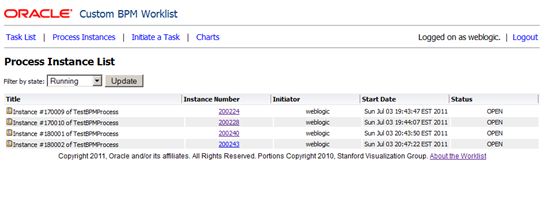
I have just uploaded an update to the custom BPM worklist sample which adds some new functionality around process instances, including the ability to list process instances:

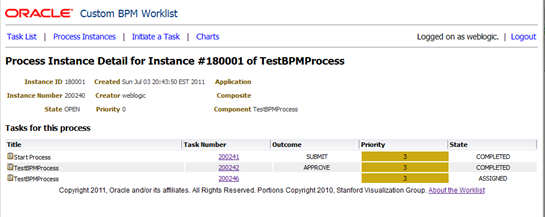
And also view details for a process instance, including a list of the tasks that are part of that process instance:

The process instance list is currently hardcoded to display open (running) instances only.  I am working on adding the filtering and also a graphical process map – stay tuned for another update soon!

You can access the source code, deployable WAR files and Javadoc on the main worklist page.

This update introduces some interesting new API usage.  The view and controller are much the same as the others, so I will not cover them explicity here.  You can take a look at the source code to see how they work.  Let’s look at the new methods in the MTaskList domain object that support process instance queries.

First, here is the queryInstances method, which will retrieve a list of process instances.  As always, there are more comments in the code in Subversion.

  public static List<IProcessInstance> queryInstances(String user, String state) {
    MLog.log("MTaskList", "Entering queryInstances()");

    try {
      List<Column> displayColumns = new ArrayList<Column>();
      displayColumns.add(IColumnConstants.PROCESS_ID_COLUMN);
      displayColumns.add(IColumnConstants.PROCESS_PROCESSNAME_COLUMN);
      displayColumns.add(IColumnConstants.PROCESS_STATE_COLUMN);
      displayColumns.add(IColumnConstants.PROCESS_TITLE_COLUMN);
      displayColumns.add(IColumnConstants.PROCESS_CREATOR_COLUMN);
      displayColumns.add(IColumnConstants.PROCESS_CREATEDDATE_COLUMN);

      IInstanceQueryInput input = new InstanceQueryInput();
      input.addState(IInstanceQueryInput.PROCESS_STATE_OPEN);
      input.setAssignmentFilter(IInstanceQueryInput.AssignmentFilter.ALL);

      return getBPMServiceClientFactory()
        .getBPMServiceClient()
        .getInstanceQueryService()
        .queryInstances(
            (IBPMContext) ContextCache.getContextCache().get(user),
            displayColumns,
            null,
            null,
            input);

    } catch (Exception e) {
      e.printStackTrace();
    }
    return null;
  }

This method shows the use of the InstanceQueryService.queryInstances() API.  The two nulls are for an optional predicate and ordering (sorting).   The code in Subversion has a list of all of the available columns that you can query .  As we did for tasks, we are just querying for the information we need to draw the instance list page, to minimise the load we put on the server.

Here is the method we use to get instance details:


  public static IProcessInstance getInstanceDetails(String user, String instanceId) {
    MLog.log("MTaskList", "Entering getInstanceDetails()");
    MLog.log("MTaskList", "Got request for instanceId " + instanceId);

    try {

      return getBPMServiceClientFactory()
        .getBPMServiceClient()
        .getInstanceQueryService()
        .getProcessInstance(
            (IBPMContext) ContextCache.getContextCache().get(user),
            instanceId);

    } catch (Exception e) {
      e.printStackTrace();
    }
    return null;
  }

This method is fairly simple and calls the InstanceQueryService.getProcessInstance() API.  I have not wrapped the process instance like I wrapped the Task yet, but I am planning to do that to simplify the view design.  If you look in the view (instancedetail.jsp) you will see that there are a variety of child objects that we need to go to in order to get the information we want.

Here is a method that will obtain a list of tasks for a given process instance:


  public static List<MTask> findTasksForProcess(String user, String processInstanceId) {
    MLog.log("MTaskList", "Entering findTasksForProcess()");

    try {
      Predicate instancePredicate = new Predicate(TableConstants.WFTASK_INSTANCEID_COLUMN, Predicate.OP_EQ, processInstanceId);
      return getMTasks(user, instancePredicate);
    } catch (Exception e) {
      e.printStackTrace();
    }
    return null;
  }

And this one will find the process instance that owns a given task:


  public static String getProcessInstanceId(String user, String taskNumber) {
    MLog.log("MTaskList", "Entering getProcessInstanceId()");

    try {

      // retrieve context
      ctx = ContextCache.getContextCache().get(user);

      // get task details
      Task task = getTaskQueryService().getTaskDetailsByNumber(ctx, Integer.parseInt(taskNumber));

      // return the process instanceId
      ProcessType processInfo = task.getProcessInfo();
      if(processInfo != null) {
        return processInfo.getInstanceId();
      }
      MLog.log("MTaskList", "Leaving getProcessInstanceId()");

    } catch (Exception e) {
      e.printStackTrace();
    }
    return null;
  }

To allow retrieving the tasks for a given process, I made some small changes to my MTaskList.getMTasks() method.  I added a new method signature to allow me to call the method using a Predicate instead of the filter and state, and I updated the method to set default values for filter and state that make sense when we are doing a query for all tasks in a process.  Here is the changed code:


  public static List<MTask> getMTasks(String user, String filter, String state) {
    return getMTasks(user, filter, state, null);
  }

  private static List<MTask> getMTasks(String user, Predicate predicate) {
    return getMTasks(user, null, null, predicate);
  }

  private static List<MTask> getMTasks(String user, String filter, String state, Predicate predicate) {

    MLog.log("MTaskList", "Entering getMTasks()");

    try {

      if (filter == null) filter = "megroup";
      if (state == null) state = "any"

      //    ... continues as before ...

I also had to add two new dependencies in order to use the new APIs that are in this version.

The two JAR files are:

  • Oracle_SOA1\soa\modules\oracle.bpm.project_11.1.1\oracle.bpm.project.model.jar
  • Oracle_SOA1\soa\modules\oracle.bpm.runtime_11.1.1\oracle.bpm.core.jar

I added these to Maven with the following coordinates respectively:

  • com.oracle.soa:bpmproject_model:11.1.1.5
  • com.oralce.soa:bpmcore:11.1.1.5

And of course I added them to my pom, as follows:


       <dependency>
            <groupId>com.oracle.soa</groupId>
            <artifactId>bpmproject_model</artifactId>
            <version>11.1.1.5</version>
            <type>jar</type>
            <scope>compile</scope>
        </dependency>
        <dependency>
            <groupId>com.oracle.soa</groupId>
            <artifactId>bpmcore</artifactId>
            <version>11.1.1.5</version>
            <type>jar</type>
            <scope>compile</scope>
        </dependency>

Enjoy!

Posted in Uncategorized | Tagged , , | Leave a comment

Introducing Oracle Middleware into your environment

This article is intended for organisations that have just recently made a decision to adopt the  Oracle Fusion Middleware stack. It can be a very exciting and nerve-wracking time. You have probably done a lot of research on the technology and have a good idea where each particular product/module will fit into your environment. You are also likely to have some projects in the pipeline on which you are planning to utilise the products. The question is: how do you take full advantage of the products to achieve the best possible outcome and fast forward though the unnecessary hurdles.

Having chosen Oracle Fusion Middleware, you most likely understand of the benefits using the ‘Service Oriented Architecture’ approach.  The main principles of SOA are to promote reusability, consistency, governance and business agility. Even if you do not have a particular project and deliverables in mind, you still should think about how to ensure you follow SOA principles.

It is important to understand the distinction between Service Oriented Architecture and Oracle Fusion Middleware product set. Service Oriented Architecture is a philosophy/methodology, a collection of best practices and approaches to software development.  Oracle Fusion Middleware products enable you to follow/implement a Service Oriented Architecture. It is your responsibility to ensure the best strategy for your organisation to build a SOA and utilise the products to their full potential.

Where do you start?  Let’s explore a few areas where  you might  start…

Many experts and analysts strongly promote the importance of organisations developing (or adopting) a Reference Architecture before embarking on a particular project development.  A Reference Architecture is a collection of documents and code samples that outlines standards, recommendations, approaches and examples for achieving various outcomes.  The purpose of the Reference Architectures is to achieve common approaches and standards thoughout the organisation. The advantages of adopting and enforcing compliance to a Reference Architecture is obvious to many large organisation with multiple internal and external IT/development groups, applications and lines of businesses involved in IT projects. It is however, equally important for smaller organisations to have a Reference Architecture, as external consultants and/or partners may be involved in projects and you need to establish standards and governance.

Your Reference Architecture should be comprehensive to cover various areas of your business, and it is up to you to define these areas. Common areas seen in Reference Architectures are process, service definition, security, monitoring and management, content management, portals and user interfaces, data models, build/release management, and so on… You probably already have some rules, documentation, and knowledge in place for some or even all of these areas. You could also look for existing Reference Architectures designed for your industry, like TMF for telecommunications, or cross-industry ones like TOGAF or Zachman. You should never start from scratch. These concepts are not new and there is no point reinventing the wheel.

A Reference Architecture would normally consist of layers:

  1. The Theoretical Layer, which gives high level architectural guidance or patterns (e.g.  follow SOA principles, build for reuse, manage your assets, separate security policy from the codebase, etc.)
  2. The Descriptive Layer, which gives more detail about each pattern, but is still agnostic of the implementation technology (e.g.  use canonical data models, expose services as web services, use policy-based security enforcement system, etc.)
  3. The Prescriptive Layer, which tells you exactly what tools and methods to use to implement various patterns (e.g. to create a service use Oracle Service Bus, to create canonical data models use XSDs, store your canonical data model in MDS, user SOAP 1.2 web services, use WS-Security or SAML for all services, etc.)
  4. The Reference Layer, which provides fully worked examples for each pattern (e.g. a working example of a service that looks up a price for a product from E-Business Suite, implemented in Oracle Services Bus, using security policies from OWSM, a canonical data model that defines customer, product, etc.)

Even the best defined Reference Architecture would be of little value if it is not being followed. This leads us to governance.

IT governance, like any type of governance, is very hard to quantify when you are considering ROI. But the importance of it is unquestionable if you want to be a true SOA practitioner. You need to have Enterprise Architect(s), or someone who acts as an enterprise architect in your organisation, to ensure compliance, monitor reuse, and carry out reviews, approvals and other general governance. Architects have to ensure that no project is able to go live unless it is compliant with your Reference Architecture principles (or there is a really good reason why it is not). Among other things, they develop processes, manage assets and their relationships, ensure reuse, analyse impact of proposed changes and record usage. Very often, architects uses tools to manage the information needed to successfully govern a SOA environment. Oracle Service Registry and Oracle Enterprise Repository are two such tools.

The other aspect to keep in mind is that as with any change you should expect and plan for resistance. It is human nature to fall back to what is comfortable and familiar. SOA will probably become comfortable in the long run, but familiarity will take time. Proper training and time for learning, acceptance and organizational change must be allocated.

Following our previous statement about not reinventing a wheel, it would be advisable to find mentors to help you through the initial steps of adopting SOA in your organisation. Here are just a few ideas of getting proper help you need:

  1. Hire someone who has done it before successfully,
  2. Follow online resources, blogs, articles, etc.,
  3. Attend conferences, user groups, related event organised by Oracle or partner (many of them are free), and
  4. Establish a good working relationship with your Oracle account manager who could quickly pull in the needed resources.

And last but not least, remember that with flexibility comes complexity. If you are new to Oracle Fusion Middleware products, we recommend adopting a three-step approach:

  • The first time, just try to get things to work any way you can, don’t worry about anything else, just make it do what you want it to do. For example, using SOA Suite connect to E-Business Suite through Integrated SOA Gateway, pull out some data and display it on a webpage using ADF. The first time you do a SOA project, you should consider it a throwaway project.  The purpose of this attempt is to get familiar with the tools, nothing more.
  • Now that you know some of the terminology and have some familiarity with the tools, read some best practices material about how to design a SOA application.  Now have a second go at it. This time try to follow the best practices, develop a canonical data layer, perhaps you will make different design decision, improve your approach the best way you can.  The purpose is to learn about how to design a SOA application, when to use each tool in your toolkit.
  • The third time, do some more reading and start thinking about issues like team development, monitoring, management, security and performance.  The purpose of this attempt is to understand how these cross cutting concerns affect your SOA design and development practices.

The reason we recommend this approach is that we have found it is generally too hard for a person to learn and put in to practice all of these new concepts  at the same time that they are learning the new technology. Give yourself time, play with the tools and enjoy the ride.

Posted in Uncategorized | Tagged | Leave a comment

Continuous Integration with SCA Tests

This post builds on the earlier posts in this series which showed an approach to getting started with continuous integration for Oracle SOA and BPM.  In this post, we will look at how to add SCA Tests to our continuous integration environment – executing them as part of the build, and reporting on them in the continuous integration server.

Let’s start by building a very simple composite with a test, then we will get that working in our continuous integration environment.  This sample is built using JDeveloper 11.1.1.5 and we will be deploying to Oracle SOA Suite 11.1.1.5.  In this case, all running on Windows 2008 Server R2 and everything is 64-bit.

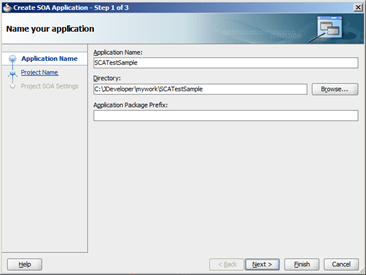
In JDeveloper, select New from the File menu to create a new application.  Choose Applications under General on the left hand side and then SOA Application from the list of templates, then click on OK.  Enter a name for your application.  I called mine SCATestSample:
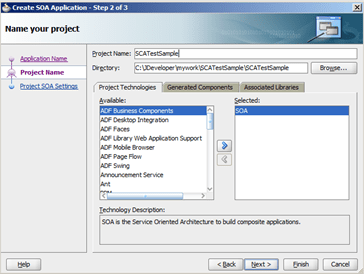
Click on Next and enter a name for your SOA project, I gave mine the same name.  Then click on Finish.
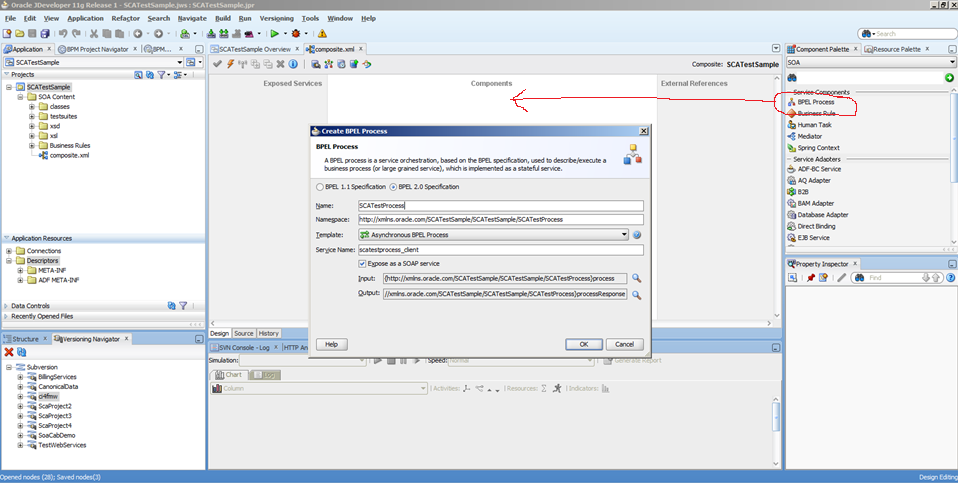
When the composite opens, drag a BPEL Process out of the palette and drop it on the composite.  I used a BPEL 2.0 process.  Give it a name, I called mine SCATestProcess and click on OK to create it.

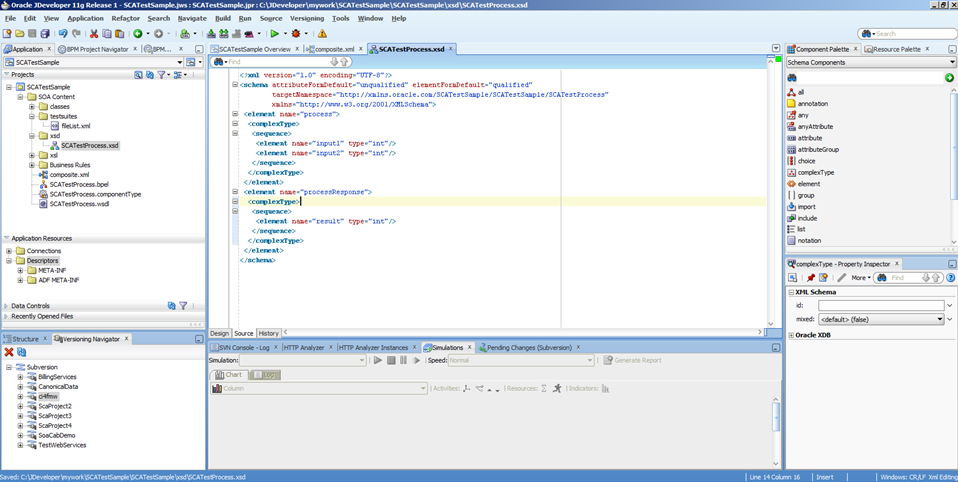
Now, let’s set up our inputs and outputs.  We are going to pass two numbers into the process and have it return the sum of those numbers.  Open up the xsd folder in the project navigator on the left hand side and find the file called SCATestProcess.xsd.  Yours might have a different name if you chose to give your process a different name, but the first part should match the name of your process.

Switch to the source view using the little tab at the bottom left of the main editor pane.

Here is the code to put in this file:


<?xml version="1.0" encoding="UTF-8"?>
<schema attributeFormDefault="unqualified" elementFormDefault="qualified"
        targetNamespace="http://xmlns.oracle.com/SCATestSample/SCATestSample/SCATestProcess"
        xmlns="http://www.w3.org/2001/XMLSchema">
 <element name="process">
  <complexType>
   <sequence>
    <element name="input1" type="int"/>
    <element name="input2" type="int"/>
   </sequence>
  </complexType>
 </element>
 <element name="processResponse">
  <complexType>
   <sequence>
    <element name="result" type="int"/>
   </sequence>
  </complexType>
 </element>
</schema>

Go back to your composte and open up your process by double clicking on it.  Drag an Assign activity from the palette into your process.  Drop it in the middle, between the receiveInput and the callbackClient.

Double click on your assign to open its settings.  On the right hand side, open up the tree so that you can see the output client:result as shown below and then drag the little calculator icon and drop it on the client:result.  This will let us enter a ‘formula’ to set the value of the output.
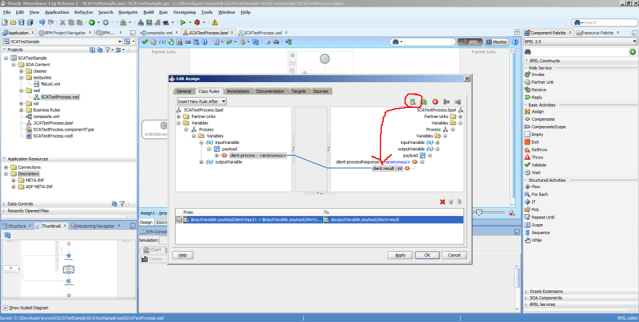
Enter the formula as shown.  You can do this by expanding the inputVariable on the left hand side and then clicking on the Insert Into Expression button, or you can just type it in.  Note that the names may be different if you chose different names for your variables when you created your XSD.


$inputVariable.payload/client:input1 + $inputVariable.payload/client:input2

Click on OK and OK again.  Then save your project.

Now we are ready to set up the SCA Test.  We will create a simple test that passes in 2 and 2 and checks that the output is 4.

To create the test, we return to the composite, and then go to the Structure pane.  It is usually in the bottom left.  If you cannot see it, you can open it from the View menu.  When you have it, right click on the Test Suites item and choose Create Test Suite… from the popup context menu.  Enter a name for your test suite, I called mine TestSuite1, and for your test, I called mine Test1.

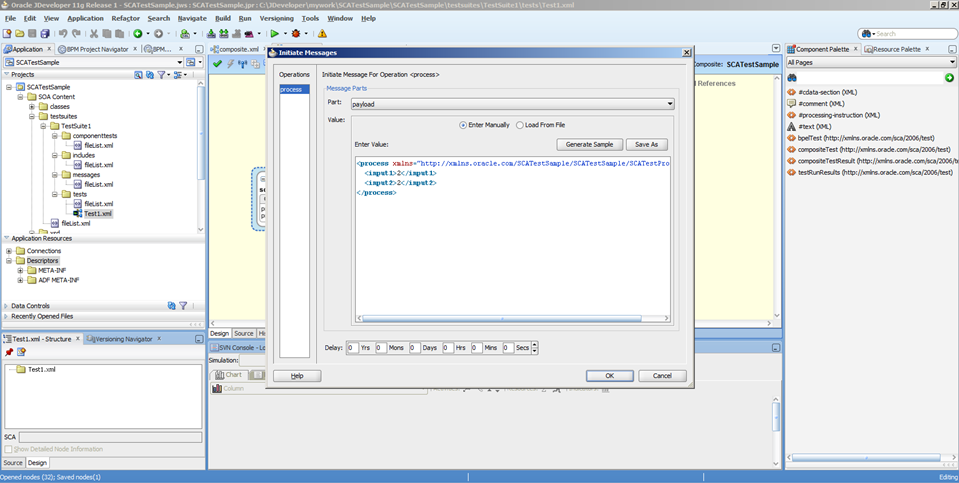
The test will open in the main editor window.  Let’s set up the inputs.  Right click on the ‘exposed service’ in the left hand yellow lane.  Choose Edit Initiate Messages from the popup menu.  Manke sure you have payload selected in the Part and then click on Generate Sample to create a message.  Now just go and edit the data so that both inputs are set to ‘2’ as shown below.  Then click on OK.

Now we will set up a test on the output.  Right click on the wire between the ‘exposed service’ and the process.  Choose Edit Wire Actions from the popup menu.  Make sure you are in the Asserts tab and click on the green plus icon to add a new assertion (i.e. something we want this test to check is true.)

Select the Assert Callback option at the top, then make sure you have processResponse as the Callback Operation.  Click on the Generate Sample button and change the result to ‘4’ as shown below.  Then click on OK and OK again, and then save your project.

Now we have a simple process that will add the two numbers we input and return the result, and a simple test case that will check that it works.

Let’s now get this ready to build this with Hudson.  We are going to take a slightly different approach than the earlier samples.  Instead of using the ‘Maven’ job type, we are going to use ‘freestyle.’  This is so that we can tell Hudson where to pick up the test results for reporting.

First, let’s set up our POM.  As in the earlier examples, create a new file called pom.xml in your project and add the following content to it.  Note that you will have to change this to suit your environment, specfically the SCM information and that path names to things in C:/Oracle/Middleware if you installed in a different location, or you are not using Windows.

<project xmlns="http://maven.apache.org/POM/4.0.0"
  xmlns:xsi="http://www.w3.org/2001/XMLSchema-instance"
  xsi:schemaLocation="http://maven.apache.org/POM/4.0.0 http://maven.apache.org/maven-v4_0_0.xsd">
  <modelVersion>4.0.0</modelVersion>

  <groupId>ScaTestSample</groupId>
  <artifactId>ScaTestSample</artifactId>
  <version>1.0-SNAPSHOT</version>

  <scm>
    <connection>scm:svn:https://administrator@bpm.mark.oracle.com/svn/ScaTestSample/trunk</connection>
    <developerConnection>scm:svn:https://administrator@bpm.mark.oracle.com/svn/ScaTestSample/trunk</developerConnection>
  </scm>

  <dependencies>
  </dependencies>

  <build>
    <plugins>
      <plugin>
        <artifactId>maven-antrun-plugin</artifactId>
        <version>1.6</version>
        <executions>
          <execution>
            <id>sca-compile</id>
            <phase>compile</phase>
            <configuration>
              <target>
                <property name="scac.input" value="${basedir}/composite.xml" />
                <property name="scac.application.home" value="${basedir}/.." />
                <ant antfile="c:/Oracle/Middleware/Oracle_SOA1/bin/ant-sca-compile.xml"
                     dir="c:/Oracle/Middleware/Oracle_SOA1/bin"
                     target="scac" />
              </target>
            </configuration>
            <goals>
              <goal>run</goal>
            </goals>
          </execution>
          <execution>
            <id>sca-package</id>
            <phase>package</phase>
            <configuration>
              <target>
                <property name="build.compiler" value="extJavac"/>
                <property name="compositeName" value="${project.artifactId}" />
                <property name="compositeDir" value="${basedir}" />
                <property name="revision" value="${project.version}" />
                <property name="scac.application.home" value="${basedir}/.." />
                <ant antfile="c:/Oracle/Middleware/Oracle_SOA1/bin/ant-sca-package.xml"
                     dir="c:/Oracle/Middleware/Oracle_SOA1/bin"
                     target="package" />
              </target>
            </configuration>
            <goals>
              <goal>run</goal>
            </goals>
          </execution>
          <execution>
            <id>sca-deploy</id>
            <phase>deploy</phase>
            <configuration>
              <target>
                <property name="serverURL" value="http://bpm.mark.oracle.com:7001" />
                <property name="user" value="weblogic" />
                <property name="password" value="welcome1" />
                <property name="sarLocation" value="${basedir}/deploy/sca_${project.artifactId}_rev${project.version}.jar" />
                <property name="overwrite" value="true" />
                <property name="forceDefault" value="true" />
                <property name="partition" value="default" />
                <ant antfile="c:/Oracle/Middleware/Oracle_SOA1/bin/ant-sca-deploy.xml"
                     dir="c:/Oracle/Middleware/Oracle_SOA1/bin"
                     target="deploy" />
              </target>
            </configuration>
            <goals>
              <goal>run</goal>
            </goals>
          </execution>
           <execution>
            <id>sca-test</id>
            <phase>deploy</phase>
            <configuration>
              <target>
                <property name="jndi.properties.input" value="c:/Oracle/Middleware/sca-test.jndi.properties" />
                <property name="scatest.input" value="SCATestSample" />
                <property name="scatest.format" value="junit" />
                <property name="scatest.result" value="reports" />
                <ant antfile="c:/Oracle/Middleware/Oracle_SOA1/bin/ant-sca-test.xml"
                     dir="c:/Oracle/Middleware/Oracle_SOA1/bin"
                     target="test" />
              </target>
            </configuration>
            <goals>
              <goal>run</goal>
            </goals>
          </execution>
        </executions>
      </plugin>
    </plugins>
  </build>

  <distributionManagement>
    <!-- use the following if you're not using a snapshot version. -->
    <repository>
      <id>local</id>
      <name>local repository</name>
      <url>file:///c:/users/administrator/.m2/repository</url>
    </repository>
    <!-- use the following if you ARE using a snapshot version. -->
    <snapshotRepository>
      <id>localSnapshot</id>
      <name>local snapshot repository</name>
      <url>file:///c:/users/administrator/.m2/repository</url>
    </snapshotRepository>
  </distributionManagement>

</project>

This POM has a new execution section added that we did not see in the previous examples.  This new section is to run the test suites.  Here it is:

<execution>
  <id>sca-test</id>
  <phase>deploy</phase>
  <configuration>
    <target>
      <property name="jndi.properties.input" value="c:/Oracle/Middleware/sca-test.jndi.properties" />
      <property name="scatest.input" value="SCATestSample" />
      <property name="scatest.format" value="junit" />
      <property name="scatest.result" value="reports" />
      <ant antfile="c:/Oracle/Middleware/Oracle_SOA1/bin/ant-sca-test.xml"
           dir="c:/Oracle/Middleware/Oracle_SOA1/bin"
           target="test" />
    </target>
  </configuration>
  <goals>
    <goal>run</goal>
  </goals>
</execution>

There are a couple of interesting things to note in this section.  First, the SCA Test task expects to be provided with a jndi.properties file that contains details about how to access the server.  We will create this in a moment.  You can see that we have a property named jndi.properties.input which points to the location of this file.

The scatest.input property has to be the name of the composite that you want to test.  It has to match exactly.  The scatest.format property, which we set to junit, tells SCA Test to provide the details on the test execution in JUnit format.  Hudson has built-in support for reading and interpreting JUnit reports.  Finally, the scatest.result property tells SCA Test where to save the reports.  We have set this to reports.  This is relative to the project root, we will see this later when we configure the job.  SCA Test will create several XML files in this location.

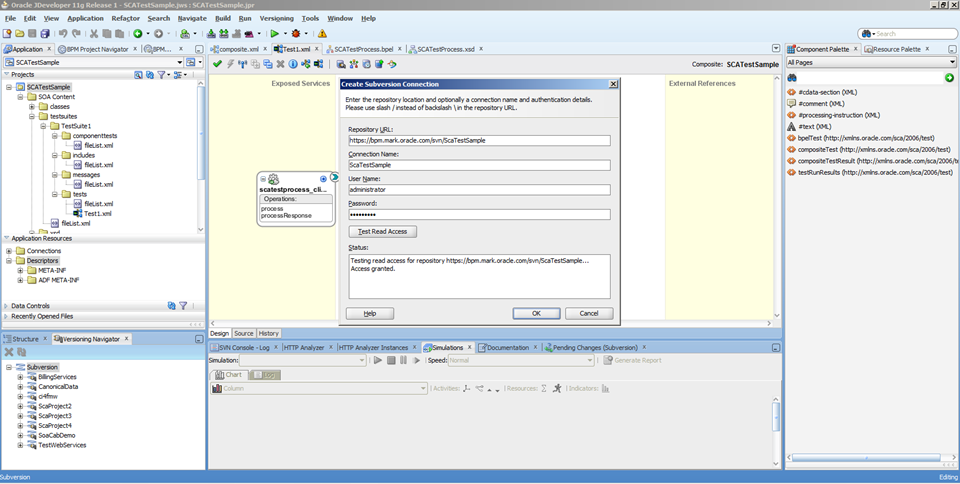
Now we need to check our project into Subversion.  If you have not done so already, create a new Subversion repository for this project, and add a Subversion connection in JDeveloper.  You can do this in the Versioning Navigator by right clicking on the Subversion item and selecting New Repository Connection from the popup menu.  If you don’t see the Versioning Navigator, you can open it from the View menu, its under Team.
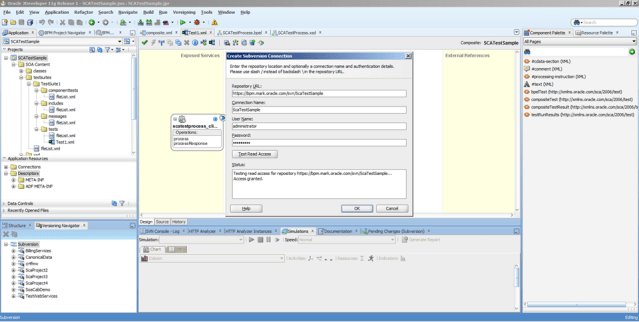
Now we can add our project to version control.  Right click on the project in the project navigator on the left and select Version Project form the popup menu.  Choose the correct repository and location, as shown below, then click on Next.  Enter a comment if you want to and then complete the wizard.

We will also need to create that jndi.properties file that we discussed earlier.  It needs to be in the location you specified in your POM.  Here is the content, you will need to change this to suit your environment:


java.naming.factory.initial=weblogic.jndi.WLInitialContextFactory
java.naming.provider.url=t3://bpm.mark.oracle.com:7001/soa-infra
java.naming.security.principal=weblogic
java.naming.security.credentials=welcome1
dedicated.connection=true
dedicated.rmicontext=true

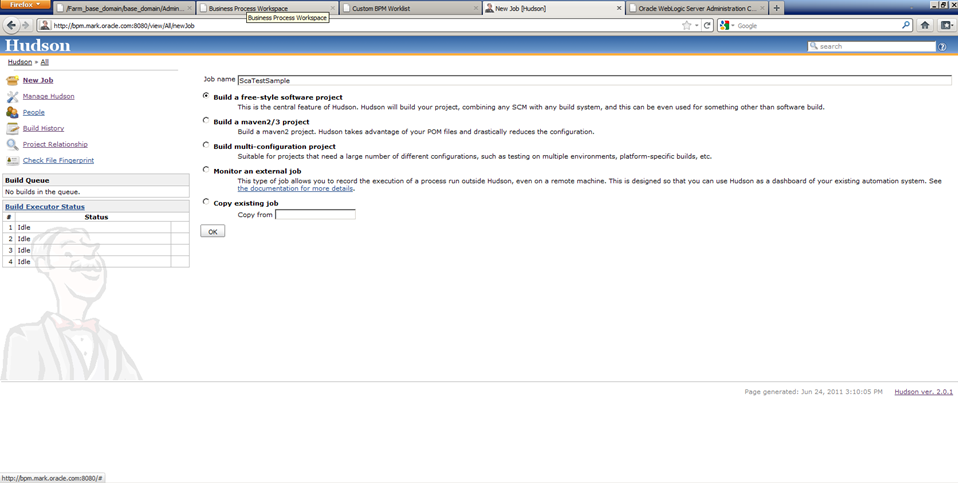
Now we will tell Hudson how to build the project and run the tests.  Log in to Hudson and create a new job.  Give it a name, I called mine ScaTestSample.  Select the option to Build a free-style software project.  Note that this is different to the earlier examples.  Then click on OK.

In the Source Code Management section, select Subversion and enter the repository URL.
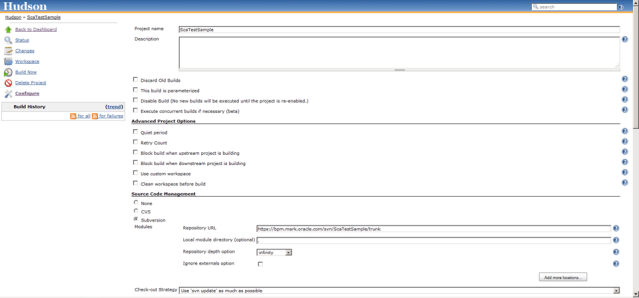
Check the Poll SCM option and enter a schedule.   I used ‘* * * * *’ (thats five asterisks separated by spaces) which means check every minute.

In the Build section, click on the Add build step button and choose Invoke top-level Maven targets.  Enter clean deploy as your Goals and set the POM to pom.xml.

In the Post-build Actions section, check the option to Publish JUnit test result report and enter the location of reports (in Your report XMLs) as reports/*.xml.  This tells Hudson to look for XML files in the reports directory.  Recall that we configured this in our POM earlier.

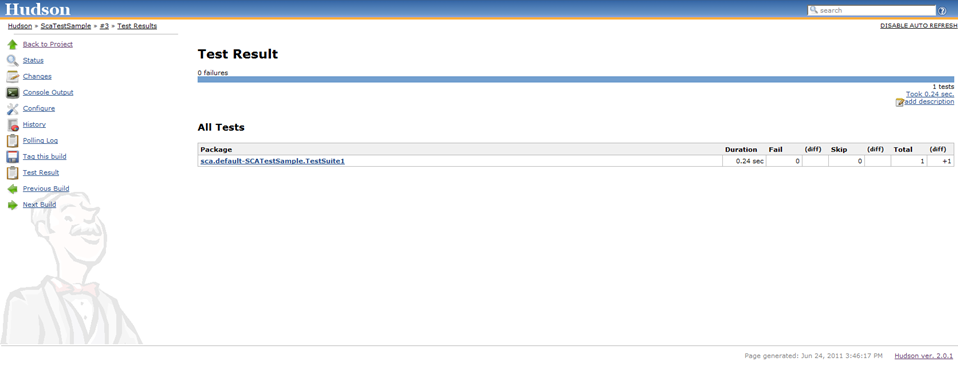
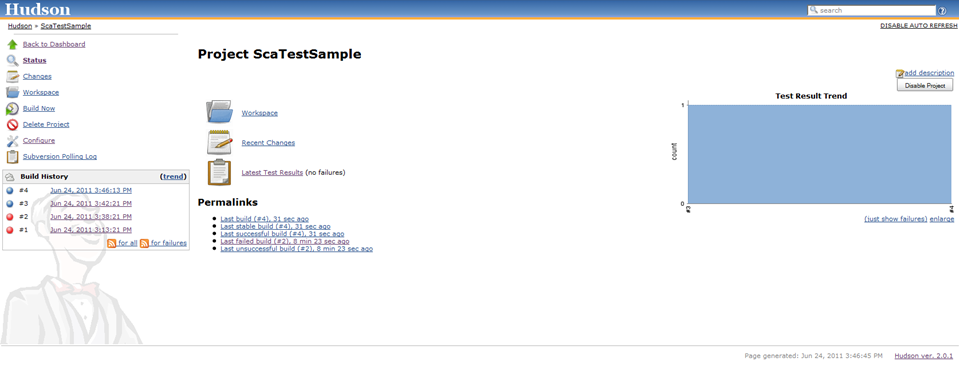
Save your new job.  Run it manually, or wait for the scheduler to run it.  After it completes, you can navigate into the build and click on the Latest Test Results link to view the outcome of the tests.  You should find your test suite and all of your tests listed here, along with the results.  There will only be one in our case, as we only defined one, but of course in a real project, you would probably define several test suites with many tests in each.
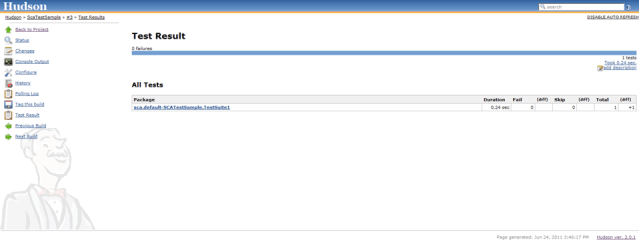
If you run the build a few more times, you will see that a Test Result Trend graph is automatically added to the job’s main page.
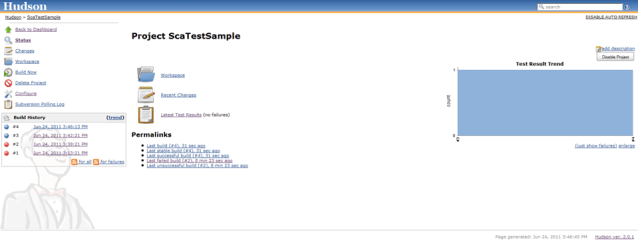
For completeness, here is the output from my job.  You can see the compile, package, deploy and test phases in here.

Started by an SCM change
Updating https://bpm.mark.oracle.com/svn/ScaTestSample/trunk revision: Jun 24, 2011 3:42:21 PM depth:infinity ignoreExternals: false
U         pom.xml
At revision 6
[workspace] $ mvn.bat -f pom.xml clean deploy
[INFO] Scanning for projects...
[INFO] ------------------------------------------------------------------------
[INFO] Building Unnamed - ScaTestSample:ScaTestSample:jar:1.0-SNAPSHOT
[INFO]    task-segment: [clean, deploy]
[INFO] ------------------------------------------------------------------------
[INFO] [clean:clean {execution: default-clean}]
[INFO] Deleting directory C:\hudson\jobs\ScaTestSample\workspace\target
[INFO] [resources:resources {execution: default-resources}]
[WARNING] Using platform encoding (Cp1252 actually) to copy filtered resources, i.e. build is platform dependent!
[INFO] skip non existing resourceDirectory C:\hudson\jobs\ScaTestSample\workspace\src\main\resources
[INFO] [compiler:compile {execution: default-compile}]
[INFO] No sources to compile
[INFO] [antrun:run {execution: sca-compile}]
[INFO] Executing tasks

main:

scac:
Validating composite "C:\hudson\jobs\ScaTestSample\workspace/composite.xml"
     [scac] BPEL 2.0 validation of "SCATestProcess" took 153.9 milliseconds
     [scac] >>>>>>>>>>>>>>>>>>>>>>>>>>>>>>>>>>>>>>>>>>>>>>
     [scac] >> modified xmlbean locale class in use
     [scac] >>>>>>>>>>>>>>>>>>>>>>>>>>>>>>>>>>>>>>>>>>>>>>
[INFO] Executed tasks
[INFO] [resources:testResources {execution: default-testResources}]
[WARNING] Using platform encoding (Cp1252 actually) to copy filtered resources, i.e. build is platform dependent!
[INFO] skip non existing resourceDirectory C:\hudson\jobs\ScaTestSample\workspace\src\test\resources
[INFO] [compiler:testCompile {execution: default-testCompile}]
[INFO] No sources to compile
[INFO] [surefire:test {execution: default-test}]
[INFO] No tests to run.
[INFO] [jar:jar {execution: default-jar}]
[WARNING] JAR will be empty - no content was marked for inclusion!
[INFO] Building jar: C:\hudson\jobs\ScaTestSample\workspace\target\ScaTestSample-1.0-SNAPSHOT.jar
[INFO] [antrun:run {execution: sca-package}]
[INFO] Executing tasks

main:
     [echo] oracle.home = c:\Oracle\Middleware\Oracle_SOA1\bin/..
    [input] skipping input as property compositeDir has already been set.
    [input] skipping input as property compositeName has already been set.
    [input] skipping input as property revision has already been set.

clean:
     [echo] deleting C:\hudson\jobs\ScaTestSample\workspace/deploy/sca_ScaTestSample_rev1.0-SNAPSHOT.jar
   [delete] Deleting: C:\hudson\jobs\ScaTestSample\workspace\deploy\sca_ScaTestSample_rev1.0-SNAPSHOT.jar

init:

scac-validate:
     [echo] Running scac-validate in C:\hudson\jobs\ScaTestSample\workspace/composite.xml
     [echo] oracle.home = c:\Oracle\Middleware\Oracle_SOA1\bin/..
    [input] skipping input as property compositeDir has already been set.
    [input] skipping input as property compositeName has already been set.
    [input] skipping input as property revision has already been set.

scac:
Validating composite "C:\hudson\jobs\ScaTestSample\workspace/composite.xml"
     [scac] BPEL 2.0 validation of "SCATestProcess" took 154.4 milliseconds
     [scac] >>>>>>>>>>>>>>>>>>>>>>>>>>>>>>>>>>>>>>>>>>>>>>
     [scac] >> modified xmlbean locale class in use
     [scac] >>>>>>>>>>>>>>>>>>>>>>>>>>>>>>>>>>>>>>>>>>>>>>

package:
     [echo] oracle.home = c:\Oracle\Middleware\Oracle_SOA1\bin/..
    [input] skipping input as property compositeDir has already been set.
    [input] skipping input as property compositeName has already been set.
    [input] skipping input as property revision has already been set.

compile-source:
    [mkdir] Created dir: C:\hudson\jobs\ScaTestSample\workspace\dist
     [copy] Copying 29 files to C:\hudson\jobs\ScaTestSample\workspace\dist
     [copy] Warning: C:\hudson\jobs\ScaTestSample\.adf does not exist.
     [copy] Warning: C:\hudson\jobs\ScaTestSample\src does not exist.
     [copy] Warning: C:\hudson\jobs\ScaTestSample\workspace\src does not exist.
      [jar] Building jar: C:\hudson\jobs\ScaTestSample\workspace\deploy\sca_ScaTestSample_rev1.0-SNAPSHOT.jar
   [delete] Deleting directory C:\hudson\jobs\ScaTestSample\workspace\dist
[INFO] Executed tasks
[INFO] [install:install {execution: default-install}]
[INFO] Installing C:\hudson\jobs\ScaTestSample\workspace\target\ScaTestSample-1.0-SNAPSHOT.jar to C:\.m2\repository\ScaTestSample\ScaTestSample\1.0-SNAPSHOT\ScaTestSample-1.0-SNAPSHOT.jar
[INFO] [deploy:deploy {execution: default-deploy}]
[INFO] Retrieving previous build number from localSnapshot
Uploading: file:///c:/users/administrator/.m2/repository/ScaTestSample/ScaTestSample/1.0-SNAPSHOT/ScaTestSample-1.0-20110624.054233-2.jar
2/2K
2K uploaded  (ScaTestSample-1.0-20110624.054233-2.jar)
[INFO] Uploading project information for ScaTestSample 1.0-20110624.054233-2
[INFO] Retrieving previous metadata from localSnapshot
[INFO] Uploading repository metadata for: 'snapshot ScaTestSample:ScaTestSample:1.0-SNAPSHOT'
[INFO] Retrieving previous metadata from localSnapshot
[INFO] Uploading repository metadata for: 'artifact ScaTestSample:ScaTestSample'
[INFO] [antrun:run {execution: sca-deploy}]
[INFO] Executing tasks

main:
     [echo] oracle.home = c:\Oracle\Middleware\Oracle_SOA1\bin/..

deploy:
    [input] skipping input as property serverURL has already been set.
    [input] skipping input as property sarLocation has already been set.
setting user/password..., user=weblogic
Processing sar=C:\hudson\jobs\ScaTestSample\workspace/deploy/sca_ScaTestSample_rev1.0-SNAPSHOT.jar
Adding sar file - C:\hudson\jobs\ScaTestSample\workspace\deploy\sca_ScaTestSample_rev1.0-SNAPSHOT.jar
INFO: Creating HTTP connection to host:bpm.mark.oracle.com, port:7001
INFO: Received HTTP response from the server, response code=200
---->Deploying composite success.
[INFO] Executed tasks
[INFO] [antrun:run {execution: sca-test}]
[INFO] Executing tasks

main:
     [echo] Running scatest using oracle.home = c:\Oracle\Middleware\Oracle_SOA1\bin/..

test:
     [echo] Classpth = c:\Oracle\Middleware\Oracle_SOA1\soa\modules\oracle.soa.fabric_11.1.1\fabric-ext.jar;c:\Oracle\Middleware\Oracle_SOA1\soa\modules\oracle.soa.fabric_11.1.1\fabric-runtime.jar;c:\Oracle\Middleware\Oracle_SOA1\soa\modules\oracle.soa.fabric_11.1.1\oracle-soa-client-api.jar;c:\Oracle\Middleware\oracle_common\soa\modules\oracle.soa.mgmt_11.1.1\soa-infra-mgmt.jar;c:\Oracle\Middleware\Oracle_SOA1\soa\modules\oracle.soa.bpel_11.1.1\orabpel-common.jar;c:\Oracle\Middleware\Oracle_SOA1\soa\modules\oracle.soa.bpel_11.1.1\orabpel.jar;c:\Oracle\Middleware\wlserver_10.3\server\lib\weblogic.jar;c:\Oracle\Middleware\oracle_common\modules\oracle.jps_11.1.1\jps-api.jar;c:\Oracle\Middleware\oracle_common\modules\oracle.jps_11.1.1\jps-common.jar;c:\Oracle\Middleware\oracle_common\modules\oracle.jps_11.1.1\jps-internal.jar;c:\Oracle\Middleware\oracle_common\modules\oracle.jrf_11.1.1\jrf-api.jar;c:\Oracle\Middleware\oracle_common\soa\modules\oracle.soa.mgmt_11.1.1\soa-client-stubs-was.jar;c:\Oracle\Middleware\Oracle_SOA1\bin\${was.home}\runtimes\com.ibm.ws.ejb.thinclient_7.0.0.jar;c:\Oracle\Middleware\Oracle_SOA1\bin\${was.home}\runtimes\com.ibm.ws.orb_7.0.0.jar;c:\Oracle\Middleware\Oracle_SOA1\bin\${was.home}\plugins\com.ibm.ws.runtime.jar;c:\Oracle\Middleware\Oracle_SOA1\bin\${was.home}\runtimes\com.ibm.ws.admin.client_7.0.0.jar
     [echo] Running scatest using oracle.home = c:\Oracle\Middleware\Oracle_SOA1\bin/.. SCATestSample
     [echo] Using context = build.properties
     [echo] Using path = c:\Oracle\Middleware\Oracle_SOA1\soa\modules\oracle.soa.fabric_11.1.1\fabric-ext.jar;c:\Oracle\Middleware\Oracle_SOA1\soa\modules\oracle.soa.fabric_11.1.1\fabric-runtime.jar;c:\Oracle\Middleware\Oracle_SOA1\soa\modules\oracle.soa.fabric_11.1.1\oracle-soa-client-api.jar;c:\Oracle\Middleware\oracle_common\soa\modules\oracle.soa.mgmt_11.1.1\soa-infra-mgmt.jar;c:\Oracle\Middleware\Oracle_SOA1\soa\modules\oracle.soa.bpel_11.1.1\orabpel-common.jar;c:\Oracle\Middleware\Oracle_SOA1\soa\modules\oracle.soa.bpel_11.1.1\orabpel.jar;c:\Oracle\Middleware\wlserver_10.3\server\lib\weblogic.jar;c:\Oracle\Middleware\oracle_common\modules\oracle.jps_11.1.1\jps-api.jar;c:\Oracle\Middleware\oracle_common\modules\oracle.jps_11.1.1\jps-common.jar;c:\Oracle\Middleware\oracle_common\modules\oracle.jps_11.1.1\jps-internal.jar;c:\Oracle\Middleware\oracle_common\modules\oracle.jrf_11.1.1\jrf-api.jar;c:\Oracle\Middleware\oracle_common\soa\modules\oracle.soa.mgmt_11.1.1\soa-client-stubs-was.jar;c:\Oracle\Middleware\Oracle_SOA1\bin\${was.home}\runtimes\com.ibm.ws.ejb.thinclient_7.0.0.jar;c:\Oracle\Middleware\Oracle_SOA1\bin\${was.home}\runtimes\com.ibm.ws.orb_7.0.0.jar;c:\Oracle\Middleware\Oracle_SOA1\bin\${was.home}\plugins\com.ibm.ws.runtime.jar;c:\Oracle\Middleware\Oracle_SOA1\bin\${was.home}\runtimes\com.ibm.ws.admin.client_7.0.0.jar
    [input] skipping input as property scatest.input has already been set.
    [input] skipping input as property jndi.properties.input has already been set.
  [scatest] Junit formatting
  [scatest] <testsuite name="sca.default-SCATestSample.TestSuite1" tests="1" errors="0" failures="0" time="0.241"><properties><property name="db.type" value="oracle"/><property name="bpel.host.name" value="bpm"/><property name="soa.oracle.home" value="C:\Oracle\Middleware\Oracle_SOA1"/><property name="suite.start.date" value="2011-06-24T15:42:37.990+10:00"/><property name="suite.end.date" value="2011-06-24T15:42:38.231+10:00"/><property name="run.start.date" value="2011-06-24T15:42:37.990+10:00"/><property name="run.end.date" value="2011-06-24T15:42:38.231+10:00"/></properties><testcase name="Test1" classname="sca.default-SCATestSample.TestSuite1.Test1" time="0.241"/></testsuite>
  [scatest] C:\hudson\jobs\ScaTestSample\workspace\reports\BPEL-sca.default-SCATestSample.TestSuite1.xml
  [scatest] <testsuite name="sca.default-SCATestSample.codeCoverages" errors="0" failures="0" tests="0" time="0.0"/>
  [scatest] C:\hudson\jobs\ScaTestSample\workspace\reports\BPEL-sca.default-SCATestSample.codeCoverages.xml
[INFO] Executed tasks
[INFO] ------------------------------------------------------------------------
[INFO] BUILD SUCCESSFUL
[INFO] ------------------------------------------------------------------------
[INFO] Total time: 22 seconds
[INFO] Finished at: Fri Jun 24 15:42:45 EST 2011
[INFO] Final Memory: 23M/439M
[INFO] ------------------------------------------------------------------------
Recording test results
Finished: SUCCESS

You might also want to take a look in Enterprise Manager at the instances for this composite.  You should see one or more test instances (marked with a little yellow dot) depending on how many times you ran the job.  You can drill down into these, as normal, and see the data.

One other point for consideration is the placement of the deploy and test in the Maven ‘deploy’ goal.  We consider that the ‘integration-test’ goal is possibly a more philosophically correct place to put these actions.  However, we are sticking to the ‘deploy’ goal as it seems to make more sense to us to deploy the project to the runtime in the ‘deploy’ phase – just because they have the same name, and it is possibly less confusing.  We may revisit this choice later.

Posted in Uncategorized | Tagged , , | 4 Comments

Allowing limited access to Enterprise Manager

Customers often ask about how to give certain people limited access to Enterprise Manager, often they talk about ‘read only’ access.  Enterprise Manager does in fact have three roles defined out-of-the-box that provide various levels of access.  You can see details of exactly what each can do in the documentation here.

Setting up a new user and giving them one of these limited access roles is pretty easy.

First, we need to create the new user.  If you are using an LDAP server or Active Directory, etc., then you will probably want to go and create the user in those tools.  Otherwise, you can do it from the WebLogic Server console.  Go to the Security Realms option in the navigation menu on the left, then open your realm and then the Users and Groups tab and then the Groups sub-tab.  You will see there is a group called Monitors.  We will use this one for our example.

Go to the Users sub-tab and click on the New button.  Enter a user name and password, as shown below and then click on OK.  I called my new user monitor.

Go back to the Users sub-tab again, and click on your new user in the list, then open the Groups tab for that user.  Find the Monitors group in the list of Available groups on the left, and click on the little blue right arrow to add it to the Chosen groups on the right.  Then click on Save.

That’s enough to give our new user limited access to the WebLogic console.  You can log in with that user now and try it out!

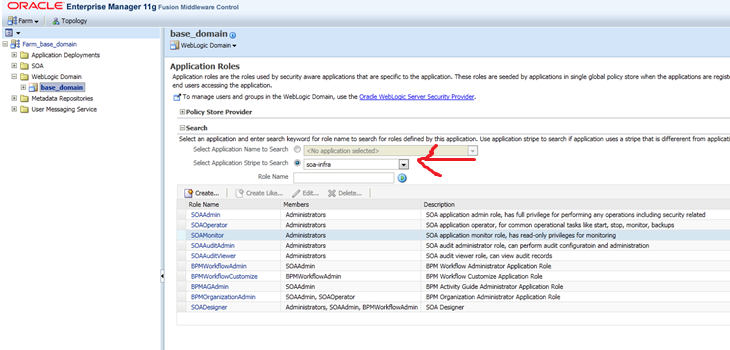
If you also want to give them limited access to the Enterprise Manager, we need to assign one more role to them.  Log on to Enterprise Manager as an administrative user.   Navigate to the WebLogic domain in the navigation tree on the left.  When the domain is displayed on the right hand side, open the menu at the top and choose Security and then Application Roles.

In the Select Application Slice to Search select soa-infra and then click on the little green arrow in a blue circle button to do a search.  You should see in the list a role called SOAMonitor.  Click on that role.

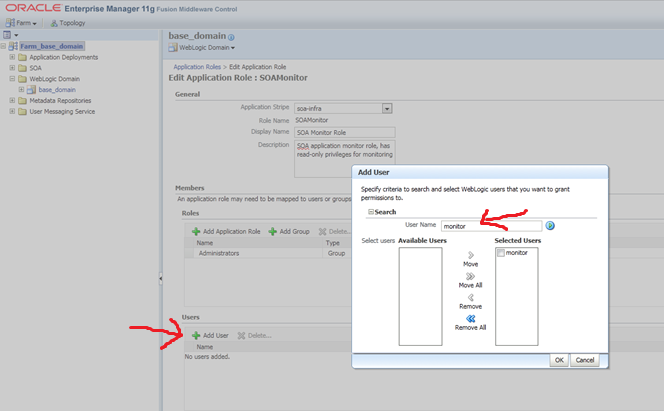
Then click on the Add User button.  In the popup dialog, search for your new user and click on the little blue arrow to move them to the Selected Users box, as shown below.  Click on OK and then OK again.

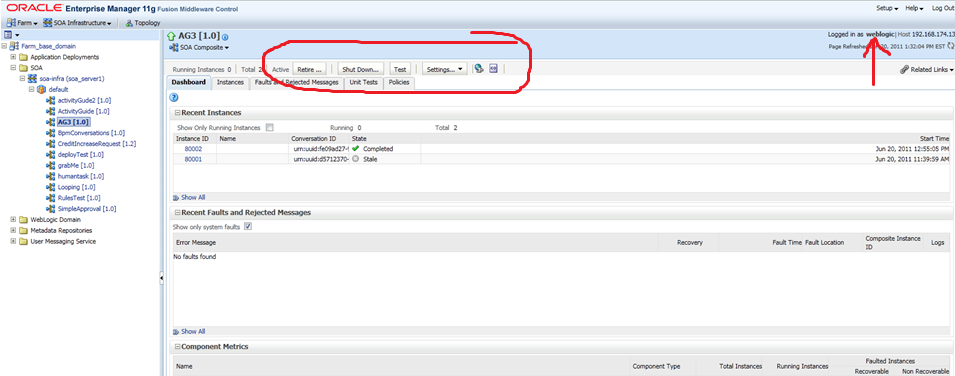
Now you can log on to Enterprise Manager using your new user.  Notice that you have limited access.  For example, on the Composite page, you only get the test option…

… whereas an administrative user gets several other options too:

So there you go, an easy way to give users limited access to the WebLogic console and Enterprise Manager.  Be sure to check the documentation link at the top of this post to see what these user are and are not able to do.

Posted in Uncategorized | Tagged , , | Leave a comment

New version of JDeveloper released with Maven support and better performance

Oracle has released a new version of JDeveloper, 11.1.2.0, with a whole bunch of new features, including Maven support, and a lot of performance enhancements.  You can check out details of the new features here.

Please note that this version does not support WebCenter, SOA and BPM development.  You should continue to use 11.1.1.x for that kind of development.

Posted in Uncategorized | Tagged , | Leave a comment

Java 7 is nearly here…

That’s right, Java 7 is just around the corner. Here’s a few of the new language features that I really like:

Match on Strings in a switch statement

No longer do we have to write those ugly case statements like the one shown below. Some people put the variable and the constant the other way around, but then you might get a NullPointerException, so you have to check for that too, which is even more ugly. I prefer to do it the way shown, but every time I type one, I can’t help feeling a little bit of distaste.

  case (&quot;something&quot;.equals(whatever));

But now, we can write these much more elegantly. Here is an example:

public class Test {
  public static void main(String[] args) {
    if (args.length != 1) {
      System.out.println(&quot;You must specify exactly one argument&quot;);
      System.exit(0);
    }
    switch (args[0]) {
      case &quot;fred&quot;:
        System.out.println(&quot;Hello fred&quot;);
        break;
      case &quot;joe&quot;:
        System.out.println(&quot;Hello joe&quot;);
        break;
      default:
        break;
    }
  }
}

Try with resources

Java 7 introduces a ‘try with resources’ construct which allows us to define our resources for a try block and have them automatically closed after the try block is completed – either successfully or when an exception occurs. This makes things a lot neater. Let’s take a look at the example below which include both the ‘old’ way and the ‘new’ way:

import java.io.File;
import java.io.FileInputStream;
import java.io.InputStream;
import java.io.IOException;
import java.io.FileNotFoundException;

public class Try {
  public static void main(String[] args) {
    // the old way...
    InputStream oldfile = null;
    try {
      oldfile = new FileInputStream(new File(&quot;myfile.txt&quot;));
      // do something with the file
    } catch (IOException e) {
      e.printStackTrace();
    } finally {
      // we need to check if the InputSteam oldfile is still open
      try {
        if (oldfile != null) oldfile.close();
      } catch (IOException ioe) {
        // ignore
      }
    }
    // the new way...
    try (InputStream newfile = new FileInputStream(new File(&quot;myfile.txt&quot;))) {
      // do something with the file
    } catch (IOException e) {
      e.printStackTrace();
    }
    // the InputStream newfile will be closed automatically
  }
}

When we do things the old way, there are a few areas of ugliness:

  • We are forced to declare our resource in the scope outside the try so that it will still be visible in the finally,
  • We have to assign it a null value, otherwise the compiler will complain (correctly) that it may not have been initialized when we try to use it in the finally block,
  • We need to write a finally block to clean up after ourselves,
  • In our finally block, we first have to check if things worked or not, and if they did not, then we have to clean up,
  • We need another try inside the finally since the cleanup operation in the finally is usually that could throw another exception!

The new way is a lot cleaner. We simply define our resources in parentheses after the try and before the opening brace of the try code block. Multiple resources can be declared by separating them with a semicolons (;). No need to define the resource in the outer scope (unless you actually want it to be available out there).

Also, you don’t have to write a finally block at all. Any resources defined this way will automatically be released when the try block is finished. Well not any resource, but any that implement the java.lang.AutoCloseable interface. Several standard library classes, including those listed below, implement this interface.

  • java.nio.channels.FileLock
  • javax.imageio.stream.ImageInputStream
  • java.beans.XMLEncoder
  • java.beans.XMLDecoder
  • java.io.ObjectInput
  • java.io.ObjectOutput
  • javax.sound.sampled.Line
  • javax.sound.midi.Receiver
  • javax.sound.midi.Transmitter
  • javax.sound.midi.MidiDevice
  • java.util.Scanner
  • java.sql.Connection
  • java.sql.ResultSet
  • java.sql.Statement

Much nicer!

Catch multiple-type exceptions

Ever found yourself writing a whole heap of catch blocks with the same code in them, just to handle different types of exceptions? Me too! Java 7 provides a much nicer way to deal with this:

try {
  // do something
} catch (JMSException | IOException | NamingException e) {
  System.out.println(&quot;Oh no! Something bad happened);
  // do something with the exception object...
  e.printStackTrace();
}

You can list the types of exceptions you want to catch in one catch block using a pipe (|) separator. You can still have other catch blocks as well.

Type Inference

I never thought I would see the day Smile and it is still a long way away from the type inference in languages like Scala, but we can now omit types when initializing a generic collection. One small step for Java… one huge leap for mankind!

  Map&lt;String, List&lt;String&gt;&gt; stuff = new HashMap&lt;&gt;();

The ‘diamond operator’ (<>) is used for type inference. Saves a bunch of wasteful typing. However, it only works when the parameterised type is obvious from the context. So this wont compile:

List&lt;String&gt; list = new ArrayList&lt;&gt;();
list.addAll(new ArrayList&lt;&gt;());

But this will:

List&lt;String&gt; list = new ArrayList&lt;&gt;();
List&lt;? extends String&gt; list2 = new ArrayList&lt;&gt;();
list.addAll(list2);

Why? The addAll() method has a parameter of Collection<? extends String>. In the first example, since there is no context, the compiler will infer the type of new ArrayList<>() in the second line to be ArrayList<Object> and Object does not extend String.

The moral of the story: just because you might be able to use <> in a method call – probably you should try to limit its use to just variable definitions.

Nicer Numeric Literals

There are also a couple of small enhancements to numeric literals. Firstly, support for binary numbers using the ‘0b’ prefix (C programmers everywhere breathe a sigh of relief) and secondly, you can put underscores (_) between digits to make numbers more readable. That’s between digits only, nowhere else, not first, or last, or next to a decimal point or type indicator (like ‘f’, ‘l’, ‘b’, ‘x’).

Here are some examples:

// this is a valid AMEX number used for test transactions, you can't buy anything with it
// but it will pass the credit card number validation tests
long myCreditCardNumber = 3782_822463_10005L;
long myNameInHex = 0x4D_41_52_4B;
long myNameInBinary = 0b01001101_01000001_01010010_01001100;
long populationOfEarth = 6_852_472_823L;
// I glad I didn't have to count this!

New Look and Feel for Swing

There is a new look and feel for Swing (which it desperately needed!) called ‘Nimbus.’ It looks a bit like this:

image

Or this:

image

It was kinda there as a draft for a little while already in Java 6. Why is it good? It can be rendered at any resolution, and it is a lot faster (yeah!) and arguably better looking that those boring old ones!

Better parallel performance

I attended a presentation by Doug Lea a couple of days ago, and he told us proudly that Java 7 also has some of his code buried in there that has long been waiting to see the light of day. A new work stealing queue implementation in the scheduler which should provide a good boost to performance of parallel tasks. This should be especially helpful as we write more and more parallel software in these days of more cores rather than higher frequencies. Especially nice if you are writing using an easy concurrent programming model like Actors in Scala, but still good if you are struggling through threads, locks, latches and all that. Thanks Doug!

Summary

Well there you have, a few small steps forward. I am looking forward to seeing a few bigger steps in Java 8!

Posted in Uncategorized | Tagged , | Leave a comment

Purging data from SOA/BPM 11g

We often get questions about how to manage purging old data (finished processes instances, task histories, etc.) from SOA and BPM 11g when those data are no longer wanted.

There are some scripts provided to do this in 11.1.1.2, 11.1.1.3 and new, improved ones in 11.1.1.4.  Now, the scripts from 11.1.1.4 (which are better) have been backported to 11.1.1.2 and 11.1.1.3 so that customers who have not upgraded yet can also take advantage of the updated scripts.  For more information on this, please log on to My Oracle Support and take a look at Note 1297250.1, and patch 10297850.

In addition to this, Demed L’Her from our product management team has posted some more detailed information about the various options available here.

Posted in Uncategorized | Tagged , , , | Leave a comment

Extending Continuous Integration to include MDS-dependent components

In this earlier post, I presented a simple approach to get started with continuous integration for SOA and BPM projects and showed how you can build and deploy an SCA composite using Hudson and Maven.  In that example, we just deployed an empty composite, and while that worked well, we usually want to put something in our composites!

If you follow that example and put say a BPEL or BPMN process in your composite, or a reference to a web service, then it will all work fine.  But, if you add a component that requires Metadata Services (MDS), then you will run into some trouble.

In this post, we will look at how we can expand on what we did previously so that we can handle components that require MDS.  Two example are Business Rules and Human Tasks.  Both of these will consume data definitions (XSDs) from MDS.  If you go ahead and add one to your project, then search for “oramds” in your project, you will see the references that were added.

I will assume for this post that you know how to add a Human Task or Business Rule to your composite.  Go ahead and do that now.  If you do not know how, then we have an example of adding a human task here.

Once you have that taken care of, you will need to add a Maven POM to you project, as we did in the earlier post.  We need to add a couple of additional items to handle building composites that include components that depend on MDS.

Here is the POM, discussion follows:

<project xmlns="http://maven.apache.org/POM/4.0.0"
  xmlns:xsi="http://www.w3.org/2001/XMLSchema-instance"
  xsi:schemaLocation="http://maven.apache.org/POM/4.0.0 http://maven.apache.org/maven-v4_0_0.xsd">
  <modelVersion>4.0.0</modelVersion>

  <groupId>ScaProject2</groupId>
  <artifactId>ScaProject2</artifactId>
  <version>1.0-SNAPSHOT</version>

  <scm>
    <connection>scm:svn:https://administrator@bpm.mark.oracle.com/svn/ScaProject2/trunk</connection>
    <developerConnection>scm:svn:https://administrator@bpm.mark.oracle.com/svn/ScaProject2/trunk</developerConnection>
  </scm>

  <dependencies>
  </dependencies>

  <build>
    <plugins>
      <plugin>
        <artifactId>maven-antrun-plugin</artifactId>
        <version>1.6</version>
        <executions>
          <execution>
            <id>sca-compile</id>
            <phase>compile</phase>
            <configuration>
              <target>
                <property name="scac.input" value="${basedir}/composite.xml" />
                <property name="scac.application.home" value="${basedir}/.." />
                <ant antfile="c:/Oracle/Middleware/Oracle_SOA1/bin/ant-sca-compile.xml"
                     dir="c:/Oracle/Middleware/Oracle_SOA1/bin"
                     target="scac" />
              </target>
            </configuration>
            <goals>
              <goal>run</goal>
            </goals>
          </execution>
          <execution>
            <id>sca-package</id>
            <phase>package</phase>
            <configuration>
              <target>
                <property name="build.compiler" value="extJavac"/>
                <property name="compositeName" value="${project.artifactId}" />
                <property name="compositeDir" value="${basedir}" />
                <property name="revision" value="${project.version}" />
                <property name="scac.application.home" value="${basedir}/.." />
                <ant antfile="c:/Oracle/Middleware/Oracle_SOA1/bin/ant-sca-package.xml"
                     dir="c:/Oracle/Middleware/Oracle_SOA1/bin"
                     target="package" />
              </target>
            </configuration>
            <goals>
              <goal>run</goal>
            </goals>
          </execution>
          <execution>
            <id>sca-deploy</id>
            <phase>deploy</phase>
            <configuration>
              <target>
                <property name="serverURL" value="http://bpm.mark.oracle.com:7001" />
                <property name="user" value="weblogic" />
                <property name="password" value="welcome1" />
                <property name="sarLocation" value="${basedir}/deploy/sca_${project.artifactId}_rev${project.version}.jar" />
                <property name="overwrite" value="true" />
                <property name="forceDefault" value="true" />
                <property name="partition" value="default" />
                <ant antfile="c:/Oracle/Middleware/Oracle_SOA1/bin/ant-sca-deploy.xml"
                     dir="c:/Oracle/Middleware/Oracle_SOA1/bin"
                     target="deploy" />
              </target>
            </configuration>
            <goals>
              <goal>run</goal>
            </goals>
          </execution>
        </executions>
      </plugin>
    </plugins>
  </build>

  <distributionManagement>
    <!-- use the following if you're not using a snapshot version. -->
    <repository>
      <id>local</id>
      <name>local repository</name>
      <url>file:///c:/users/administrator/.m2/repository</url>
    </repository>
    <!-- use the following if you ARE using a snapshot version. -->
    <snapshotRepository>
      <id>localSnapshot</id>
      <name>local snapshot repository</name>
      <url>file:///c:/users/administrator/.m2/repository</url>
    </snapshotRepository>
  </distributionManagement>

</project>

First, notice we provide standard Maven coordinates (groupId, artifactId, version) for our project:

  <groupId>ScaProject2</groupId>
  <artifactId>ScaProject2</artifactId>
  <version>1.0-SNAPSHOT</version>

Next, we have added the scac.application.home property to both the sca-compile and sca-package ‘executions.’  This needs to point to the location where the JDeveloper Application is located.  For a bit of variety, this example was built on Windows 7 (64-bit Ultimate) so you can see the Windows-style filenames in the POM.

          <execution>
            <id>sca-package</id>
            <phase>package</phase>
            <configuration>
              <target>
                <property name="build.compiler" value="extJavac"/>
                <property name="compositeName" value="${project.artifactId}" />
                <property name="compositeDir" value="${basedir}" />
                <property name="revision" value="${project.version}" />
                <property name="scac.application.home" value="${basedir}/.." />
                <ant antfile="c:/Oracle/Middleware/Oracle_SOA1/bin/ant-sca-package.xml"
                     dir="c:/Oracle/Middleware/Oracle_SOA1/bin"
                     target="package" />
              </target>
            </configuration>
            <goals>
              <goal>run</goal>
            </goals>
          </execution>

Setting the scac.application.home is required when you use MDS-dependent components, as the build tasks will look for a configuration file called {scac.application.home}/.adf/adf-config.xml in order to find out where your MDS is located.  If you do not set this parameter, the (ANT) build tasks will not be able to find your MDS and the build will fail.

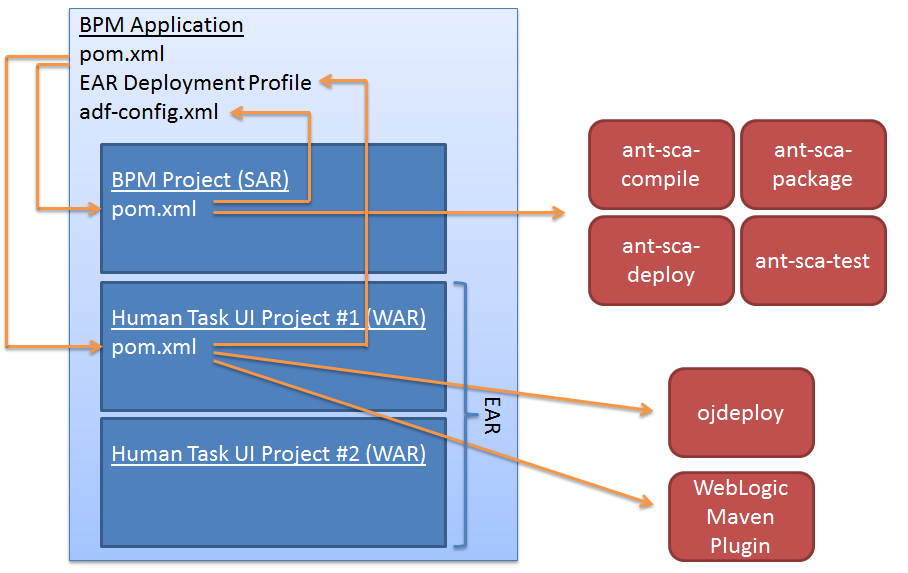
Here we see where the POM and ADF config are located in the project:

You also need to add some details into this file to point to your MDS.  Here is an example file, discussion follows:


<?xml version="1.0" encoding="windows-1252" ?>
<adf-config xmlns="http://xmlns.oracle.com/adf/config"
            xmlns:config="http://xmlns.oracle.com/bc4j/configuration"
            xmlns:adf="http://xmlns.oracle.com/adf/config/properties"
            xmlns:sec="http://xmlns.oracle.com/adf/security/config">
  <adf-adfm-config xmlns="http://xmlns.oracle.com/adfm/config">
    <defaults useBindVarsForViewCriteriaLiterals="true"/>
    <startup>
      <amconfig-overrides>
        <config:Database jbo.locking.mode="optimistic"/>
      </amconfig-overrides>
    </startup>
  </adf-adfm-config>
  <adf:adf-properties-child xmlns="http://xmlns.oracle.com/adf/config/properties">
    <adf-property name="adfAppUID" value="ScaTest2-9609"/>
  </adf:adf-properties-child>
  <sec:adf-security-child xmlns="http://xmlns.oracle.com/adf/security/config">
    <CredentialStoreContext credentialStoreClass="oracle.adf.share.security.providers.jps.CSFCredentialStore"
                            credentialStoreLocation="../../src/META-INF/jps-config.xml"/>
  </sec:adf-security-child>
  <adf-mds-config xmlns="http://xmlns.oracle.com/adf/mds/config">
    <mds-config xmlns="http://xmlns.oracle.com/mds/config">
      <persistence-config>
        <metadata-namespaces>
          <namespace metadata-store-usage="mstore-usage_1" path="/soa/shared"/>
        </metadata-namespaces>
        <metadata-store-usages>
          <metadata-store-usage id="mstore-usage_1">
            <metadata-store class-name="oracle.mds.persistence.stores.db.DBMetadataStore">
              <property name="jdbc-userid" value="dev_mds"/>
              <property name="jdbc-password" value="welcome1"/>
              <property name="jdbc-url"
                        value="jdbc:oracle:thin://@localhost:1521:bpm"/>
              <property name="partition-name" value="soa-infra"/>
            </metadata-store>
          </metadata-store-usage>
        </metadata-store-usages>
      </persistence-config>
    </mds-config>
  </adf-mds-config>
</adf-config>

The important section here is the metadata-store-usage part.  In the example above you can see how a database-based MDS is defined.  In this example, I have it pointing to the MDS on the SOA/BPM server where I will deploy the composite.  The MDS is defined using the JDBC details to connect to the database that stores the MDS – you will have created it during the RCU (Repository Creation Utility) phase of the installation.  You might not have noticed it or known what it was for – but you created a schema called DEV_MDS (or something similar) which contains your server’s MDS repository.

You can also see in the namespace entry it defines the path within the MDS repository as /soa/shared.  This is the area in MDS where the common XSD schema are stored.  You can browse through it and have a look at them by creating a SOA-MDS connection in JDeveloper.  If you don’t know how to do that – you can find an example in this post, towards the end of the post.

If you prefer to use a file-based MDS, your adf-config.xml will need to contain a section a little more like this:


 <metadata-store class-name="oracle.mds.persistence.stores.file.FileMetadataStore">
   <property value="c:/oracle/middleware/jdeveloper/integration" name="metadata-path"/>
   <property value="seed" name="partition-name"/>
 </metadata-store>

This demonstrates using the file-based MDS repository that is included with JDeveloper.  You can take a look at it by looking under your JDeveloper directory inside integration and then seed.

Once you have these two files in place, and have edited them to match your environment, you can go ahead and check in everything to Subversion, like we did in the earlier post.  Make sure you get all the WSDL and XSD files and so on.  You might need to go into the Pending Changes view to make sure you have everything you need.  The default selections may not get everything.  You can open this view from the View menu, then Team then Pending Changes.

Open the Candidates tab, click on Refresh (the little blue arrows icon), highlight anything that you will need – basically anything that is not in the classes or deploy directories, and add it using the little green plus icon.

Then go to the Outgoing tab, highlight all the files and click on the little green tick icon to commit the files to Subversion.

Set up a Hudson job, as described in the earlier post, and then run it.  You should get your composite built and deployed to your server.  Here is an example of my Hudson build output:

Started by an SCM change
Updating https://bpm.mark.oracle.com/svn/ScaProject2/trunk
A         ScaProject2\Humantask1.componentType
A         ScaProject2\.taskeditor\Humantask1_graphics.xml
A         ScaProject2\xsd\Humantask1Payload.xsd
A         ScaProject2\xsd\Humantask1WorkflowTask.xsd
A         ScaProject2\Humantask1.task
At revision 39
Found mavenVersion 2.2.1 from file jar:file:/c:/apache-maven-2.2.1/lib/maven-2.2.1-uber.jar!/META-INF/maven/org.apache.maven/maven-core/pom.properties
Parsing POMs
[ScaProject2] $ c:\java\jdk1.6.0_25/bin/java -classpath c:\Oracle\Middleware\oracle_common\modules\oracle.mds_11.1.1\oramds.jar -cp C:\hudson\plugins\maven-plugin\WEB-INF\lib\maven-agent-2.0.0.jar;c:\apache-maven-2.2.1\boot\classworlds-1.1.jar hudson.maven.agent.Main c:\apache-maven-2.2.1 C:\hudson\war\WEB-INF\lib\hudson-remoting-2.0.0.jar C:\hudson\plugins\maven-plugin\WEB-INF\lib\maven-interceptor-2.0.0.jar 51179 C:\hudson\plugins\maven-plugin\WEB-INF\lib\maven2.1-interceptor-1.2.jar
<===[HUDSON REMOTING CAPACITY]===>channel started
Executing Maven:  -B -f C:\hudson\jobs\ScaProject2\workspace\ScaProject2/pom.xml deploy
[INFO] Scanning for projects...
[INFO] ------------------------------------------------------------------------
[INFO] Building Unnamed - ScaProject2:ScaProject2:jar:1.0-SNAPSHOT
[INFO]    task-segment: [deploy]
[INFO] ------------------------------------------------------------------------
[INFO] [resources:resources {execution: default-resources}]
[WARNING] Using platform encoding (Cp1252 actually) to copy filtered resources, i.e. build is platform dependent!
[INFO] skip non existing resourceDirectory C:\hudson\jobs\ScaProject2\workspace\ScaProject2\src\main\resources
[INFO] [compiler:compile {execution: default-compile}]
[INFO] No sources to compile
[INFO] [antrun:run {execution: sca-compile}]
[INFO] Executing tasks

main:

scac:
Validating composite "C:\hudson\jobs\ScaProject2\workspace\ScaProject2/composite.xml"
     [scac] BPEL 2.0 validation of "testBpel2" took 189.9 milliseconds
     [scac] BPEL 2.0 validation of "testBpel2sub" took 26.0 milliseconds
     [scac] ### clazz: interface scaproject2.myServiceInterface
     [scac] warning: in Humantask1.task: Task owner not specified
     [scac] warning: in Humantask1.task: Error assignee not specified
[INFO] Executed tasks
[INFO] [resources:testResources {execution: default-testResources}]
[WARNING] Using platform encoding (Cp1252 actually) to copy filtered resources, i.e. build is platform dependent!
[INFO] skip non existing resourceDirectory C:\hudson\jobs\ScaProject2\workspace\ScaProject2\src\test\resources
[INFO] [compiler:testCompile {execution: default-testCompile}]
[INFO] No sources to compile
[INFO] [surefire:test {execution: default-test}]
[INFO] No tests to run.
[HUDSON] Recording test results
[INFO] [jar:jar {execution: default-jar}]
[WARNING] JAR will be empty - no content was marked for inclusion!
[INFO] [antrun:run {execution: sca-package}]
[INFO] Executing tasks

main:
     [echo] oracle.home = c:\Oracle\Middleware\Oracle_SOA1\bin/..
    [input] skipping input as property compositeDir has already been set.
    [input] skipping input as property compositeName has already been set.
    [input] skipping input as property revision has already been set.

clean:
     [echo] deleting C:\hudson\jobs\ScaProject2\workspace\ScaProject2/deploy/sca_ScaProject2_rev1.0-SNAPSHOT.jar
   [delete] Deleting: C:\hudson\jobs\ScaProject2\workspace\ScaProject2\deploy\sca_ScaProject2_rev1.0-SNAPSHOT.jar

init:

scac-validate:
     [echo] Running scac-validate in C:\hudson\jobs\ScaProject2\workspace\ScaProject2/composite.xml
     [echo] oracle.home = c:\Oracle\Middleware\Oracle_SOA1\bin/..
    [input] skipping input as property compositeDir has already been set.
    [input] skipping input as property compositeName has already been set.
    [input] skipping input as property revision has already been set.

scac:
Validating composite "C:\hudson\jobs\ScaProject2\workspace\ScaProject2/composite.xml"
     [scac] BPEL 2.0 validation of "testBpel2" took 210.1 milliseconds
     [scac] BPEL 2.0 validation of "testBpel2sub" took 29.5 milliseconds
     [scac] ### clazz: interface scaproject2.myServiceInterface
     [scac] warning: in Humantask1.task: Task owner not specified
     [scac] warning: in Humantask1.task: Error assignee not specified

package:
     [echo] oracle.home = c:\Oracle\Middleware\Oracle_SOA1\bin/..
    [input] skipping input as property compositeDir has already been set.
    [input] skipping input as property compositeName has already been set.
    [input] skipping input as property revision has already been set.

compile-source:
     [echo] deleting .class files of C:\hudson\jobs\ScaProject2\workspace\ScaProject2/SCA-INF/classes
    [javac] c:\Oracle\Middleware\Oracle_SOA1\bin\ant-sca-package.xml:183: warning: 'includeantruntime' was not set, defaulting to build.sysclasspath=last; set to false for repeatable builds
    [javac] Compiling 2 source files to C:\hudson\jobs\ScaProject2\workspace\ScaProject2\SCA-INF\classes
    [mkdir] Created dir: C:\hudson\jobs\ScaProject2\workspace\ScaProject2\dist
     [copy] Copying 36 files to C:\hudson\jobs\ScaProject2\workspace\ScaProject2\dist
     [copy] Copying 2 files to C:\hudson\jobs\ScaProject2\workspace\ScaProject2\dist\SCA-INF\classes
      [jar] Building jar: C:\hudson\jobs\ScaProject2\workspace\ScaProject2\deploy\sca_ScaProject2_rev1.0-SNAPSHOT.jar
   [delete] Deleting directory C:\hudson\jobs\ScaProject2\workspace\ScaProject2\dist
[INFO] Executed tasks
[INFO] [install:install {execution: default-install}]
[INFO] Installing C:\hudson\jobs\ScaProject2\workspace\ScaProject2\target\ScaProject2-1.0-SNAPSHOT.jar to C:\.m2\repository\ScaProject2\ScaProject2\1.0-SNAPSHOT\ScaProject2-1.0-SNAPSHOT.jar
[INFO] [deploy:deploy {execution: default-deploy}]
[INFO] Retrieving previous build number from localSnapshot
Uploading: file:///c:/users/administrator/.m2/repository/ScaProject2/ScaProject2/1.0-SNAPSHOT/ScaProject2-1.0-20110527.112732-11.jar
2K uploaded  (ScaProject2-1.0-20110527.112732-11.jar)
[INFO] Retrieving previous metadata from localSnapshot
[INFO] Uploading repository metadata for: 'artifact ScaProject2:ScaProject2'
[INFO] Uploading project information for ScaProject2 1.0-20110527.112732-11
[INFO] Retrieving previous metadata from localSnapshot
[INFO] Uploading repository metadata for: 'snapshot ScaProject2:ScaProject2:1.0-SNAPSHOT'
[INFO] [antrun:run {execution: sca-deploy}]
[INFO] Executing tasks

main:
     [echo] oracle.home = c:\Oracle\Middleware\Oracle_SOA1\bin/..

deploy:
    [input] skipping input as property serverURL has already been set.
    [input] skipping input as property sarLocation has already been set.
setting user/password..., user=weblogic
Processing sar=C:\hudson\jobs\ScaProject2\workspace\ScaProject2/deploy/sca_ScaProject2_rev1.0-SNAPSHOT.jar
Adding sar file - C:\hudson\jobs\ScaProject2\workspace\ScaProject2\deploy\sca_ScaProject2_rev1.0-SNAPSHOT.jar
INFO: Creating HTTP connection to host:bpm.mark.oracle.com, port:7001
INFO: Received HTTP response from the server, response code=200
---->Deploying composite success.
[INFO] Executed tasks
[HUDSON] Archiving C:\hudson\jobs\ScaProject2\workspace\ScaProject2\pom.xml to C:\hudson\jobs\ScaProject2\modules\ScaProject2$ScaProject2\builds\2011-05-27_21-27-10\archive\ScaProject2\ScaProject2\1.0-SNAPSHOT\pom.xml
[HUDSON] Archiving C:\hudson\jobs\ScaProject2\workspace\ScaProject2\target\ScaProject2-1.0-SNAPSHOT.jar to C:\hudson\jobs\ScaProject2\modules\ScaProject2$ScaProject2\builds\2011-05-27_21-27-10\archive\ScaProject2\ScaProject2\1.0-20110527.112732-11\ScaProject2-1.0-SNAPSHOT.jar
[INFO] ------------------------------------------------------------------------
[INFO] BUILD SUCCESSFUL
[INFO] ------------------------------------------------------------------------
[INFO] Total time: 26 seconds
[INFO] Finished at: Fri May 27 21:27:38 EST 2011
[INFO] Final Memory: 22M/333M
[INFO] ------------------------------------------------------------------------
channel stopped
Finished: SUCCESS
Posted in Uncategorized | Tagged , , , , , , , , | 9 Comments

Using Java/Spring components in SOA/BPM 11g

Oracle SOA and BPM Suites 11g include the ability to use Java components in a composite application through the Spring component implementation type.

Let’s look first at why you might want to do this and then take a look at how it is done.  Many of you will know that BPEL has long included support for Java Embedding (in the Oracle extensions), so you can include Java code inside a BPEL process.  Of course, it is an extension, it’s non-standard.  So that might be a reason why some people may prefer not to use it.  Another reason is to keep the Java code out of the process so that it can be independently maintained, updated, etc.

Side note:  The OASIS WS-BPEL Technical Committee (the standards body for BPEL) did discuss inclusion of Java Embedding in the past, but it was never voted in to the standard.  You can read about it in their archives if you are interested.

BPMN does not have an equivalent Java Embedding task available in its palette.  So if you are using a BPMN process, you would not have the option of embedding some Java code in it.  Of course, you could call a BPEL process with embedded Java, but perhaps using the Spring component is a more elegant way.

You might also ask yourself – why not just wrap the Java classes you want to call in a web service and call that from the BPEL or BPMN process, and of course that is a valid option as well.

However, if you have a Java API that you need to integrate with, or particularly if you want to do things like using Runtime to execute operating system commands on the server, then the Spring component is a good choice.

Let’s look at how to do it!

In this post, we are using JDeveloper 11.1.1.4 running on Windows 2008 Server R2, 64-bit.  Our test server (where we deploy) is SOA Suite 11.1.1.4 running on Oracle Linux 5.5, 64-bit also.  If you have not used Spring in JDeveloper before, you will need to install it.  Select Check for Updates from the Help menu.   In the wizard, select and install the Spring & Oracle WebLogic SCA update.

image

First, we need to create a new Application by selecting New and then Application from the File menu. Enter a name for the application, I called mine RedStackSpring, and select SOA Application from the Application Template list.  Then click on Next.

image

Enter a name for your project, I called mine MySpringComposite.  Then click on Next.

image

For this example, you can go ahead and create an Empty Composite.  Click on Finish to continue.

image

Now drag a BPEL Process from the palette across to the Components area in the middle of your composite and drop it there.

image

In the Create BPEL Process wizard, enter a name for your process, I called mine MyProcess and select BPEL 2.0 Specification (go ahead – you may not have used it yet, may as well try it out now).  If you are using 11.1.1.3, or an earlier version, BPEL 2.0 will not be available.   Leave the Expose as a SOAP service box checked and click on OK to create your process.

image

Next, we want to drag a Spring Context into the composite.  In the Create Spring wizard, enter a name for your component, I called mine MySpringComponent and click on OK to create it.

image

Your composite should now look like this:

image

Now, let’s create a simple Java class that we can expose through this Spring component.    Select New from the File menu.  In the New Gallery, select Java Class from the General category.  If you do not see it in the list, you may have to select the All Technologies tab at the top first.  Then click on OK.

image

Enter a class name and package for your new class, I called mine com.redstack.MyClass.  Then click on OK.

image

For this example, we can just create a really simple class.  Of course, in real life, you can do whatever you like at this point – you can include libraries (JARs) and call whatever APIs you need to.  Here is the simple demo class for this example:

package com.redstack;

public class MyClass implements MyInterface {
  public MyClass() {
    super();
  }

  public String doSomething(String input) {
    return "hello" + input;
  }
}

We will expose the doSomething() method to our composite shortly.

We are also going to need an interface, so let’s create that too.  Again, select New from the File menu, and this time select Java Interface from the General category.  Give your interface a name, I called mine com.redstack.MyInterface and put the following simple code in to it:

package com.redstack;

public interface MyInterface {
  String doSomething(String input);
}

Now let’s configure the Spring component to invoke this class.  Return to your composite.xml and double click on your Spring component to open the MySpringComponent.xml configuration file.  There will already be some data in this file.  We need to add a couple of lines to point to our class.  After doing so, your file should look like this:

<?xml version="1.0" encoding="windows-1252" ?>
<beans xmlns="http://www.springframework.org/schema/beans"
       xmlns:util="http://www.springframework.org/schema/util"
       xmlns:jee="http://www.springframework.org/schema/jee"
       xmlns:lang="http://www.springframework.org/schema/lang"
       xmlns:aop="http://www.springframework.org/schema/aop"
       xmlns:tx="http://www.springframework.org/schema/tx"
       xmlns:sca="http://xmlns.oracle.com/weblogic/weblogic-sca"
       xmlns:xsi="http://www.w3.org/2001/XMLSchema-instance"
       xsi:schemaLocation="http://www.springframework.org/schema/beans
         http://www.springframework.org/schema/beans/spring-beans-2.5.xsd
         http://www.springframework.org/schema/util
         http://www.springframework.org/schema/util/spring-util-2.5.xsd
         http://www.springframework.org/schema/aop
         http://www.springframework.org/schema/aop/spring-aop-2.5.xsd
         http://www.springframework.org/schema/jee
         http://www.springframework.org/schema/jee/spring-jee-2.5.xsd
         http://www.springframework.org/schema/lang
         http://www.springframework.org/schema/lang/spring-lang-2.5.xsd
         http://www.springframework.org/schema/tx
         http://www.springframework.org/schema/tx/spring-tx-2.5.xsd
         http://www.springframework.org/schema/tool
         http://www.springframework.org/schema/tool/spring-tool-2.5.xsd
         http://xmlns.oracle.com/weblogic/weblogic-sca
         META-INF/weblogic-sca.xsd">
  <!--Spring Bean definitions go here-->
  <bean class="com.redstack.MyClass" id="impl" />
  <sca:service name="test" target="impl" type="com.redstack.MyInterface" />
</beans>

The bean entry defines our Java class to the Spring context.  The sca:service entry will create an interface on the Spring component that matches the Java interface we have specified.  This interface will show up on the composite diagram so that we can wire the Spring component to our process.  Note that the target attribute in the sca:service entry points to the bean using its id attribute.

Save this file and return to your composite diagram.  You can now draw a wire from the (right hand side of your) BPEL process to the (left hand side of the) Spring component.  If you get any messages about needing to compile your class, or creating WSDL, go ahead and say yes to those.  Your composite should now look like this:

image

Now, let’s put some simple logic in the BPEL process to interact with the Spring component so we can deploy our composite and see it working.  Double click on the BPEL Process to open it.  It should look like this:

image

Notice that there is a Partner Link on the right hand side for the MySpringComponent that we just wired to the process.  Now is also a good time to take a look at the palette for BPEL 2.0, if you have not seen it before.  You will notice some new icons, some new names for some familiar activities from BPEL 1.1, and some new things added in BPEL 2.0.

Let’s drag an Invoke activity into the process, between the receiveInput activity and the callbackClient activity:

image

Now drag a wire from the right hand side of the invoke to the MySpringComponent partner link:

image

Click on the green ‘plus’ sign in the Input tab to automatically create an input variable of the correct type.  Then select the Output tab and create an output variable the same way.

image

You can accept the default names.  Then click on OK.

Now, let’s add an assign to pass the input of the process to the Spring component.  Drag an Assign activity between the receiveInput activity and the Invoke you just created.

image

Double click on the assign to open its settings.  If you have not used BPEL 2.0 before, welcome to the new Assign editor!  Drag a line from the client:input inside the inputVariable on the left, to the arg0 inside your Invoke1_doSomething_InputVariable on the right as shown below.  Then click on OK.

image

Now we are ready to deploy our composite and test it.  Select Save All from the File menu, then right click on the MySpringComposite project and select Deploy and then MySpringComposite… from the popup menu.

image

Select Deploy to Application Server and click on Next.

image

You can just click on Next on the next screen, but note that you will need to increase the revision ID or check the Overwrite any existing composite with the same revision ID option if you make changes later and want to redeploy your composite.  Then click on Next.

image

Choose your application server and click on Next.

image

Select your SOA Server and click on Next and then Finish.

image

You can watch the progress of the deployment in the Deployment view.  You should see something similar to this:

[05:37:03 PM] ----  Deployment started.  ----
[05:37:03 PM] Target platform is  (Weblogic 10.3).
[05:37:03 PM] Running dependency analysis...
[05:37:03 PM] Building...
[05:37:17 PM] Deploying profile...
[05:37:17 PM] Updating revision id for the SOA Project 'MySpringComposite.jpr' to '1.0'..
[05:37:17 PM] Wrote Archive Module to C:\JDeveloper\mywork\RedStackSpring\MySpringComposite\deploy\sca_MySpringComposite_rev1.0.jar
[05:37:17 PM] Deploying sca_MySpringComposite_rev1.0.jar to partition "default" on server soa_server1 [http://ofm1.au.oracle.com:8001]
[05:37:17 PM] Processing sar=/C:/JDeveloper/mywork/RedStackSpring/MySpringComposite/deploy/sca_MySpringComposite_rev1.0.jar
[05:37:17 PM] Adding sar file - C:\JDeveloper\mywork\RedStackSpring\MySpringComposite\deploy\sca_MySpringComposite_rev1.0.jar
[05:37:17 PM] Preparing to send HTTP request for deployment
[05:37:18 PM] Creating HTTP connection to host:ofm1.au.oracle.com, port:8001
[05:37:18 PM] Sending internal deployment descriptor
[05:37:18 PM] Sending archive - sca_MySpringComposite_rev1.0.jar
[05:37:23 PM] Received HTTP response from the server, response code=200
[05:37:23 PM] Successfully deployed archive sca_MySpringComposite_rev1.0.jar to partition "default" on server soa_server1 [http://ofm1.au.oracle.com:8001]
[05:37:23 PM] Elapsed time for deployment:  20 seconds
[05:37:23 PM] ----  Deployment finished.  ----

Now you can test your composite from the Enterprise Manager console.  Log on to Enterprise Manager (at http://yourserver:7001/em) and navigate to your composite under the SOA folder.

image

Click on the Test button to start a test.  Enter some input data and then click the Test Web Service button to start an instance of your composite.

image

Now click on the Launch Flow Trace button to review what happened!  You should see that both your process and your Spring component ran successfully.  Click on the process to open it up.

image

Expand the payload under the Invoke1 activity and you can see the data going into and out of your Spring component (and the Java class it ran).

image

Congratulations!  It worked!

Of course, any components can be wired together on the composite diagram, so you could just as easily call a Spring component from a BPMN process or a Mediator or even from another Spring component!  Have fun!

Posted in Uncategorized | Tagged , , , | 10 Comments