
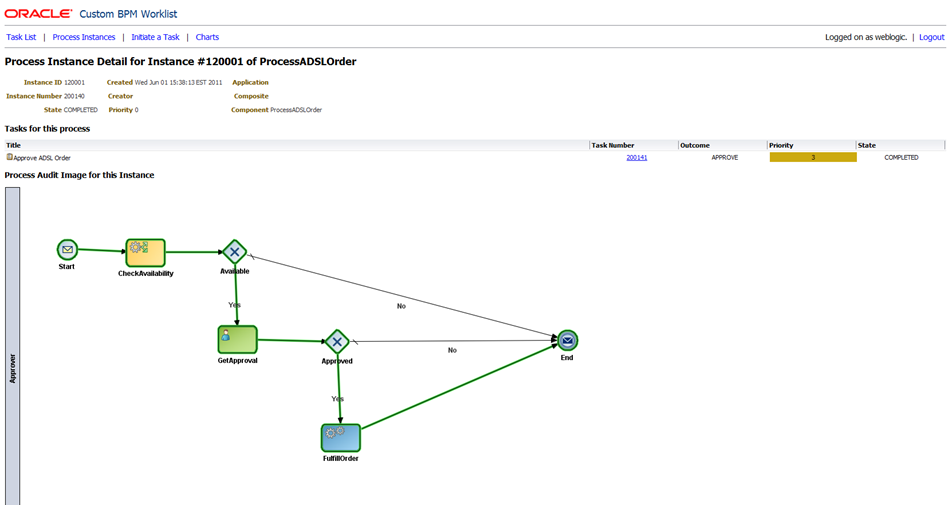
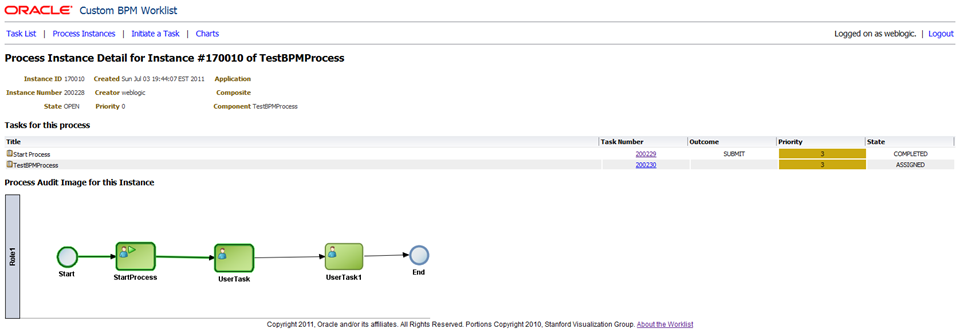
I have just uploaded another update for the custom BPM worklist sample, the second one this week! This update adds the ‘process instance audit image’ to the ‘process instance detail’ page. That means the a picture of the actual process model with the path that this instance of the process has followed (so far) highlighted in green.
Here are a couple of examples so you can see what I mean:
And another:
As always, you can download the source code from Subversion and the Javadoc and WARs from the main worklist page.
This update adds some interesting new API usage, which we will discuss in this article. It also requires the addition of some more libraries into your Maven repository to allow you to build with the necessary dependencies. There are getting to be enough of these now, that I thought it was time to write a script to save you some work. You can download the script from here (for Windows) or here (Unix-like). Warning: The scripts are not ‘thoroughly tested’ so please check the results carefully. Please leave a comment if you have problems with them.
You will also need one more JAR file that I am making available for download here. This file contains a utility class that you will need to use to get the image. We do not currently have a working API in the product (i.e. as of 11.1.1.5) to get the process instance audit image. This JAR file contains a utility class from Oracle that will allow you to get the image, and its API is fairly similar to what we have planned for the real API we plan to introduce in a future release. Hopefully this will minimise any changes you need to make in the future should we release a real API.
Please note, as for the worklist as a whole, this JAR file is a sample, that is provided “as is” without any warranty or support.
This JAR file contains a class called oracle.bpm.example.util.ProcessDiagramUtil. This class has a constructor that takes the BPMServiceClient which we have seen before, and a method called InputStream getProcessAuditDiagram(IBPMContext ctx, String instanceId) which retrieves the actual image in PNG format.
Here is the basic usage of this utility class:
  // get the utility class which will retrieve the image for us
  ProcessDiagramUtil pdu = new ProcessDiagramUtil(
      getBPMServiceClientFactory().getBPMServiceClient());

  // get the image for the requested instance
  InputStream auditDiagramData = pdu.getProcessAuditDiagram(
      (IBPMContext) ContextCache.getContextCache().get(user), instanceId);
We need to create an instance of the class, passing the constructor the BPMServiceClient. Then we are able to get the instance audit image (in PNG format) as an InputStream.
The controller in this case is also a little different, so it is presented here. It is just returning the PNG image, without a ‘page’ wrapped around it, so the intention is that it is called from and img tag, not from the browser URL. We will see this later in the view.
Here is the controller code:
package com.oracle.ateam;

import org.springframework.web.servlet.ModelAndView;

import java.io.InputStream;
import java.io.OutputStream;
import java.io.ByteArrayOutputStream;
import java.io.IOException;

import javax.servlet.http.HttpServletRequest;
import javax.servlet.http.HttpServletResponse;
import javax.servlet.ServletOutputStream;

import oracle.bpel.services.workflow.client.util.WorkflowAttachmentUtil;
import oracle.bpel.services.workflow.verification.IWorkflowContext;

import com.oracle.ateam.util.MLog;
import com.oracle.ateam.domain.ContextCache;
import com.oracle.ateam.domain.MTaskList;

/**
    A Controller that will display the grpahical audit image for a given process instance.
    This controller should only be called in an 'img' tag - not the main application window.
 */
public class AuditImageController extends SimpleSuccessFailureController {

  private static final int IO_BUFFER_SIZE = 1;

  public ModelAndView handleRequest(HttpServletRequest request, HttpServletResponse response)
      throws Exception {
    MLog.log("AuditImageController", "Entering handleRequest()");
    // get parameters from request
    String xProcessId = request.getParameter("x_processid");

    InputStream image = null;

    try {
      image = MTaskList.getAuditImage(request.getUserPrincipal().getName(), xProcessId);
      if (image == null) {
        MLog.log("AuditImageController", "image is null");
        return null;
      }
    } catch (Exception e) {
      MLog.log("AuditImageController", "Got an exception in the call to MTaskList.getAuditImage(), bailing out...");
      e.printStackTrace();
      return null;
    }

    // set up the response
    response.setContentType("image/png");

    ServletOutputStream out = response.getOutputStream();
    copy(image, out);
    out.flush();
    out.close();
    return null;
  }

  private static void copy(InputStream in, OutputStream out) throws IOException {
    byte[] b = new byte[IO_BUFFER_SIZE];
    int read;
    while ((read = in.read(b)) != -1) {
      out.write(b, 0, read);
    }
  }

}
This controller uses a similar approach to the one we used in the DownloadAttachmentController. We set the ContentType of the HttpServletResponse and then write the image data directly into the ServletOutputStream and return null from the controller. This is how we deliver binary data to the browser in the Spring Web MVC framework.
Here is the part of the view that calls this controller:
 <h2 class="td-h2">Process Audit Image for this Instance</h2>
  <img src="auditimage.do?x_processid=<c:out value="${model.instance.systemAttributes.processInstanceId}"/>"  />
Good luck and enjoy!

 RedStack
Your post was invaluable and it was a kind of functionality that we urgently sought. I confirm that it also works with release 11.1.1.4 .
Thanks again,
Serafeim (http://serafeimk.blogspot.com)
That’s great, thanks for sharing your experiences!
I found out that there is one class that isnt being set in the classpath of the standalone java code..
oracle.bpm.type.TypeUtils
Can you point out as which jar is this class file part of?
That should be in Oracle_SOA1/soa/modules/oracle.bpm.runtime_11.1.1/oracle.bpm.lib.jar
Thanks Mark. That helped. 🙂
Hi Mark,
I am trying to get this working with PS5 release. The ProcessDiagramUtil class throws a NoClassDefFoundError for oracle/bpm/xml/XMLSerializer class. I see that there are few Serializer classes available in bpmcore jar but none of them is with name XMLSerializer. Any idea what I could be missing out here in the whole setup?
-Hemant
Hi Mark,
I got the NoClassDefFoundError for oracle/bpm/xml/XMLSerializer error (thrown in the utility class for getting the audit trail image) which was not allowing the audit trail image to come up in the worklist. I had to add oracle.bpm.fdi.jar which contains the above specified class. I installed it into maven’s repo and updated the pom accordingly. I am using PS5 (11.1.1.6) release.
Thank you.
-Hemant
Yes I believe in PS5 we got rid of that helper class and use a proper API. Have a look at the MTaskList.AuditImage() here http://java.net/projects/bpmworklist/sources/worklist/content/tags/ps6/src/main/java/com/oracle/ateam/domain/MTaskList.java?rev=114 to see how to use the new InstanceQueryService.getProcessAuditDiagram() method which is a fully supported published API.
Hi Mark,
Thanks for the valuable post.. Can we manipulate the output image for example change the green highlight color or this is not doable?
Thanks
Thanks for your comment. In the current release you cannot manipulate the image, but I think that we may add this ability in some future release.
Hi Mark,
Just discovered something strange in the API. In BPM process design, I changed the default icon for human task activity to be (approver_lg). Then the following exception was thrown when the image is produced:
java.net.MalformedURLException: no protocol: images/approver_lg.png
at java.net.URL.(URL.java:567)
at java.net.URL.(URL.java:464)
at oracle.bpm.ui.CustomImageHelper.getCustomImageUrl(CustomImageHelper.java:112)
at oracle.bpm.ui.CustomImageHelper.getCustomImageUrl(CustomImageHelper.java:68)
at oracle.bpm.ui.CustomImageHelper.getCustomImage(CustomImageHelper.java:59)
at oracle.bpm.ui.CustomImageHelper.getCustomImage(CustomImageHelper.java:37)
at oracle.bpm.draw.renderer.FlowElementImageRenderer.getCustomImage(FlowElementImageRenderer.java:236)
at oracle.bpm.draw.renderer.FlowElementImageRenderer.getNormalImage(FlowElementImageRenderer.java:69)
at oracle.bpm.draw.renderer.FlowElementImageRenderer.getImage(FlowElementImageRenderer.java:270)
at oracle.bpm.draw.renderer.FlowElementImageRenderer.contains(FlowElementImageRenderer.java:185)
at oracle.bpm.draw.DrawableFlowNodeImpl.contains(DrawableFlowNodeImpl.java:74)
at oracle.bpm.diagram.draw.DrawableUtils.outbound(DrawableUtils.java:59)
at oracle.bpm.diagram.draw.DrawableConnectionImpl.updatePath(DrawableConnectionImpl.java:328)
at oracle.bpm.diagram.draw.DrawableConnectionImpl.refresh(DrawableConnectionImpl.java:201)
at oracle.bpm.draw.DrawableSequenceFlow.refresh(DrawableSequenceFlow.java:144)
at oracle.bpm.draw.DrawableChildPopulator.populateChild(DrawableChildPopulator.java:30)
at oracle.bpm.draw.DrawableChildPopulator.populate(DrawableChildPopulator.java:40)
at oracle.bpm.draw.DrawableChildPopulator.populateChild(DrawableChildPopulator.java:28)
at oracle.bpm.draw.diagram.ImageProcessDiagrammer.addProcessToRoot(ImageProcessDiagrammer.java:292)
at oracle.bpm.draw.diagram.ImageProcessDiagrammer.(ImageProcessDiagrammer.java:71)
at oracle.bpm.draw.diagram.AuditProcessDiagrammer.(AuditProcessDiagrammer.java:36)
Yeah that is strange. Can you share the code you are using to call the API please, looks like it might be a bug 🙂