
That’s a provocative title! Let’s start by talking about why you might want to disable B2B!
If you are using BPM (or SOA) and you are not using any of the B2B functionality, then you might want to consider disabling B2B on your SOA managed servers. There are a few good reasons for doing this:
- You will save some memory,
- You will reduce your managed server start (and restart) time, and
- You avoid any potential problems that may be introduced by running unnecessary modules – think security.
So how do we do it? There are two steps that you need to take.
First, log on the WebLogic Console and go to Deployments. Find the b2b application and stop it.
The second step is a little more involved – we need to set the b2b.donot_initialize property to true. But first, we need to define this property.
Log on the Enterprise Manager and navigate to soa-infra. Then open the SOA Infrastructure menu, then SOA Administration, then B2B Server Properties.

Click on the More B2B Configuration Properties… link.

Go to the Operations tab.
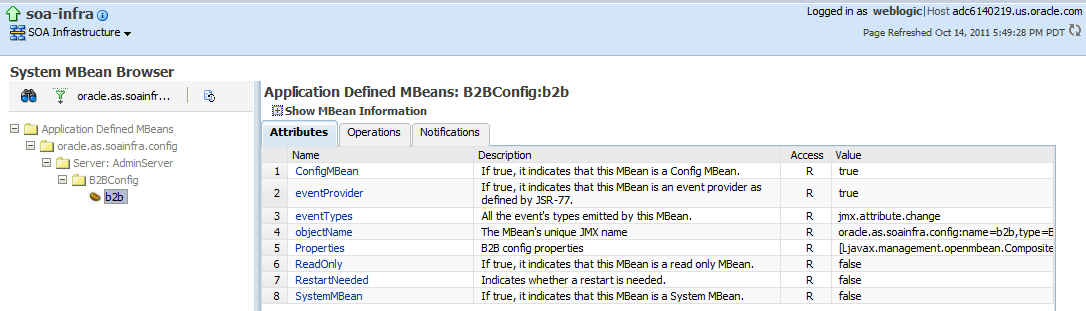
Click on the addProperty operation to define a new property.

In the key field, enter b2b.donot_initialize. In the value field, enter true. Add a comment if you wish.
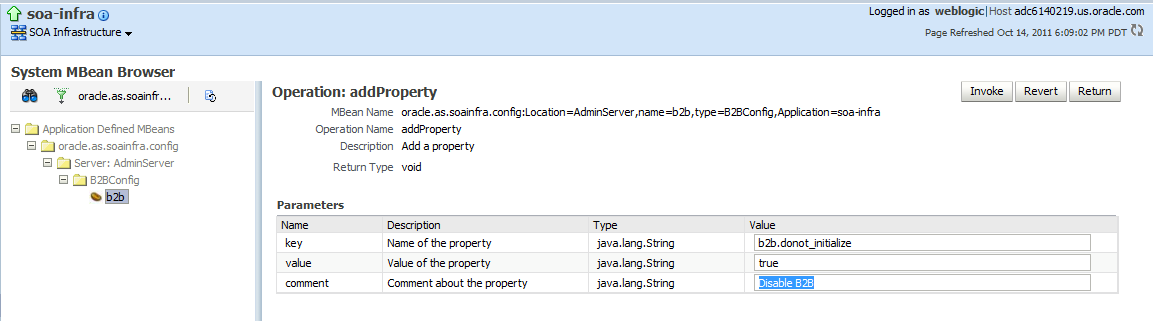
Click on the Invoke button to add the property.
Now restart your managed servers. Viola!

 RedStack
interesting easter egg 😉
how about “untargeting” the b2b app through WLS console? Does it have the same effect?
Unfortunately life is not that simple 🙂
Thank you for this article. Here in our environment we also disabled the materialized views .
Best Regards,
Marcello Morettoni