
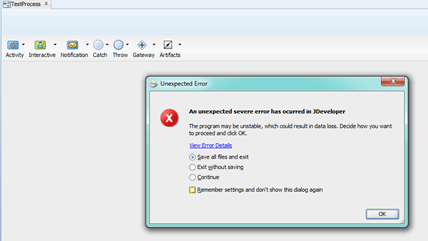
A small number of people have been seeing an error when using the BPMN process editor in JDeveloper 11.1.1.6 (PS5). The symptom is a NullPointerException, as seen in the log, an example below, and a dialog box telling you an unexpected error has occurred (see image below).
If you hit this issue, you should log a service request with Oracle Support and ask for a patch for bug number 13088538. You will need to provide details about your JDeveloper environment, versions of plugins, etc.
[source]
Performing action Save[ from oracle.bpm.fusion.studio.editor.ProcessEditor ]
Invoking command: [ from oracle.bpm.fusion.studio.editor.ProcessEditor ]
Performing action Rebuild BoundaryEvents.jpr[ from oracle.bpm.fusion.studio.editor.ProcessEditor ]
Invoking command: modify adf-config for soa
Invoking command: [ from oracle.bpm.fusion.studio.editor.ProcessEditor ]
Invoking command:
Invoking command:
Invoking command:
Invoking command:
Uncaught exception
java.lang.NullPointerException
net.miginfocom.layout.Grid.addLinkIDs()
net.miginfocom.layout.Grid.<init>()
net.miginfocom.swing.MigLayout.checkCache()
net.miginfocom.swing.MigLayout.getSizeImpl()
net.miginfocom.swing.MigLayout.preferredLayoutSize()
o.bpm.ui.layout.MigLayout.preferredLayoutSize(MigLayout.java:114)
[/source]

Thank Mark, this problem was really getting annoying 😉
Pingback: BPMN process editor problems in 11.1.1.6 (update) | RedStack
Pingback: JDeveloper crashing while using BPM plugin « J@n van Zoggel