
The first version of this application could already answer support questions against real policy data. Oracle Vector Store was retrieving the right documents before generation, and the responses were grounded in what was actually in the database rather than in whatever the model happened to know from training.
But every request started from zero.
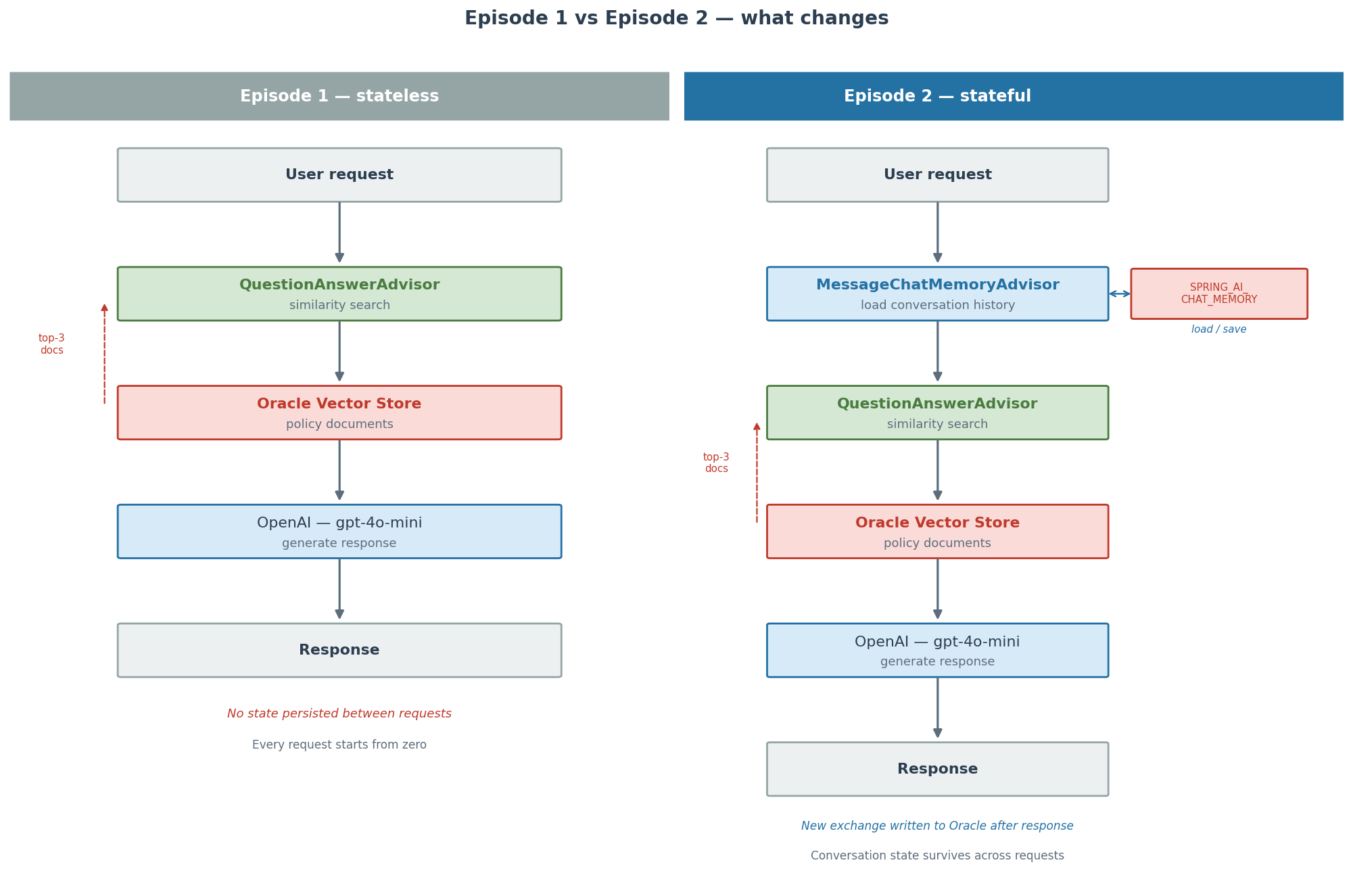
Send “My name is Maya” and then immediately ask “What’s my name?” and the assistant had no idea. Not because retrieval failed. Because the application itself was stateless. Conversation history was never stored anywhere. Each request arrived with only the current message and the policy documents that matched the similarity search. The moment the response was sent, everything about the exchange was gone.
That is the gap between a search engine with a chat interface and something that actually behaves like a conversation. Episode 2 closes it. Watch it here,
RAG and memory are different problems
It is worth being precise about this before looking at the code, because the two ideas are easy to conflate.
RAG — retrieval-augmented generation — gives the model access to information it would not otherwise have. When a customer asks about the refund policy, the application runs a similarity search against Oracle Vector Store, finds the relevant policy document, and includes it in the prompt. The model can then answer from real data rather than from training knowledge.
Conversational memory is a different thing entirely. It is not about what the model knows. It is about what the application remembers. Without memory, each request is independent. With memory, the application accumulates context across exchanges — facts the user has shared, questions already asked, decisions already made — and makes that context available to the model on every subsequent request.
Both matter. RAG makes individual answers accurate. Memory makes the conversation coherent. Episode 1 solved the first problem. Episode 2 solves the second.
What changes
The overall architecture stays the same. Spring Boot, Spring AI, Oracle Vector Store, and OpenAI are all unchanged from Episode 1. The only addition is persistent chat memory backed by a JDBC repository in Oracle.
One new dependency:
<dependency> <groupId>org.springframework.ai</groupId> <artifactId>spring-ai-starter-model-chat-memory-repository-jdbc</artifactId></dependency>
One new configuration property:
spring: ai: chat: memory: repository: jdbc: initialize-schema: always
That creates the SPRING_AI_CHAT_MEMORY table in Oracle on startup. No migration script, no manual DDL.
The memory bean
ChatMemoryConfig.java creates a ChatMemory bean backed by JdbcChatMemoryRepository:
@Bean@ConditionalOnMissingBean(ChatMemory.class)public ChatMemory chatMemory(DataSource dataSource, MemoryProperties memoryProperties) { return MessageWindowChatMemory.builder() .chatMemoryRepository(JdbcChatMemoryRepository.builder() .dataSource(dataSource) .build()) .maxMessages(memoryProperties.maxMessages()) .build();}
MessageWindowChatMemory keeps a sliding window of the most recent messages per conversation. The window size is maxMessages, set to 100 in application.yml. As the conversation grows, older messages fall off the window so the prompt does not grow without bound.
The @ConditionalOnMissingBean annotation is worth noting. Tests substitute an in-memory ChatMemory implementation in TestSupportConfiguration, so the test suite can load the full application context without requiring a live database. The @ConditionalOnMissingBean is what makes that substitution work — if a test has already registered a ChatMemory bean, this bean definition is skipped.
Adding memory to the chat client
Episode 1 already had a QuestionAnswerAdvisor wired into the ChatClient for RAG retrieval. Episode 2 adds MessageChatMemoryAdvisor in front of it:
return chatClientBuilder .defaultSystem(assistantProperties.systemPrompt()) .defaultAdvisors( MessageChatMemoryAdvisor.builder(chatMemory).build(), questionAnswerAdvisor ) .build();
The order matters, and it is worth understanding why.
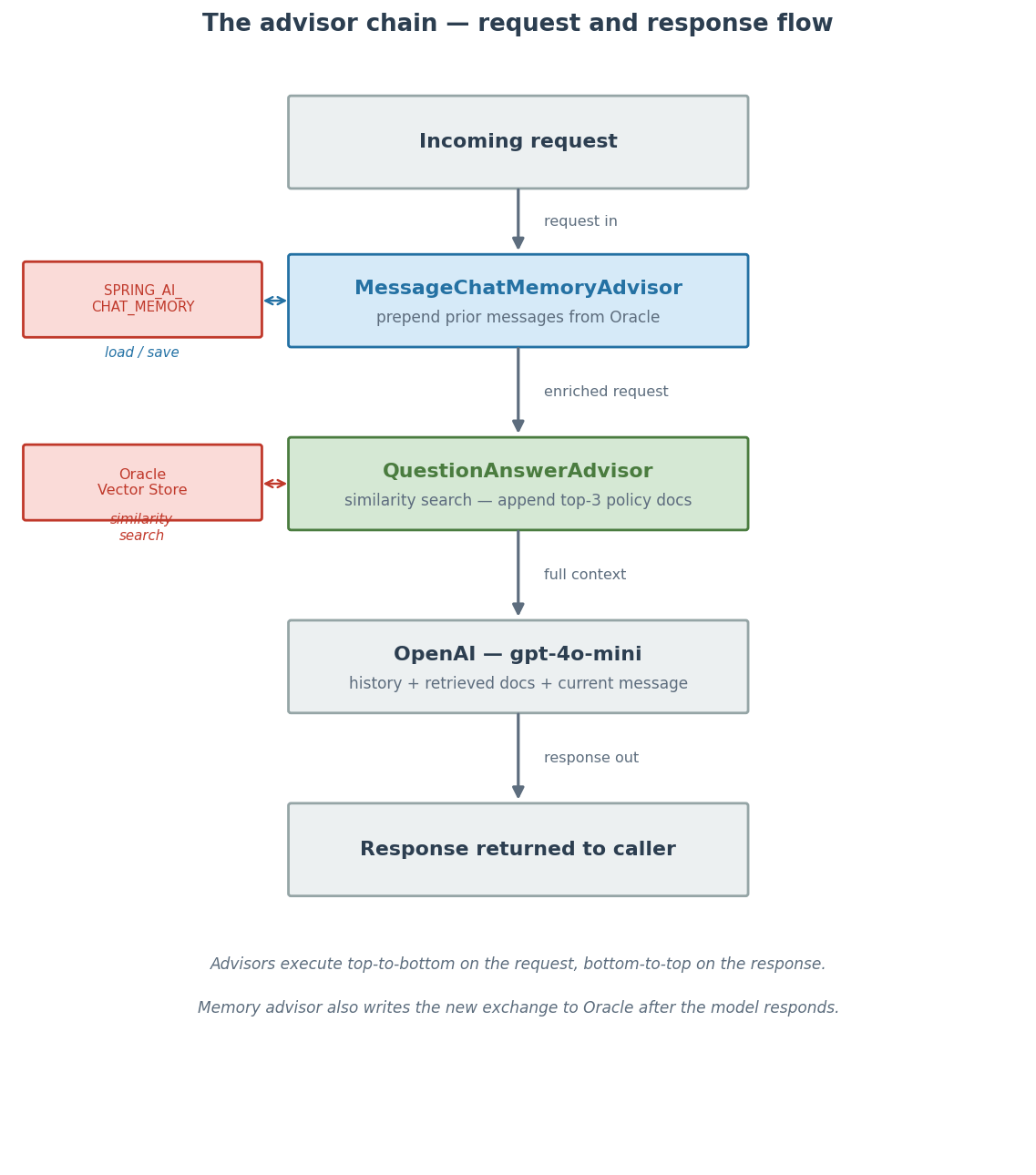
Advisors in Spring AI form a chain that wraps around the model call. Each advisor can modify the request before it reaches the model and can inspect or modify the response on the way back out. They execute in registration order on the way in, and in reverse order on the way out.
Registering MessageChatMemoryAdvisor first means it runs before QuestionAnswerAdvisor. On the way in, the memory advisor loads the stored conversation history for the current conversation ID and adds those messages to the request. By the time QuestionAnswerAdvisor runs its similarity search, the full conversation context is already present. The retrieved policy documents are then appended on top of that. By the time the model sees the request, it has both the conversation history and the relevant policy knowledge.
If the advisors were in the wrong order — retrieval first, memory second — the memory advisor would add conversation history after retrieval had already run. That would still work for basic memory, but the similarity search would only have the current message to work with, not the full conversation context. For most queries that does not matter, but it can affect retrieval quality for follow-up questions where the topic is implicit from prior context rather than stated explicitly in the current message.
Scoping memory by conversation
Without scoping, all users would share the same memory, which would be disastrous. The chat endpoint now requires an X-Conversation-Id header:
@PostMapping("/chat")public ChatResponse chat( @RequestHeader("X-Conversation-Id") String conversationId, @Valid @RequestBody ChatRequest request) { return new ChatResponse( assistantService.answer(sanitizeConversationId(conversationId), request.message()), "stateful-rag" );}
The caller is responsible for supplying and maintaining the conversation ID. The application does not generate or track session identifiers — that is intentional. For this demo, any string works. In production you would tie the conversation ID to an authenticated user session, but that is out of scope here.
The conversation ID is passed into the advisor chain at call time:
chatClient.prompt() .user(message) .advisors(advisorSpec -> advisorSpec.param(ChatMemory.CONVERSATION_ID, conversationId)) .call() .chatClientResponse();
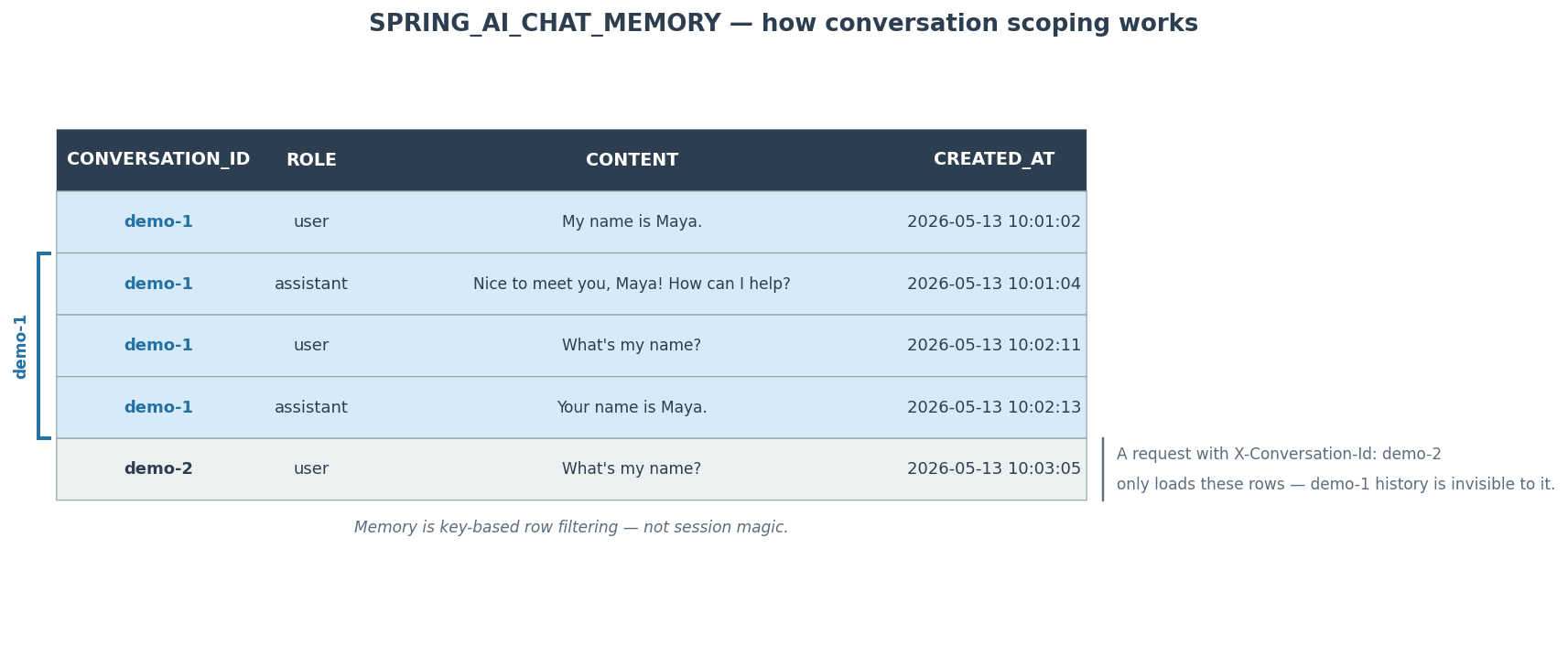
Spring AI reads that parameter, loads the matching rows from SPRING_AI_CHAT_MEMORY, prepends them to the prompt, and writes the new exchange back to the table when the call completes. The scoping is entirely key-based. Two requests with different conversation IDs read and write completely separate sets of rows. There is no shared state between them.
Trying it
Start the application and send two messages with the same conversation ID:
curl -X POST http://localhost:8080/api/v1/agent/chat -H "Content-Type: application/json" -H "X-Conversation-Id: demo-1" -d '{"message":"My name is Maya."}'curl -X POST http://localhost:8080/api/v1/agent/chat -H "Content-Type: application/json" -H "X-Conversation-Id: demo-1" -d '{"message":"What'''s my name?"}'
The second request should come back with “Maya”. Now try the same question with a different conversation ID:
curl -X POST http://localhost:8080/api/v1/agent/chat -H "Content-Type: application/json" -H "X-Conversation-Id: demo-2" -d '{"message":"What'''s my name?"}'
The assistant should not know. The rows for demo-1 are invisible to a request arriving with demo-2. Memory does not leak between conversations.
Inspecting what Oracle is storing
There is a debug endpoint that reads directly from ChatMemory:
curl "http://localhost:8080/api/v1/debug/memory?conversationId=demo-1"
It returns the stored messages with their roles:
[ {"role": "user", "text": "My name is Maya."}, {"role": "assistant", "text": "Nice to meet you, Maya! How can I help you today?"}]
You can also go directly to the table:
SELECT * FROM SPRING_AI_CHAT_MEMORY;
These are ordinary rows. Conversation ID, role, content, timestamp. There is nothing opaque about the storage format. This also means the memory is durable — restart the application and the conversation history is still there, because it is in Oracle and not in process memory.
The model did not become smarter between episodes. The application stopped throwing away state.
Oracle is now storing three kinds of data
After Episode 1, Oracle was already handling two things: relational order data in CUSTOMER_ORDER, and vectorized policy knowledge in the Spring AI Oracle Vector Store table.
Episode 2 adds a third: conversational state in SPRING_AI_CHAT_MEMORY.
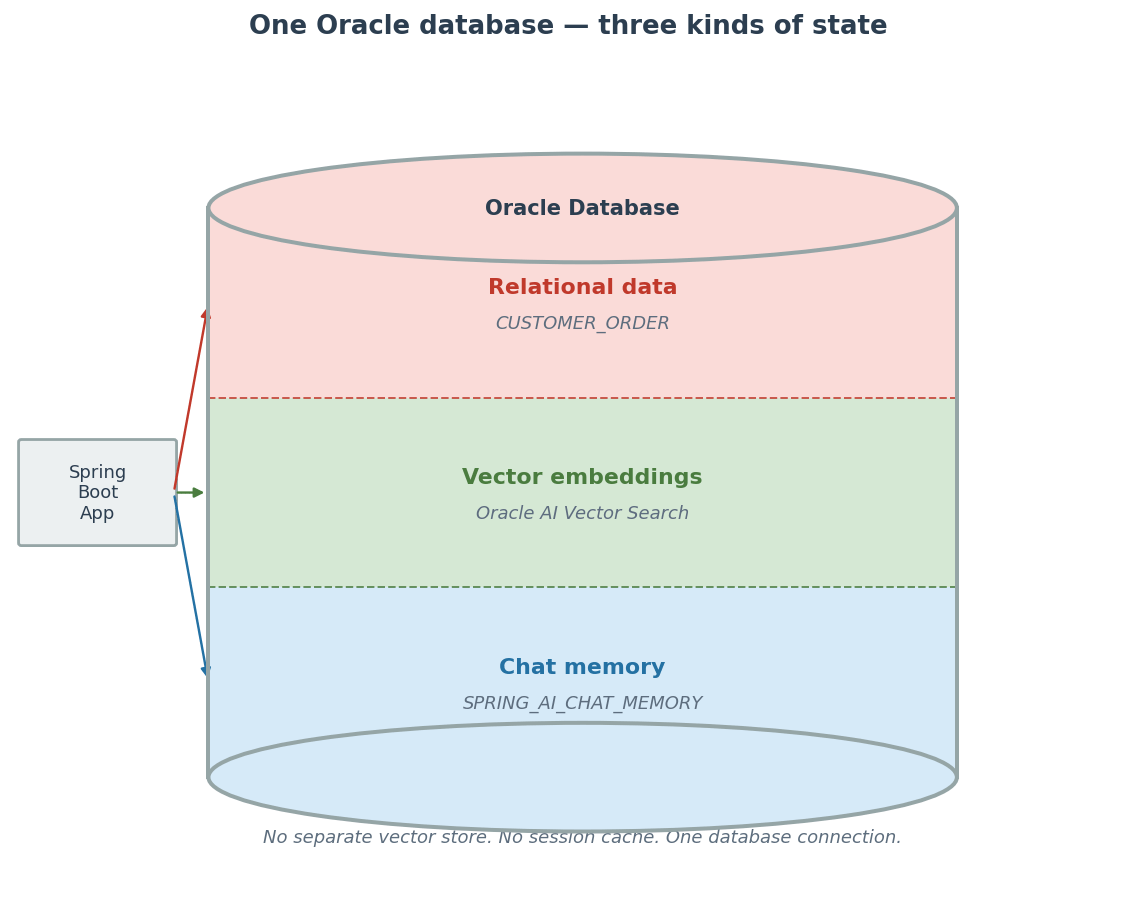
All three live in the same database. There is no separate vector store running alongside, no in-memory session cache to manage, no additional infrastructure to operate. The application connects to one Oracle instance and that instance holds everything the assistant needs — business data, knowledge, and conversation history.
That consolidation is not just operationally convenient. It also opens up possibilities that would be harder to achieve across separate systems. If you later wanted to run a query that joined conversation history with relational order data — for example, to find conversations where a customer mentioned an order that was then returned — all the data is in the same place. You do not have to reconcile records across multiple stores.
What is next
The assistant can now retrieve knowledge and remember conversations. But it still cannot act on any of the backend data. If a customer asks about the status of order ORD-1002, the assistant can only explain what the return policy says. It cannot look up the actual order.
Episode 3 changes that. Spring AI tool calling lets the assistant call narrow backend methods — order lookup, return initiation, support ticket creation — with the backend owning all the validation logic. The model handles the conversation. The backend handles the rules.

You must be logged in to post a comment.