
By the end of Episode 2, the assistant could answer policy questions from Oracle Vector Store and remember conversations across requests. That combination already felt more like a real application than a bare LLM wrapper.
But it still could not act on anything.
Ask it about order ORD-1002 and it would explain the shipping policy. It could not look up the actual order. Ask it to return a product and it would describe the return process. It could not initiate the return. The knowledge was there. The memory was there. The connection to the backend was not.
Episode 3 adds that. Watch it here.
The distinction that matters
Before looking at the code, it is worth being precise about what tool calling is and what it is not.
The model does not get direct access to the database. It does not write SQL. It does not update rows. What it gets is the ability to request that the backend perform a specific named action. The backend then decides whether to allow it, validates the input against business rules, performs the operation if allowed, and returns a result. The model reads that result and generates a response.
This is the difference between AI orchestration and AI autonomy. The model orchestrates. The backend decides. That distinction is what makes the system trustworthy rather than unpredictable.
What changes
The architecture from Episode 2 carries forward unchanged. The memory advisor, the vector-store advisor, and the Oracle-backed persistence are all still there. The only additions are one tool class, one new entity, and one line in ChatClientConfig.
That line:
return chatClientBuilder .defaultSystem(assistantProperties.systemPrompt()) .defaultAdvisors( MessageChatMemoryAdvisor.builder(chatMemory).build(), questionAnswerAdvisor ) .defaultTools(agentTools) .build();
defaultTools(agentTools) registers the AgentTools bean with the chat client. From that point, the model knows those tools exist and can request them during any conversation.
The system prompt was also updated to tell the model how to use the tools and to reinforce that tool results are authoritative:
app: assistant: system-prompt: > You are ShopAssist, a concise and practical support assistant for a demo electronics store. Use retrieved policy context when it is available. Use tools for order status lookup, return initiation, and support ticket creation. Treat tool results as the source of truth for business actions and explain validation failures clearly. Do not invent order details. Do not invent action outcomes.
The tool class
AgentTools.java contains three methods, each annotated with @Tool. That annotation is what exposes the method to the model. Spring AI reads the description and parameter annotations at startup and includes them in the model’s context so it knows what each tool does and when to use it.
@Tool(description = "Look up the current status and basic details for a ShopAssist order.")@Transactional(readOnly = true)public String lookupOrderStatus( @ToolParam(description = "The ShopAssist order ID, for example ORD-1002.") String orderId) { ... }@Tool(description = "Initiate a return for an eligible delivered ShopAssist order after backend validation.")@Transactionalpublic String initiateReturn( @ToolParam(description = "The ShopAssist order ID, for example ORD-1001.") String orderId, @ToolParam(description = "The customer's reason for the return.") String reason) { ... }@Tool(description = "Create a support ticket for an existing ShopAssist order.")@Transactionalpublic String createSupportTicket( @ToolParam(description = "The ShopAssist order ID, for example ORD-1002.") String orderId, @ToolParam(description = "A short description of the customer issue.") String issue, @ToolParam(description = "Ticket priority such as LOW, NORMAL, HIGH, or URGENT.", required = false) String priority) { ... }
The return types are all String. That is intentional — plain text results are easy for the model to summarise naturally without needing to parse structured data.
lookupOrderStatus is marked @Transactional(readOnly = true). initiateReturn and createSupportTicket are @Transactional because they write to Oracle. The transaction boundary sits inside the tool method, so a validation failure exits cleanly without any partial database change.
How a tool call actually flows
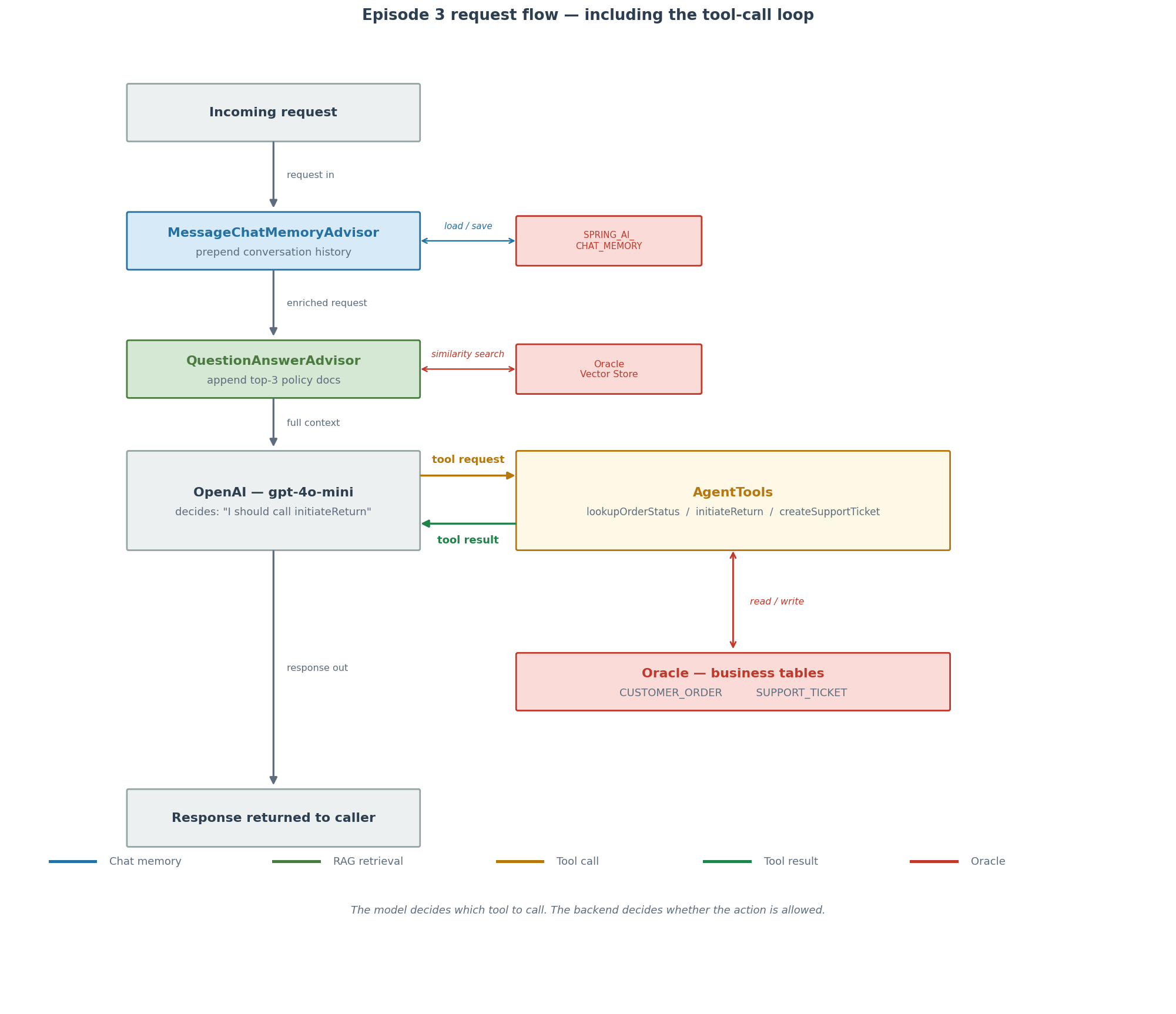
When the model decides a tool is needed, it does not generate a response immediately. Instead it emits a structured tool-call request back to the application. Spring AI intercepts that, invokes the matching method, and sends the result back to the model as a tool message. The model then generates its final response with the result in context.
The full round trip for a return request looks like this: the user message arrives, the memory advisor loads conversation history, the vector-store advisor retrieves relevant policy documents, the model sees all of that and decides to call initiateReturn, the backend validates and either updates Oracle or returns a failure reason, and the model then writes the response to the user based on what the backend actually said.
Business rules in the backend
The return validation is worth looking at directly because it is the clearest example of the backend owning business policy:
private String initiateReturnForOrder(CustomerOrder order) { if (order.getStatus() == OrderStatus.PREPARING_RETURN) { return "A return has already been initiated for order %s." .formatted(order.getOrderId()); } if (order.getStatus() != OrderStatus.DELIVERED) { return "Order %s is currently %s and is not eligible for return until it has been delivered." .formatted(order.getOrderId(), order.getStatus()); } if (daysSincePurchase(order) > RETURN_WINDOW_DAYS) { return "Order %s is outside the %d-day return window." .formatted(order.getOrderId(), RETURN_WINDOW_DAYS); } order.markPreparingReturn(); customerOrderRepository.save(order); return "Return initiated for order %s. The order status is now %s." .formatted(order.getOrderId(), order.getStatus());}
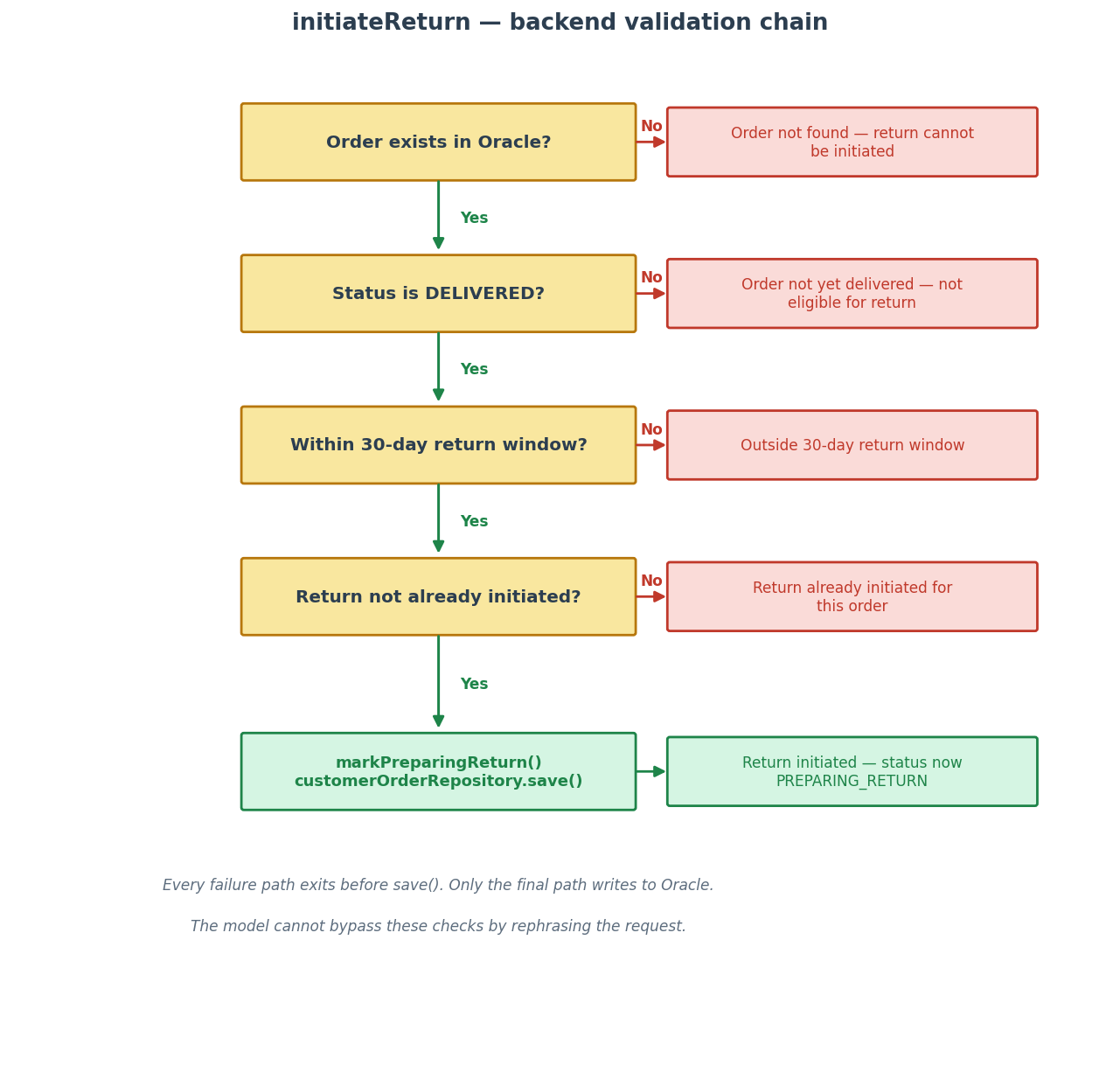
Four checks in sequence: already returning, not yet delivered, outside the 30-day window, then success. Every failure exits early with a plain-text reason and touches nothing in the database. Only the last path calls customerOrderRepository.save().
The markPreparingReturn() call is a domain method on CustomerOrder. The status change lives on the entity, not scattered across service or tool layers.
The support ticket entity
SupportTicket is a simple JPA entity backed by the SUPPORT_TICKET table. Episode 3 adds it with Hibernate’s ddl-auto=update creating the table on first startup — no migration script.
@Entity@Table(name = "SUPPORT_TICKET")public class SupportTicket { @Id @GeneratedValue(strategy = GenerationType.SEQUENCE, generator = "support_ticket_seq") @SequenceGenerator(name = "support_ticket_seq", sequenceName = "SUPPORT_TICKET_SEQ", allocationSize = 1) @Column(name = "TICKET_ID", nullable = false, updatable = false) private Long ticketId; @Column(name = "ORDER_ID", nullable = false, length = 40) private String orderId; @Column(name = "ISSUE", nullable = false, length = 1000) private String issue; @Column(name = "PRIORITY", nullable = false, length = 20) private String priority; @Column(name = "STATUS", nullable = false, length = 20) private String status; @Column(name = "CREATED_AT", nullable = false) private LocalDateTime createdAt; ...}
The key ID uses GenerationType.SEQUENCE with an explicit @SequenceGenerator, which is the recommended Oracle pattern. Priority and status are plain strings rather than enums — the tool normalises whatever the model passes and defaults anything unrecognised to NORMAL.
Trying it
The application seeds four deterministic demo orders on startup: ORD-1001 (delivered, within the 30-day return window), ORD-1002 (shipped), ORD-1003 (delivered, outside the return window), and ORD-1004 (processing).
Order lookup:
curl -s -X POST http://localhost:8080/api/v1/agent/chat -H "Content-Type: application/json" -H "X-Conversation-Id: demo-1" -d '{"message":"What is the status of order ORD-1002?"}' | jq
The assistant calls lookupOrderStatus, reads the live status from Oracle, and returns it. It does not guess or interpolate from the conversation.
Successful return:
curl -s -X POST http://localhost:8080/api/v1/agent/chat -H "Content-Type: application/json" -H "X-Conversation-Id: demo-1" -d '{"message":"I want to return order ORD-1001 because the product was defective."}' | jq
The backend finds the order, confirms it is delivered and within the return window, calls markPreparingReturn(), and saves to Oracle. The status in CUSTOMER_ORDER is now PREPARING_RETURN.
Failed return:
curl -s -X POST http://localhost:8080/api/v1/agent/chat -H "Content-Type: application/json" -H "X-Conversation-Id: demo-1" -d '{"message":"I want to return order ORD-1003 because the product was defective."}' | jq
ORD-1003 was delivered 45 days ago. The backend rejects it at the return-window check and returns a clear reason. Nothing is written to the database. The model relays the rejection to the user.
This failure case is as important as the success case. It demonstrates that the model cannot bypass business rules by asking politely.
Support ticket:
curl -s -X POST http://localhost:8080/api/v1/agent/chat -H "Content-Type: application/json" -H "X-Conversation-Id: demo-1" -d '{"message":"Create a high-priority support ticket for ORD-1002 because shipping is stuck."}' | jq
The backend verifies the order exists, normalises the priority to HIGH, sets status to OPEN, and inserts a row into SUPPORT_TICKET.
Inspecting Oracle directly
After those four requests, you can see the backend state directly:
SELECT ORDER_ID, STATUS FROM CUSTOMER_ORDER;
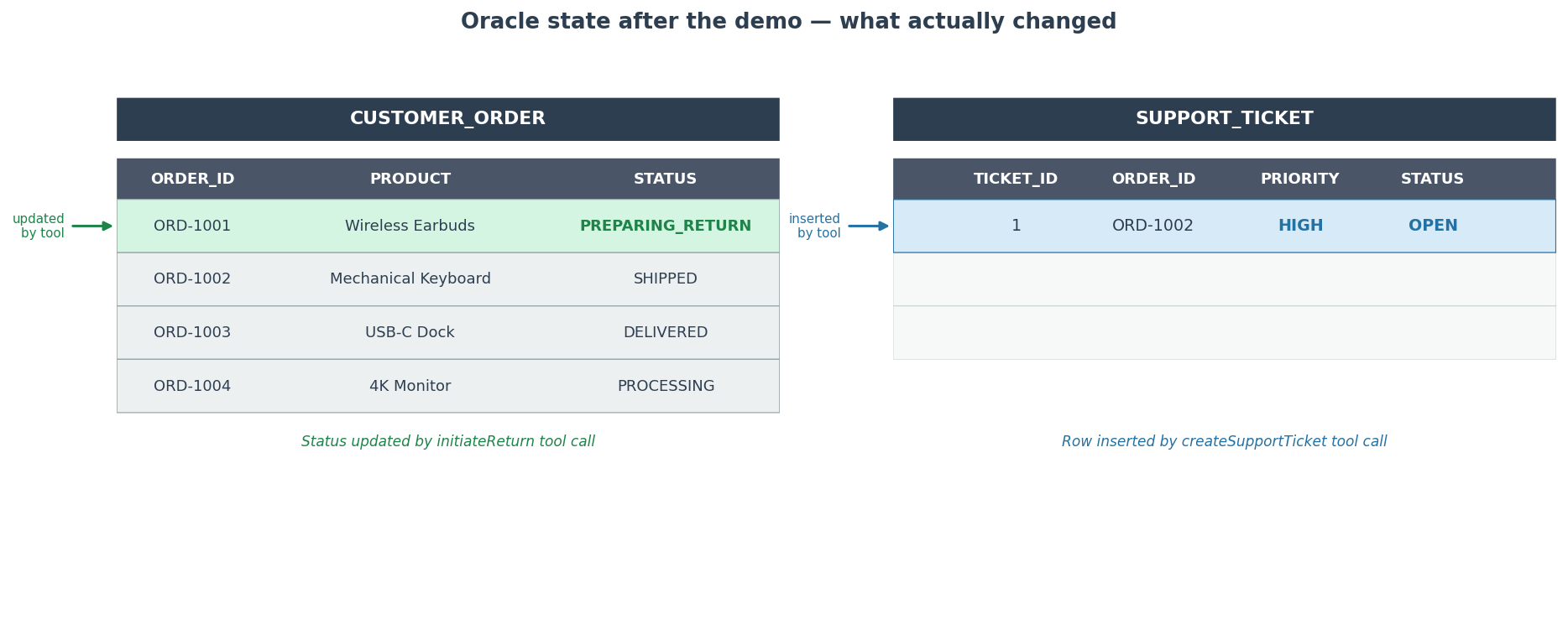
ORD-1001 now shows PREPARING_RETURN. The other three are unchanged.
SELECT TICKET_ID, ORDER_ID, PRIORITY, STATUS FROM SUPPORT_TICKET;
One row: the high-priority ticket for ORD-1002.
The assistant is useful because it is connected to real application state. Not because the model became more capable.
Oracle is now storing four kinds of data
Episode 1 added relational order data and vector embeddings. Episode 2 added conversational state. Episode 3 adds support ticket rows written by tool calls.
All four live in the same Oracle database: CUSTOMER_ORDER, the vector store table, SPRING_AI_CHAT_MEMORY, and SUPPORT_TICKET. Still one database connection from the application. No additional infrastructure.
What is next
The application can now retrieve knowledge, remember conversations, and perform backend actions. But everything still happens synchronously inside a single HTTP request. The model calls a tool, waits for the result, and then responds.
That works for simple actions. It does not work for anything that takes time, depends on external systems, or needs to be retried. Episode 4 starts moving toward event-driven processing — work that can happen outside the request cycle and feed back into the conversation when it completes.

Pingback: Add Event-Driven Workflows to Your Spring AI App with Oracle (Part 4 of 4) | RedStack