
By the end of Episode 3 (video), the assistant could act. Tool calls let it look up orders, initiate returns, and create support tickets — real backend operations against Oracle, not simulated responses. But every one of those operations happened synchronously inside a single HTTP request. The chat endpoint called a tool method, that method did the work inline, and the response went back to the caller. All of it blocking, all of it inside the same transaction.
That works for simple demos. It starts breaking when the work is slow, depends on external systems, has multiple steps, or needs to be retried independently of the chat request.
Episode 4 changes the model.
The distinction that matters
The single most important idea in this episode is direct: the assistant starts workflows. The backend owns workflows.
In Episode 3, the tool was doing everything: validating the request, writing to Oracle, returning a result. If validation failed, the model got a clear error to relay. If it succeeded, the row was written and the request was done. Clean and correct for the demo.
But it ties the chat request tightly to the outcome of the workflow. If the workflow takes five seconds, the user waits five seconds for a reply. If the workflow involves multiple downstream steps, all of them need to complete inside the HTTP timeout. If something fails midway, the tool fails, and the model tries to explain an error that probably makes no sense to a customer.
The event-driven model separates those concerns. The tool’s job is to validate that the request makes sense and publish an event. The consumer’s job is to pick up that event and do the actual work. The user gets a fast response either way.
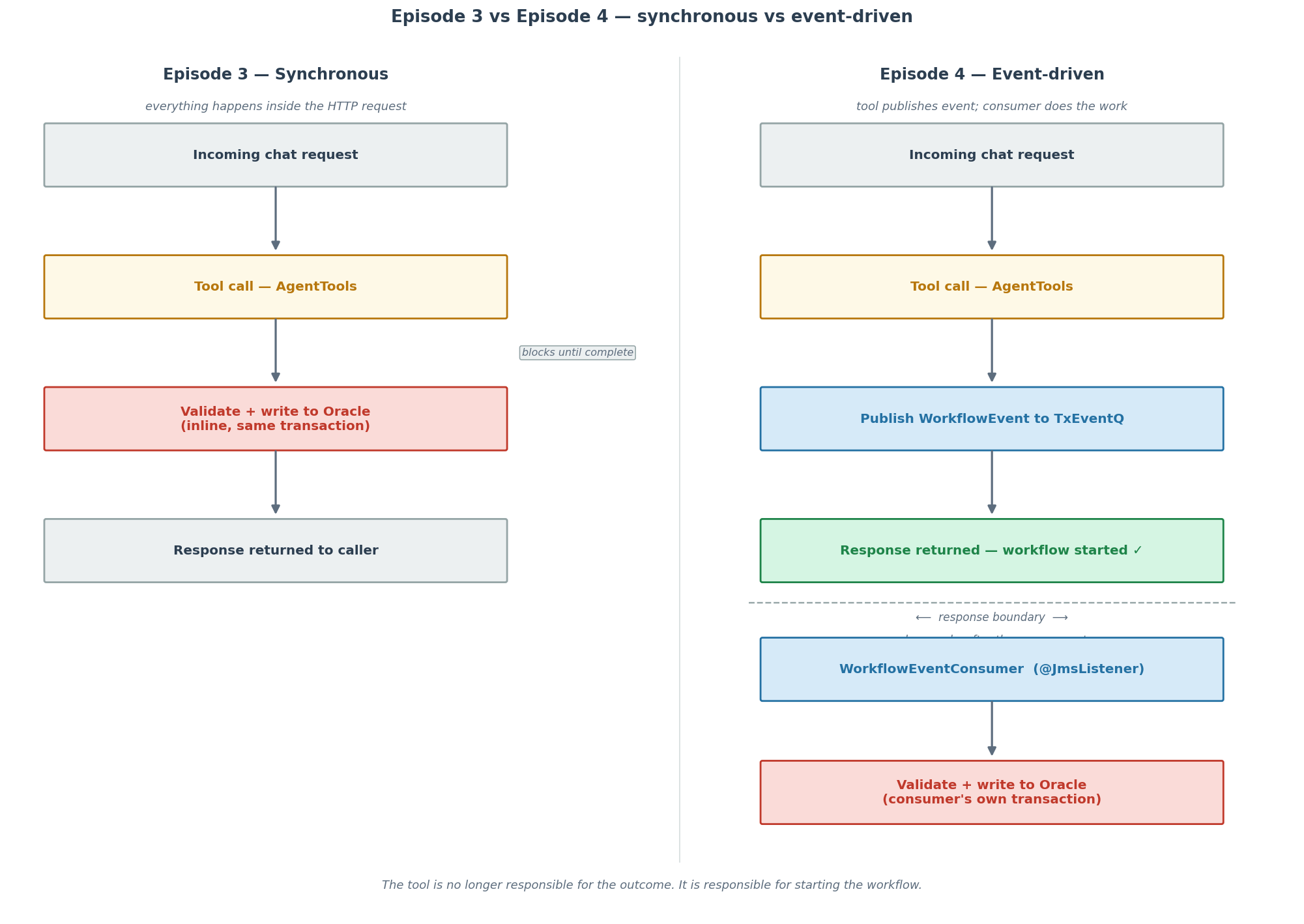
Figure 1 — The key architectural shift. On the left, the Episode 3 synchronous path: the tool call, validation, Oracle write, and response all happen in the same HTTP thread. On the right, the Episode 4 path: the tool call publishes an event and the response returns immediately at the response boundary. A downstream consumer handles validation and the database write in a separate transaction.
What changes
The architecture from Episodes 1 through 3 carries forward unchanged. The memory advisor, the vector-store advisor, and the Oracle-backed persistence are all still there. The chat client configuration is the same. AgentTools still exposes the same three @Tool methods with the same descriptions.
What changes is what those methods do internally, and what powers the new workflow layer: Oracle TxEventQ.
The new dependency in pom.xml:
<dependency> <groupId>com.oracle.database.spring</groupId> <artifactId>oracle-spring-boot-starter-aqjms</artifactId> <version>26.1.1</version></dependency>
Oracle TxEventQ supports the Kafka wire protocol, but here it is accessed through JMS via the Oracle AQ JMS starter. From the Spring application’s perspective, the queue looks like any other JMS destination — JmsTemplate for publishing, @JmsListener for consuming. Nothing Kafka-specific in the application code.
The reason this matters: by Episode 4, Oracle is handling relational state, vector retrieval, conversation memory, and event streaming. No additional infrastructure.
The event shape
WorkflowEvent is a Java record:
@JsonInclude(JsonInclude.Include.NON_NULL)public record WorkflowEvent( String eventType, UUID eventId, Instant occurredAt, String conversationId, String orderId, String reason, String issue, String priority) { public static final String RETURN_REQUESTED = "RETURN_REQUESTED"; public static final String SUPPORT_TICKET_REQUESTED = "SUPPORT_TICKET_REQUESTED";}
Two event types. The constants on the record itself keep string literals out of the rest of the code. @JsonInclude(JsonInclude.Include.NON_NULL) means unused fields are omitted from serialized JSON — a return event does not include issue or priority, a support ticket event does not include reason.
The conversationId field carries the conversation ID from the original chat request through to the consumer. The consumer knows which conversation triggered the workflow. That is useful if the system eventually needs to send a message back into the conversation when work completes.
How the tool changes
The most visible change is in AgentTools. The initiateReturn method went from doing validation and database writes inline to doing a quick existence check and publishing an event:
@Tool(description = "Initiate a return for an eligible delivered ShopAssist order after backend validation.")@Transactional(readOnly = true)public String initiateReturn( @ToolParam(description = "The ShopAssist order ID, for example ORD-1001.") String orderId, @ToolParam(description = "The customer's reason for the return.") String reason, ToolContext toolContext) { String normalizedOrderId = normalizeOrderId(orderId); if (!StringUtils.hasText(normalizedOrderId)) { return "Order ID is required."; } if (!StringUtils.hasText(reason)) { return "A return reason is required."; } if (customerOrderRepository.findById(normalizedOrderId).isEmpty()) { return "Order %s was not found, so a return workflow could not be started.".formatted(normalizedOrderId); } workflowEventPublisher.publish(new WorkflowEvent( WorkflowEvent.RETURN_REQUESTED, UUID.randomUUID(), Instant.now(clock), conversationId(toolContext), normalizedOrderId, reason.trim(), null, null )); return "Return workflow started for order %s.".formatted(normalizedOrderId);}
The method is now @Transactional(readOnly = true). It only writes one thing: nothing. It confirms the order exists, publishes a RETURN_REQUESTED event, and returns. The return string is “Return workflow started” rather than “Return initiated” — a deliberate phrasing change that the system prompt picks up on.
The third parameter, ToolContext toolContext, is new. Spring AI passes tool context to any tool method that declares it. AssistantService populates it with the conversation ID at call time:
ChatClientResponse response = chatClient.prompt() .user(message) .advisors(advisorSpec -> advisorSpec.param(ChatMemory.CONVERSATION_ID, conversationId)) .toolContext(Map.of("conversationId", conversationId)) .call() .chatClientResponse();
The tool reads it back via a private helper:
private String conversationId(ToolContext toolContext) { Map<String, Object> context = toolContext == null ? Map.of() : toolContext.getContext(); Object conversationId = context.get("conversationId"); return conversationId instanceof String value && StringUtils.hasText(value) ? value : UNKNOWN_CONVERSATION_ID;}
That conversation ID ends up in the WorkflowEvent. The consumer knows which conversation triggered the workflow from the moment the event is dequeued.
Publishing the event
WorkflowEventPublisher is a simple interface:
public interface WorkflowEventPublisher { void publish(WorkflowEvent event);}
The JMS implementation uses JmsTemplate:
@Overridepublic void publish(WorkflowEvent event) { String json; try { json = objectMapper.writeValueAsString(event); } catch (JacksonException e) { throw new IllegalStateException("Workflow event could not be serialized", e); } jmsTemplate.send(queueName, session -> session.createTextMessage(json)); logger.info( "Published workflow event eventType={} eventId={} orderId={} conversationId={}", event.eventType(), event.eventId(), event.orderId(), event.conversationId() );}
The queue name comes from configuration:
app: workflow: queue-name: SHOPASSIST_WORKFLOW_TEQ
The interface abstraction means unit tests can inject an in-memory publisher without touching JMS at all. The real implementation serializes the event to JSON, sends it as a JMS text message, and logs the key identifiers.
The consumer
WorkflowEventConsumer listens on the same queue:
@JmsListener(destination = "${app.workflow.queue-name}")@Transactionalpublic void onWorkflowEvent(String json) { WorkflowEvent event; try { event = objectMapper.readValue(json, WorkflowEvent.class); } catch (JacksonException e) { logger.error("Discarding malformed workflow event JSON: {}", e.getMessage()); return; } if (event == null) { logger.error("Discarding empty workflow event JSON"); return; } logger.info( "Received workflow event eventType={} eventId={} orderId={} conversationId={}", event.eventType(), event.eventId(), event.orderId(), event.conversationId() ); switch (event.eventType()) { case WorkflowEvent.RETURN_REQUESTED -> handleReturnRequested(event); case WorkflowEvent.SUPPORT_TICKET_REQUESTED -> handleSupportTicketRequested(event); case null, default -> logger.error( "Discarding unknown workflow event type eventType={} eventId={}", event.eventType(), event.eventId() ); }}
@JmsListener and @Transactional together mean the message dequeue and the database write are part of the same transaction. If the database write fails, the message stays on the queue.
The business validation that lived inside AgentTools in Episode 3 has moved to the consumer. handleReturnRequested re-checks order status, the return window, and whether a return is already in progress before calling save():
private void handleReturnRequested(WorkflowEvent event) { String orderId = normalizeOrderId(event.orderId()); if (!StringUtils.hasText(orderId) || !StringUtils.hasText(event.reason())) { logger.error("Rejecting return workflow event with missing orderId or reason eventId={}", event.eventId()); return; } CustomerOrder order = customerOrderRepository.findById(orderId) .orElse(null); if (order == null) { logger.warn("Rejecting return workflow event for missing order orderId={} eventId={}", orderId, event.eventId()); return; } if (order.getStatus() == OrderStatus.PREPARING_RETURN) { logger.info("Return workflow already applied for orderId={} eventId={}", orderId, event.eventId()); return; } if (order.getStatus() != OrderStatus.DELIVERED) { logger.warn( "Rejecting return workflow for ineligible status orderId={} status={} eventId={}", orderId, order.getStatus(), event.eventId() ); return; } if (ChronoUnit.DAYS.between(order.getPurchaseDate(), LocalDate.now(clock)) > RETURN_WINDOW_DAYS) { logger.warn("Rejecting return workflow outside return window orderId={} eventId={}", orderId, event.eventId()); return; } order.markPreparingReturn(); customerOrderRepository.save(order); logger.info("Return workflow updated order state orderId={} status={}", orderId, order.getStatus());}
The consumer does not trust the event blindly. It re-validates because events can be replayed or arrive out of order. The idempotency check — if the status is already PREPARING_RETURN, log and return without error — means processing the same event twice has no effect.
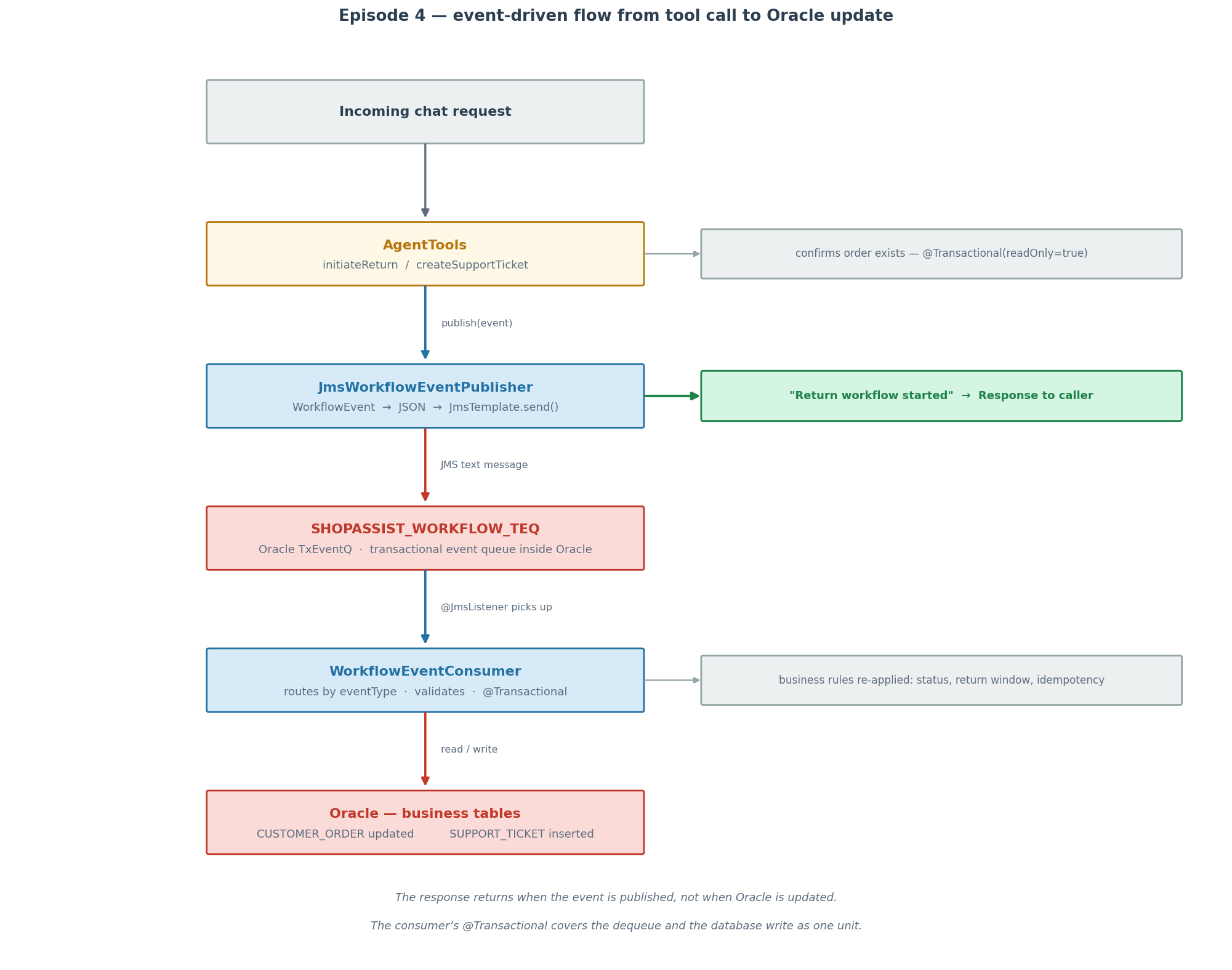
Figure 2 — The full event-driven flow. A chat request arrives,
AgentToolsconfirms the order exists,JmsWorkflowEventPublisherserializes and sends the event toSHOPASSIST_WORKFLOW_TEQ, and the response returns at that point. Separately,WorkflowEventConsumerpicks up the event via@JmsListener, re-validates the business rules, and writes to Oracle. The consumer’s@Transactionalcovers the dequeue and the database write as one unit.
The queue setup
Oracle TxEventQ is created by a SQL script that runs on every container start:
BEGIN DBMS_AQADM.CREATE_TRANSACTIONAL_EVENT_QUEUE( queue_name => 'shopassist.SHOPASSIST_WORKFLOW_TEQ', multiple_consumers => FALSE );EXCEPTION WHEN OTHERS THEN IF SQLCODE IN (-24001, -24006) THEN NULL; ELSE RAISE; END IF;END;/
The EXCEPTION block catches the Oracle error codes for “queue already exists” and “queue table already exists” and silently continues. This makes the script safe to run against an existing volume — the first run creates the queue, every subsequent run does nothing.
The same script grants enqueue and dequeue privileges to the application schema, so the Spring application uses the same database credentials for JMS messaging that it uses for JDBC everywhere else.
The system prompt
The system prompt was updated to reflect the workflow semantics:
app: assistant: system-prompt: > You are ShopAssist, a concise and practical support assistant for a demo electronics store. Use retrieved policy context when it is available. Use prior messages only when they are available through the active conversation ID. Do not invent policy details. Do not invent order details. Use tools for order status lookup, return initiation, and support ticket creation. Treat tool results as the source of truth for business actions and explain validation failures clearly. When a tool returns a workflow-started message, relay it directly to the user. Do not imply the action has already completed. Do not invent a workflow status. If the answer is not grounded in retrieved context, current conversation history, or tool results, say you do not know. Do not share memory across conversation IDs.
The critical addition: “When a tool returns a workflow-started message, relay it directly to the user. Do not imply the action has already completed.”
Without that instruction, a model will naturally rephrase “Return workflow started for order ORD-1001” into something like “I’ve initiated your return” — which implies instant completion. That would be inaccurate and would confuse users who check their order status immediately afterward. The prompt constraint prevents it. This is a good example of the system prompt doing coordination work that code cannot easily do.
Startup behaviour
On startup, DataSeeder drains any stale messages from the queue before seeding the demo orders:
private void drainWorkflowQueue() { Message message; while ((message = jmsTemplate.receive(queueName)) != null) { logger.info("Drained stale workflow event from {} on startup", queueName); }}
Events published in a previous run persist in TxEventQ across container restarts because the queue is backed by Oracle’s durable storage. Draining on startup ensures that old events from a previous demo session do not get processed unexpectedly when the application restarts with freshly seeded data.
Trying it
The same four demo orders from previous episodes are seeded: ORD-1001 (delivered, within the 30-day return window), ORD-1002 (shipped), ORD-1003 (delivered, outside the return window), ORD-1004 (processing).
Return workflow:
curl -s -X POST http://localhost:8080/api/v1/agent/chat -H "Content-Type: application/json" -H "X-Conversation-Id: demo-1" -d '{"message":"Initiate a return for ORD-1001 because the product was defective."}' | jq
The tool confirms the order exists, publishes a RETURN_REQUESTED event, and returns immediately. In the application logs you will see two lines in quick succession: the publisher logging Published workflow event and the consumer logging Received workflow event, followed by Return workflow updated order state. The response was already back at the client before the consumer finished.
Support ticket workflow:
curl -s -X POST http://localhost:8080/api/v1/agent/chat -H "Content-Type: application/json" -H "X-Conversation-Id: demo-1" -d '{"message":"Create a high-priority support ticket for ORD-1002 because shipping is stuck."}' | jq
The tool verifies the order exists, publishes a SUPPORT_TICKET_REQUESTED event, and returns. The consumer inserts the ticket row with priority HIGH.
After both requests, the database reflects the results:
SELECT ORDER_ID, STATUS FROM CUSTOMER_ORDER;
ORD-1001 shows PREPARING_RETURN. The other three orders are unchanged.
SELECT TICKET_ID, ORDER_ID, PRIORITY, STATUS FROM SUPPORT_TICKET;
One ticket row for ORD-1002 with priority HIGH and status OPEN.
The important thing to notice: the assistant reported “Return workflow started for ORD-1001” rather than “Return initiated”. The system prompt worked. The model did not imply the return was already complete.
Where things stand
Episode 1 made the assistant knowledgeable. Episode 2 made it remember. Episode 3 made it act. Episode 4 connects those actions to backend workflows.
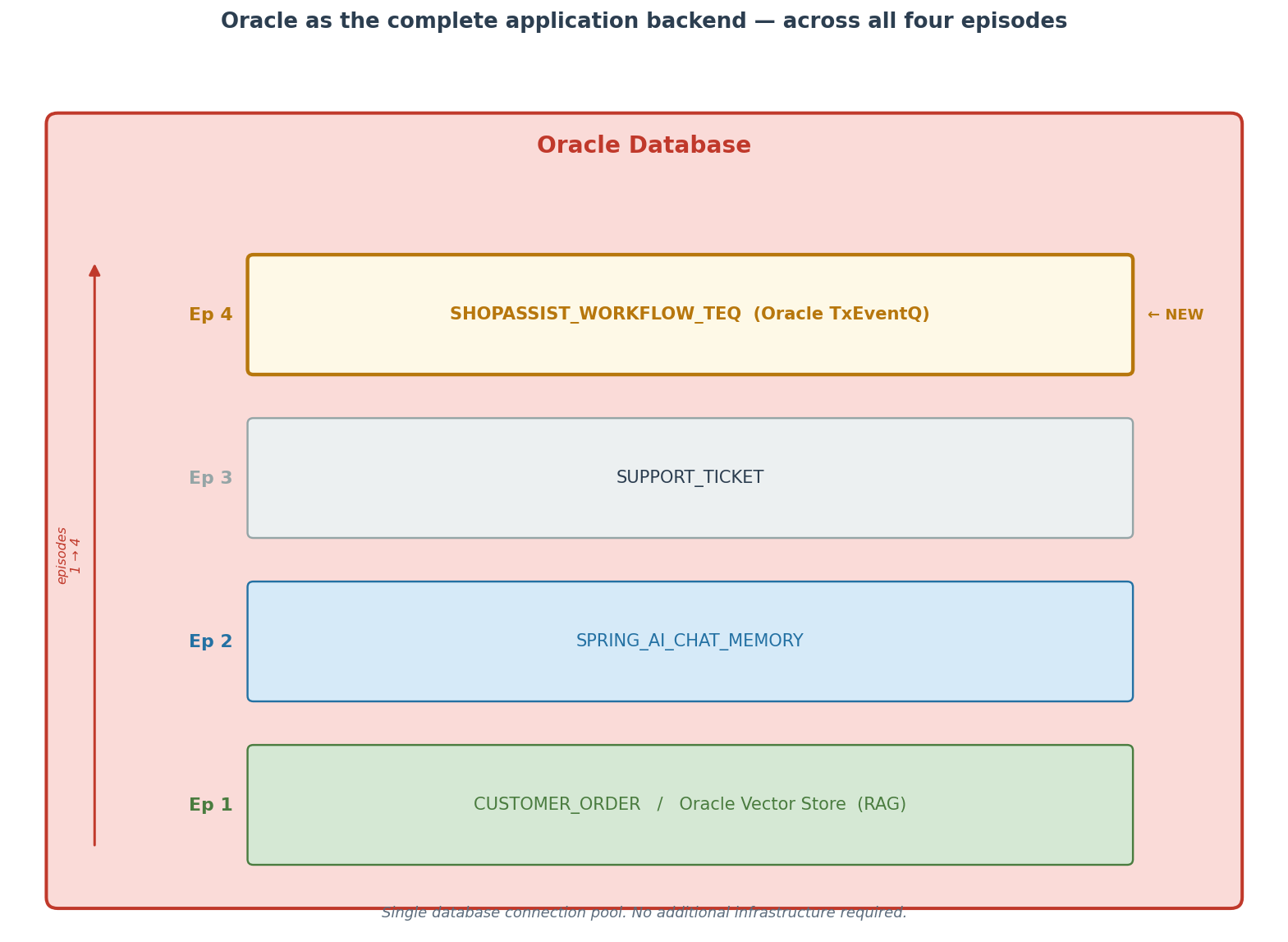
Figure 3 — Oracle’s role across all four episodes. The relational tables and vector store arrived in Episode 1. Chat memory was added in Episode 2. The support ticket table came in Episode 3. Oracle TxEventQ event streaming arrived in Episode 4. Single database connection pool, no additional infrastructure.
At this point Oracle is the backing store for every layer of the application: relational order data in CUSTOMER_ORDER, vectorized policy documents in the Oracle Vector Store table, conversation history in SPRING_AI_CHAT_MEMORY, support ticket records in SUPPORT_TICKET, and event streaming through SHOPASSIST_WORKFLOW_TEQ. All of it through one database, one connection pool.
The assistant’s role throughout the series has stayed consistent. It retrieves knowledge. It remembers conversations. It initiates actions. It starts workflows. In every case, the backend owns what happens next. That boundary — the model orchestrates, the backend decides and executes — is what makes the system trustworthy rather than unpredictable.

You must be logged in to post a comment.