
Key Takeaways
- Helidon SE can expose a small AI endpoint without turning the application into a framework exercise.
- LangChain4j gives the app a clean Java path to OpenAI chat and embeddings.
- Oracle AI Database can store the recipe text, JSON metadata, and vectors in the same place as the rest of the recipe data.
- A useful first AI feature is not “chat with everything”; it is a grounded recipe question endpoint that retrieves a few trusted chunks and answers from those.
In the previous Helidon Eats article, the application was already in a good place for an AI feature. The recipe data was normalized, the API was small, and Oracle AI Database was already doing useful work with JSON Relational Duality Views. That is a nice starting point because an AI assistant needs more than a model call. It needs application data it can trust.
The source code for this article is available in GitHub at https://github.com/markxnelson/helidon-eats/tree/AI1
Let’s add a recipe assistant to the same style of application. The endpoint is deliberately modest:
GET /ask?q=what%20can%20I%20make%20with%20rhubarb
The route takes the question, embeds it with OpenAI through LangChain4j, searches recipe chunks in Oracle AI Database, builds a grounded prompt, and sends that prompt to OpenAI for the final answer.
I am using Helidon SE, LangChain4j, OpenAI, and Oracle AI Database Free. The demo keeps the dependency versions pinned in the build file so the commands are repeatable.
Helidon AI keeps this style of feature close to regular Helidon SE code. LangChain4j supplies Java abstractions for models, embeddings, listeners, and memory; Helidon keeps the HTTP and configuration layer small; the application decides which Oracle data is trusted enough to send to the model.
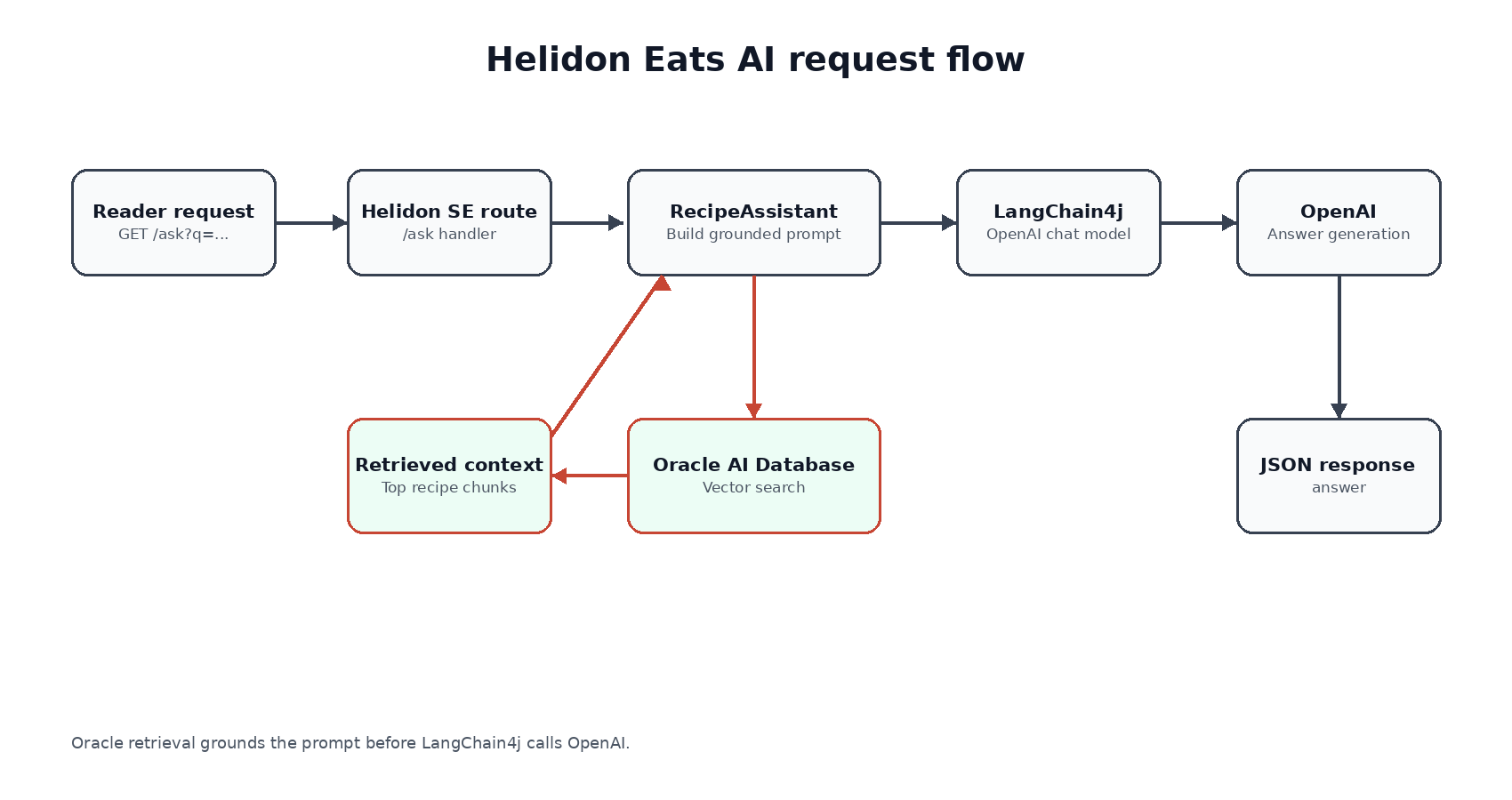
The important thing in this flow is where the grounding happens. The model does not get the whole database. It gets a small amount of context selected by the application. That keeps the endpoint understandable, and it makes the demo easy to inspect from both Java and SQL. It also gives us a narrow first feature that can be validated before we add richer agent behavior.
Start with the database shape
The recipe app already has structured recipe data from the previous article. The public domain LDJSON recipe data is loaded through recipe_dv into the normalized RECIPE, INGREDIENT, and DIRECTION tables. For the assistant, I add a second representation beside that existing data: short text chunks that are useful for semantic retrieval.
CREATE TABLE recipe_chunks ( chunk_id NUMBER GENERATED BY DEFAULT AS IDENTITY PRIMARY KEY, recipe_id NUMBER NOT NULL REFERENCES recipe(recipe_id), chunk_text CLOB NOT NULL, embedding VECTOR(1536, FLOAT32), metadata JSON NOT NULL);
The metadata column is JSON because the chunk carries small retrieval hints such as source table and category. The embedding column is a native Oracle VECTOR, sized for the OpenAI text-embedding-3-small model used by the demo.
I keep vectors in a separate chunk table instead of adding one vector column to RECIPE because the retrieval unit is not always the same as the source row. Today the demo creates one chunk per recipe. Tomorrow it could create separate chunks for ingredients, directions, notes, or nutrition text. The separate table also gives the embedding a small JSON metadata lifecycle without cluttering the source recipe table.
The chunk data comes from the same recipes that the first article exposed through the API. The seed keeps Tangy Rhubarb Salsa in the retrieval set by looking it up from the loaded recipe data using its title, category, and subcategory. That is more durable than depending on a generated numeric id. It also selects up to 499 more existing recipes from the loaded recipe table, so the assistant searches a bounded subset of the real demo data rather than a one-row toy corpus:
INSERT INTO recipe_chunks (recipe_id, chunk_text, metadata)WITH target_recipe AS ( SELECT * FROM recipe WHERE recipe_title = 'Tangy Rhubarb Salsa' AND category = 'Appetizers And Snacks' AND subcategory = 'Salsa' FETCH FIRST 1 ROW ONLY),selected_recipes AS ( SELECT * FROM target_recipe UNION ALL SELECT * FROM ( SELECT * FROM recipe WHERE recipe_id NOT IN (SELECT recipe_id FROM target_recipe) ORDER BY recipe_id FETCH FIRST 499 ROWS ONLY ))SELECT recipe_id, recipe_title || ': ' || description, JSON_OBJECT('source' VALUE 'recipe')FROM selected_recipes;
I leave the vector empty in SQL and let the Java app populate it with OpenAI embeddings on startup. That keeps the stored vectors tied to the same embedding model the application will use at query time. It also shows the boundary I usually want in this kind of application: SQL creates the durable shape, and the application owns the model-specific embedding call.
The demo runs Oracle AI Database Free with the gvenzl/oracle-free:23.26.2-slim-faststart image:
services: oracle: image: gvenzl/oracle-free:23.26.2-slim-faststart ports: - "15211:1521" environment: ORACLE_PASSWORD: "Welcome_12345"
The Helidon app connects as the existing food user with password Welcome12345##. The AI objects are additive objects in the Helidon Eats schema, not a replacement schema with similar names. The setup separates the one-time admin step from runtime access: SYSTEM grants the setup privileges, and the Helidon app runs as food for the tutorial path. That keeps the example aligned with least privilege while preserving the application shape.
Add the Helidon route
The Helidon SE route is intentionally plain. The route does not need a lot of framework machinery to be useful.
WebServer server = WebServer.builder() .port(config.port()) .routing(routing -> routing .get("/health", (req, res) -> json(res, Json.object("status", "UP"))) .get("/ask", (req, res) -> { String question = req.query() .first("q") .orElse("What can I make with rhubarb?"); json(res, assistant.answer(question)); }) .get("/observe/ai", (req, res) -> json(res, assistant.observe()))) .build() .start();
The /observe/ai route comes back in the next article when we add the observability thread. For now it is enough to know that the AI path is not a black box. The app records request and response events from the LangChain4j chat model listener.
The configuration comes from environment variables:
OPENAI_API_KEY=sk-your-keyOPENAI_CHAT_MODEL=gpt-4o-miniOPENAI_EMBEDDING_MODEL=text-embedding-3-smallJDBC_URL=jdbc:oracle:thin:@//localhost:15211/FREEPDB1DB_USER=foodDB_PASSWORD=Welcome12345##SERVER_PORT=8080
The model names are not magic constants buried in Java code. They are normal deployment settings, which is enough for this demo.
Embed the recipe chunks
On startup, the assistant looks for recipe chunks that do not have embeddings yet. When OPENAI_API_KEY is present, it embeds each missing chunk and writes the vector back to Oracle.
private void ensureRecipeEmbeddings() { for (RecipeChunk chunk : repository.chunksMissingEmbeddings()) { float[] vector = embeddingModel.embed(chunk.text()).content().vector(); repository.updateRecipeEmbedding(chunk.id(), vector); }}
The embedding model is a normal LangChain4j OpenAI model:
OpenAiEmbeddingModel.builder() .apiKey(config.openAiApiKey()) .modelName(config.embeddingModel()) .build();
The repository writes the vector through SQL:
UPDATE recipe_chunksSET embedding = TO_VECTOR(?)WHERE chunk_id = ?
This is a useful place to pause. The application is not trying to hide Oracle behind an abstraction. LangChain4j handles the OpenAI embedding call. Oracle stores and searches the vector. The Java repository is the small bit of glue that makes the data flow obvious.
For this demo, startup ingestion keeps the example compact and repeatable.
Search Oracle with the question vector
When a user asks a question, the app embeds the question with the same OpenAI embedding model and passes that vector into Oracle.
float[] queryEmbedding = embeddingModel.embed(question).content().vector();List<RecipeHit> hits = repository.searchByDemoVector(queryEmbedding, 2);
The SQL uses VECTOR_DISTANCE and asks for the closest chunks:
SELECT r.recipe_id, r.recipe_title, r.category, rc.chunk_text, VECTOR_DISTANCE(rc.embedding, TO_VECTOR(?), COSINE) AS distanceFROM recipe_chunks rcJOIN recipe r ON r.recipe_id = rc.recipe_idWHERE rc.embedding IS NOT NULLORDER BY distanceFETCH FIRST ? ROWS ONLY
There are two details I like here.
First, the vector search is just SQL. We can join it to recipe rows, filter it later by category or subcategory, and inspect it with normal database tools.
Second, the application decides how many chunks to retrieve. The demo asks for two. That is enough to answer a small recipe question without dumping the entire corpus into the prompt.
After the app starts, a direct database check shows the chunks are embedded:
EMBEDDED_CHUNKS--------------- 500
And a simple vector-distance check returns the closest recipe chunk:
RECIPE_TITLE DISTANCE-------------------- --------Tangy Rhubarb Salsa 0
That output is just a sanity check: the vector column is populated, and Oracle can rank the recipe chunks.
Debug it in layers
One reason I like this demo shape is that every layer has a plain check.
Start with the database. Before the app calls OpenAI, the smoke script can prove that the recipe rows, chunk rows, working memory row, semantic memory row, episodic event, procedural rule, and property graph are present. At that point the vector columns are still empty, which is exactly what I expect before startup ingestion.
The full smoke script lives at demos/helidon-eats-ai/sql/20-smoke-checks.sql. These are the checks I care about first:
SELECT COUNT(*) AS recipe_countFROM recipeWHERE recipe_title = 'Tangy Rhubarb Salsa' AND category = 'Appetizers And Snacks' AND subcategory = 'Salsa';SELECT COUNT(*) AS chunk_count FROM recipe_chunks;SELECT COUNT(*) AS working_memory_count FROM working_memory;SELECT COUNT(*) AS episodic_count FROM episodic_events;SELECT COUNT(*) AS procedural_count FROM procedural_rules;SELECT COUNT(*) AS semantic_count FROM semantic_memories;SELECT COUNT(*) AS chunks_waiting_for_openai_embeddingsFROM recipe_chunksWHERE embedding IS NULL;SELECT COUNT(*) AS semantic_memories_waiting_for_openai_embeddingsFROM semantic_memoriesWHERE embedding IS NULL;SELECT JSON_VALUE(state_doc, '$.goal') AS current_goalFROM working_memoryWHERE tenant_id = 'demo' AND user_id = 'mark' AND session_id = 'weeknight';SELECT graph_nameFROM all_property_graphsWHERE graph_name = 'EATS_MEMORY_GRAPH';
The graph check can go one step further and prove that the graph shape is useful, not just present:
SELECT recipe_name, liked_ingredientFROM GRAPH_TABLE ( eats_memory_graph MATCH (u IS entity) -[likes IS remembers]-> (i IS entity) <-[uses IS recipe_link]- (r IS recipe) WHERE u.display_name = 'mark' AND likes.relation_type = 'likes' AND uses.relation_type = 'uses' COLUMNS ( r.recipe_title AS recipe_name, i.display_name AS liked_ingredient ))ORDER BY recipe_name;
Then start the app with an OpenAI key. The first thing it does is embed the missing recipe chunks and semantic memory. That gives us a second database check: the counts for missing embeddings should drop to zero. If they do not, the failure is probably in configuration, outbound model access, or the vector update path.
Only after those checks does the /ask route matter. The route is useful because it exercises the whole loop: HTTP request, OpenAI embedding, Oracle vector search, memory lookup, prompt construction, OpenAI chat, and JSON response. If the answer looks strange, you can inspect the retrieved recipe names and selected memory before blaming the model.
That is also why I keep the endpoint small. A first AI feature should make it easy to answer simple debugging questions. Did we retrieve the right chunks? Did the prompt contain the selected memory? Did OpenAI return a response? Did the observability listener record the call? If those answers are visible, the application is much easier to improve.
Build the grounded prompt
Once the app has the recipe hits, it turns them into a small context block:
String context = hits.stream() .map(hit -> "- " + hit.name() + ": " + hit.text()) .collect(Collectors.joining("n"));
The prompt includes that retrieved context and a selected slice of memory:
String prompt = """ You are helping with the Helidon Eats recipe app. Use only this recipe context and the selected memory. Working memory goal: %s Semantic memory: %s Procedural rule: %s Recipe context: %s Question: %s """.formatted(memoryGoal, semanticMemory, proceduralRule, context, question);
The working memory line is a JSON document in Oracle that says what the user is trying to do:
{ "goal": "find a use for extra rhubarb", "constraints": ["appetizer or snack"], "pantry": ["rhubarb", "red onion", "tomatoes"], "avoid": ["peanuts"]}
The semantic memory and procedural rule are the first hints of the fuller memory model in the next article. They are still selected by the application, not sprayed wholesale into the prompt.
I like this pattern because it keeps the prompt construction in application code. It is not scattered across the database, the model provider, and a hidden framework layer. You can debug it by logging the retrieved recipe names, checking the memory row, checking the selected preference, and reading the prompt template.
Call OpenAI through LangChain4j
The chat model is also straightforward:
OpenAiChatModel chatModel = OpenAiChatModel.builder() .apiKey(config.openAiApiKey()) .modelName(config.chatModel()) .temperature(0.2) .listeners(eventRecorder) .build();String answer = chatModel.chat(prompt);
The listener is small, but it matters:
final class AiEventRecorder implements ChatModelListener { @Override public void onRequest(ChatModelRequestContext context) { String provider = context.modelProvider().toString(); events.add(Instant.now() + " chat.request provider=" + provider); } @Override public void onResponse(ChatModelResponseContext context) { String provider = context.modelProvider().toString(); events.add(Instant.now() + " chat.response provider=" + provider); }}
This is just enough instrumentation for the tutorial. The app knows when a chat request starts, when a response comes back, and which provider handled the call. In the next article, we will connect that to the memory path so the assistant is easier to reason about.
Try the endpoint
You need Java 21 or newer, Maven, Docker, an Oracle Free container, and an OpenAI API key for the mode=openai path.
Start Oracle. The Compose file mounts a startup directory into the database
container, so the same idempotent setup runs on every startup. It creates the
same food user when needed, loads the predecessor recipe data only when the
recipe table is empty, rebuilds the additive AI objects, and runs the smoke
checks from sql/20-smoke-checks.sql.
docker compose up -d oracle
Then run the app:
export OPENAI_API_KEY=sk-your-keySERVER_PORT=18080 mvn exec:java
Ask what to make with rhubarb:
curl "http://localhost:18080/ask?q=what%20can%20I%20make%20with%20rhubarb"
The response comes back as JSON. Here is the shape:
{ "mode": "openai", "question": "what can I make with rhubarb", "workingMemoryGoal": "find a use for extra rhubarb", "semanticMemory": "The user likes tangy salsas...", "proceduralRule": "Prefer recipes from the Helidon Eats catalog...", "answer": "Tangy Rhubarb Salsa is a good fit..."}
The exact wording can vary, but the important parts should be stable. Check whether the response stays within the retrieved recipe context; the demo prompt is designed to discourage answers outside those chunks.
The salsa preference is not coming from nowhere. The seed memory already says
the user likes tangy, salsa-style appetizers that can be served with chips, and
the working memory says the current goal is to use extra rhubarb for an
appetizer or snack. That is why the response and the AI observation path both
surface salsa-related context instead of making the recipe choice look like a
surprise.
You can also check the lightweight observability route:
curl "http://localhost:18080/observe/ai"
That returns database counts and the recorded AI events:
{ "database": { "recipeChunks": 500, "embeddedRecipeChunks": 500, "semanticMemories": 8, "embeddedSemanticMemories": 8, "episodicEvents": 8, "workingMemoryRows": 1, "proceduralRules": 4 }, "events": [ "chat.request provider=OPEN_AI", "chat.response provider=OPEN_AI" ]}
That is enough to prove the loop is alive: Helidon is serving the route, Oracle has the recipe vectors, LangChain4j is calling OpenAI, and the application can show a little bit of what happened.
Why this is a good first AI feature
The endpoint is intentionally small, but it has the pieces I want before adding more agent behavior.
The model call is grounded. The recipe context comes from Oracle vector search, not from a vague instruction to “answer about recipes.”
The data stays close together. Recipes, JSON metadata, vectors, and the first memory row all live in Oracle AI Database. That makes the example easier to validate than a demo spread across a database, a vector service, a cache, and a local file.
The application owns the policy. It decides how many chunks to retrieve, what memory to include, and when to call OpenAI. LangChain4j handles the provider mechanics, but the recipe app still reads like a recipe app.
The implementation stays close to the application concepts. There is a repository method for vector search, a prompt builder that shows the selected context, and a listener that records the AI call. Those are ordinary application seams, which makes the assistant easier to explain and easier to change.
That last point is the part I would protect as the application grows. It is tempting to turn every model-facing feature into a general chat endpoint. For Helidon Eats, a better path is to keep adding application-shaped capabilities: answer a recipe question, remember a planning goal, suggest two dinners, explain why a recipe matched the pantry, or show which memory influenced the answer. Each capability can still use OpenAI, LangChain4j, Oracle JSON, and vector search, but it stays tied to a user task the application understands.
The demo also gives us a clean next step. Right now the working memory row is only a hint. In the next article, we will turn that into a more complete memory model with working, semantic, episodic, and procedural memory. We will also add a relationship graph and make the observability endpoint more useful.
That is where the assistant starts to feel less like a search box and more like a small agent that can remember what it is helping with.

Pingback: Exploring Helidon AI: give the recipe assistant memory | RedStack
Pingback: Exploring Helidon AI: trace the recipe assistant with OpenTelemetry and Jaeger | RedStack