
Key Takeaways
- Agent memory is easier to reason about when each memory type has a clear job and a separate storage shape.
- Oracle JSON works well for working memory because session state changes shape as the user plans.
- Oracle vector search works well for semantic memory, while SQL property graphs make relationship memory visible.
- Keep retrieved memory selective so the prompt gets only the small working set needed for the current answer.
In the last article, the Helidon Eats application learned how to answer a recipe question. The route embedded the question with OpenAI, searched recipe chunks in Oracle AI Database, built a grounded prompt, and called OpenAI through LangChain4j.
The source code for this article is available in GitHub at https://github.com/markxnelson/helidon-eats/tree/AI2
That is a good first AI feature, but it is still a little forgetful. If I ask what to make with rhubarb, accept one of the suggestions, and then come back with a follow-up question, the assistant needs somewhere to keep the useful parts of that interaction.
Now we add that memory while keeping the same recipe domain and the same Helidon SE application. The goal is not to make a mysterious autonomous agent. The goal is to make the assistant remember the right things in the right place, and to keep those choices visible in the application response.
The demo stores four memory types and uses the current, semantic, and procedural pieces in the /ask path:
- working memory for the current task state;
- semantic memory for durable facts and preferences retrieved by meaning;
- episodic memory for past events and outcomes;
- procedural memory for task rules and routines.
It also adds relationship memory through a SQL property graph. The next article will take the same request path and instrument it with OpenTelemetry so we can inspect the whole run in a trace.
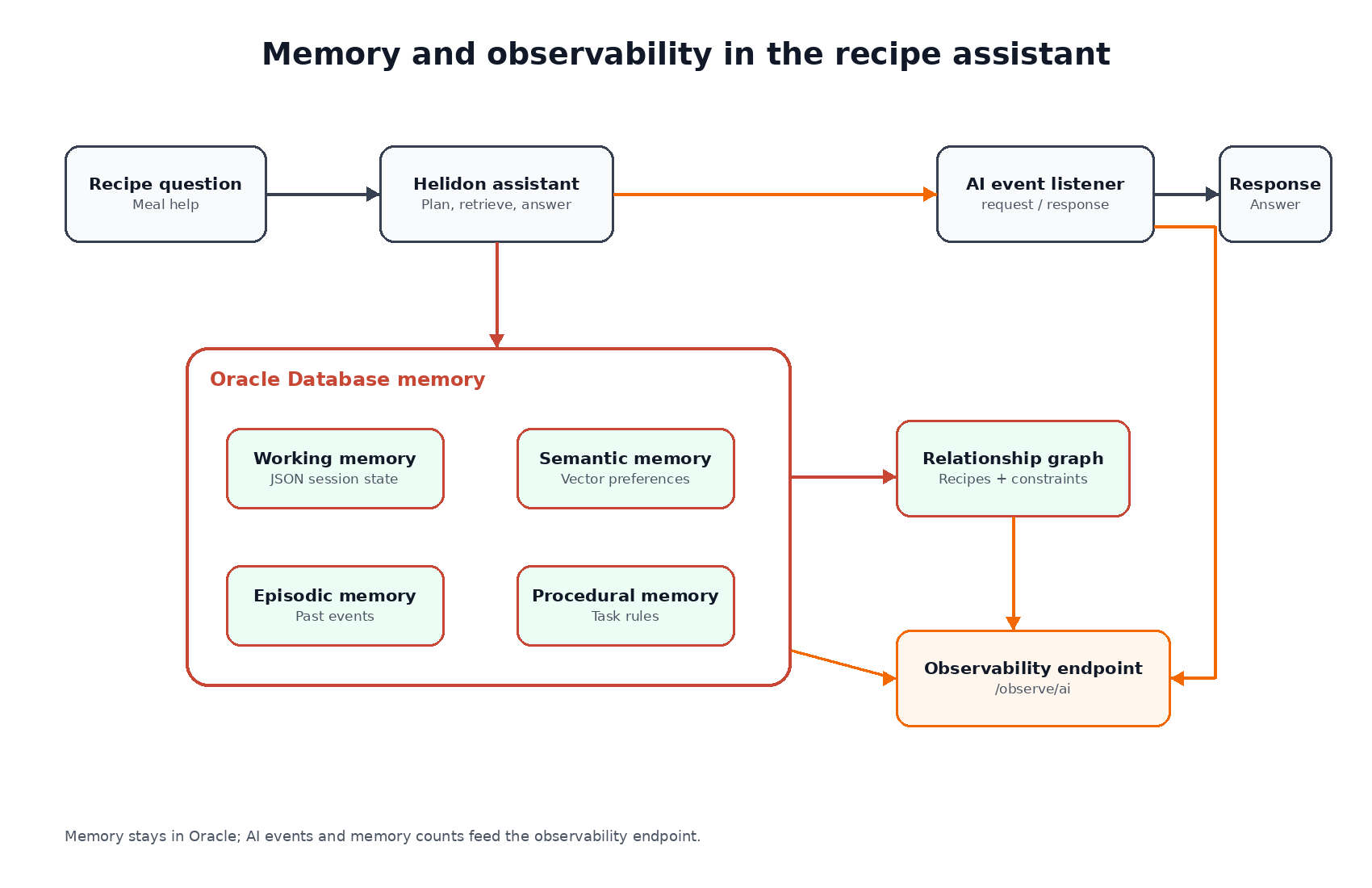
The useful constraint is that every memory path remains inspectable. We can see the schema, query it directly, call the Helidon routes, and decide whether the memory model is helping.
The separation is the main design choice. Working memory, semantic memory, episodic memory, procedural memory, and relationship memory should not collapse into one “memory” table just because the assistant eventually sees them in one prompt. They change for different reasons, they age differently, and they need different validation checks.
Helidon SE keeps the agent surface small: a few routes, a configuration object, and a service class. LangChain4j handles OpenAI chat and embeddings. Oracle AI Database keeps the state, vectors, JSON, and graph relationships in one database so the app can inspect what it is about to send to the model.
The seed data is intentionally big enough to test retrieval behavior. It uses one current working-memory document, eight semantic memories, eight episodic events, four procedural rules, and relationship edges over recipe and preference entities. That is still small enough to read, but it is no longer a one-row memory demo.
The request path then chooses a small working set from those stores. It reads the current JSON scratchpad, searches semantic memories by vector distance, selects the active rule for the task, and keeps the event and graph stores available for direct checks. That separation is useful because “memory” is not one operation. Some memory is state, some is retrieval, some is audit history, and some is relationship context. The assistant only needs a few of those values in the prompt, but the database keeps the fuller model available for validation and future routes.
That makes the demo easier to extend without making the prompt harder to understand.
Start with working memory
Working memory is the assistant’s current scratchpad. In the recipe app, that means the current planning goal, constraints, pantry items, and things to avoid.
I store it as JSON:
CREATE TABLE working_memory ( tenant_id VARCHAR2(80) NOT NULL, user_id VARCHAR2(80) NOT NULL, session_id VARCHAR2(80) NOT NULL, state_doc JSON NOT NULL, updated_at TIMESTAMP DEFAULT SYSTIMESTAMP NOT NULL, CONSTRAINT working_memory_pk PRIMARY KEY (tenant_id, user_id, session_id));
The seed row is intentionally easy to read:
INSERT INTO working_memory (tenant_id, user_id, session_id, state_doc)VALUES ( 'demo', 'mark', 'weeknight', JSON('{ "goal":"find a use for extra rhubarb", "constraints":["appetizer or snack"], "pantry":["rhubarb","red onion","tomatoes"], "avoid":["peanuts"] }'));
That shape is one reason JSON belongs here. The working state may change as the conversation changes. Maybe we add budget, servings, leftovers, or equipment. I do not want to redesign a relational table every time the scratchpad gets one more field.
The app reads the current goal with a normal JSON query:
SELECT JSON_VALUE(state_doc, '$.goal') AS goalFROM working_memoryWHERE tenant_id = ? AND user_id = ? AND session_id = ?
The assistant includes that goal in the prompt:
Working memory goal: find a use for extra rhubarb
That is enough for the first pass. The next refinement would be a route that updates the JSON document as the user accepts, rejects, or changes the plan.
Add semantic memory with vectors
Semantic memory is the durable “what we know” layer. In this recipe app, it can hold preferences such as:
The user is interested in tangy appetizer ideas and has extra rhubarb, red onion, and tomatoes.
The table mirrors the recipe chunk idea:
CREATE TABLE semantic_memories ( memory_id NUMBER GENERATED BY DEFAULT AS IDENTITY PRIMARY KEY, tenant_id VARCHAR2(80) NOT NULL, user_id VARCHAR2(80) NOT NULL, memory_text CLOB NOT NULL, embedding VECTOR(1536, FLOAT32), metadata JSON NOT NULL, created_at TIMESTAMP DEFAULT SYSTIMESTAMP NOT NULL);
The point is not that every preference must become a vector. The point is that some memories are useful by meaning rather than by exact key. “I need a quick dinner” might be close to stored preferences about weeknight meals even when the words are not identical.
In the first article, the app used OpenAI embeddings for recipe chunks. The same approach applies here. The app embeds a memory summary, stores it in Oracle, and later retrieves it with VECTOR_DISTANCE.
That gives the assistant two retrieval paths in the demo:
- recipe context from
recipe_chunks; - user or session context from
semantic_memories.
On startup, the app embeds missing semantic memories with the same OpenAI embedding model it uses for recipe chunks. When a question arrives, it searches semantic_memories with VECTOR_DISTANCE, selects one relevant preference, and includes that text in the prompt alongside the recipe hits.
The app should still choose what to include. Memory retrieval is not a license to stuff every past fact into every prompt. For the recipe assistant, the demo retrieves one relevant preference and lets working memory decide the current task.
Record episodic memory
Episodic memory is event memory. It answers questions like:
- What did the user accept last time?
- Which recommendation failed?
- Which substitution worked?
- What did the tool call return?
The table is relational, with a JSON payload for the event details:
CREATE TABLE episodic_events ( event_id NUMBER GENERATED BY DEFAULT AS IDENTITY PRIMARY KEY, tenant_id VARCHAR2(80) NOT NULL, user_id VARCHAR2(80) NOT NULL, session_id VARCHAR2(80) NOT NULL, event_type VARCHAR2(80) NOT NULL, payload JSON NOT NULL, created_at TIMESTAMP DEFAULT SYSTIMESTAMP NOT NULL);
A seed event might look like this:
INSERT INTO episodic_events (tenant_id, user_id, session_id, event_type, payload)SELECT 'demo', 'mark', 'weeknight', 'recommendation.accepted', JSON_OBJECT( 'recipeId' VALUE recipe_id, 'recipe' VALUE recipe_title, 'reason' VALUE 'uses extra rhubarb' )FROM recipeWHERE recipe_title = 'Tangy Rhubarb Salsa' AND category = 'Appetizers And Snacks' AND subcategory = 'Salsa'FETCH FIRST 1 ROW ONLY
This is not chat history. It is a curated event stream. That distinction matters.
LangChain4j chat memory is useful for carrying recent messages through a conversation, but the LangChain4j documentation is careful to distinguish memory from full user-visible history. If the application needs an exact transcript, store that separately. Episodic memory is smaller and more purposeful. It keeps the events that should influence future behavior.
For the recipe assistant, episodic events are where I would store accepted recommendations, rejected recipes, allergy warnings, failed substitutions, and generated shopping lists.
Keep procedural memory as rules
Procedural memory is “how we do this task.” In a recipe assistant, that might be:
Prefer recipes from the Helidon Eats catalog. Never recommend ingredients listed in avoid.
The table is simple:
CREATE TABLE procedural_rules ( rule_id NUMBER GENERATED BY DEFAULT AS IDENTITY PRIMARY KEY, tenant_id VARCHAR2(80) NOT NULL, task_key VARCHAR2(120) NOT NULL, rule_text CLOB NOT NULL, rule_version NUMBER DEFAULT 1 NOT NULL, active CHAR(1) DEFAULT 'Y' CHECK (active IN ('Y', 'N')) NOT NULL);
I like storing procedures separately from semantic memory because rules age differently from preferences. A preference might be updated when the user says “I like chickpeas.” A procedure should be versioned more deliberately because it changes the assistant’s behavior.
In the prompt, a procedural rule is not just another fact. The demo reads the active meal-plan rule and includes it as an instruction that constrains the answer:
Prefer recipes from the Helidon Eats catalog.Never recommend ingredients listed in avoid.
For this demo, one active rule is enough; the useful part is that task rules stay separate from user preferences.
Add relationship memory with a SQL property graph
The four memory types are useful, but the recipe domain also has relationships:
- a user likes an ingredient;
- a recipe uses an ingredient;
- a recipe matches a constraint;
- an ingredient conflicts with an allergy;
- a cuisine is related to a substitution pattern.
Those relationships fit naturally in graph form. The demo creates entity and edge tables:
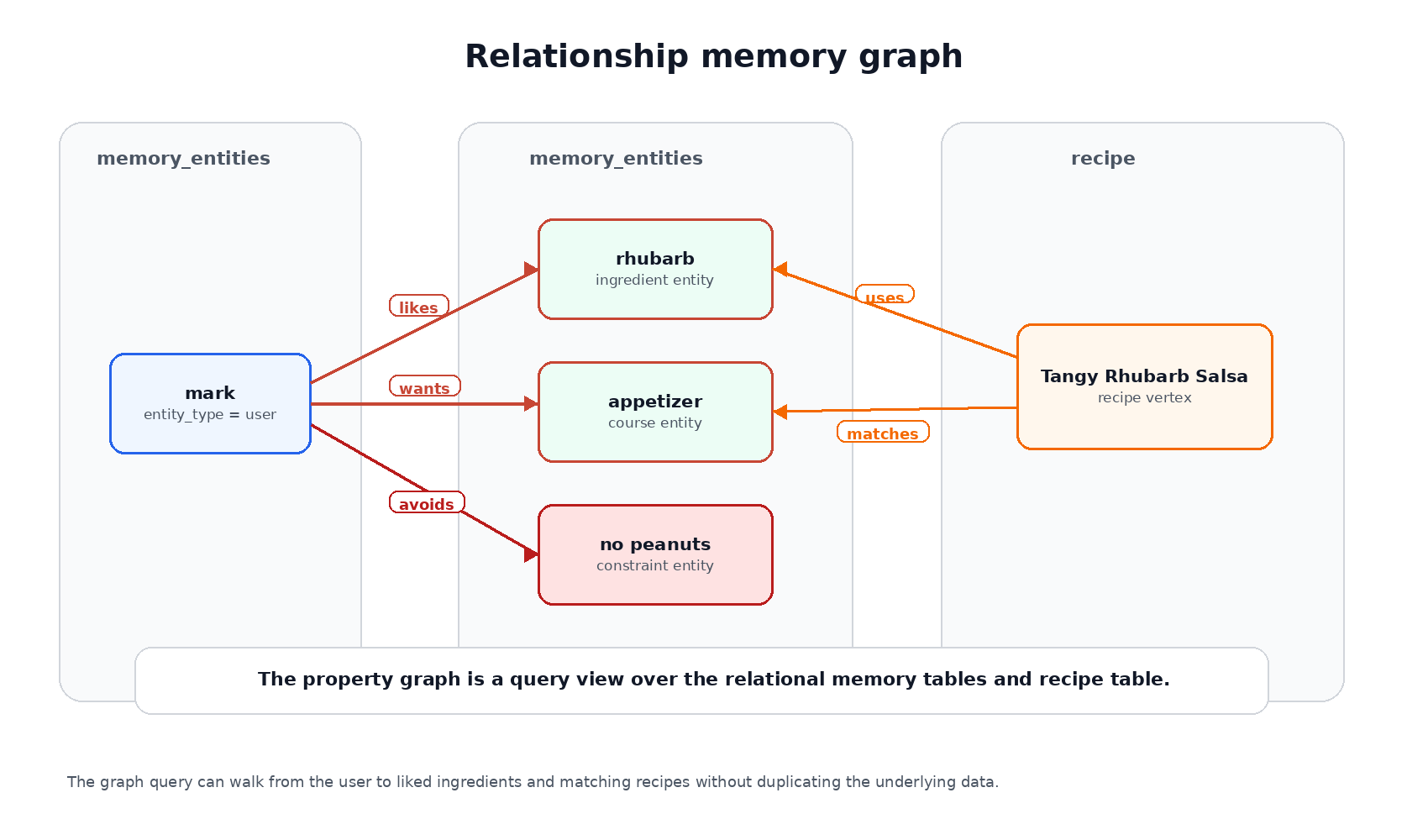
The graph does not replace the tables. It gives the application a relationship-oriented query view over the same user, recipe, and memory data.
CREATE TABLE memory_entities ( entity_id NUMBER GENERATED BY DEFAULT AS IDENTITY PRIMARY KEY, entity_type VARCHAR2(40) NOT NULL, display_name VARCHAR2(200) NOT NULL);CREATE TABLE memory_edges ( edge_id NUMBER GENERATED BY DEFAULT AS IDENTITY PRIMARY KEY, from_entity_id NUMBER NOT NULL REFERENCES memory_entities(entity_id), to_entity_id NUMBER NOT NULL REFERENCES memory_entities(entity_id), relation_type VARCHAR2(80) NOT NULL);
It also links recipes to entities:
CREATE TABLE recipe_entity_edges ( edge_id NUMBER GENERATED BY DEFAULT AS IDENTITY PRIMARY KEY, recipe_id NUMBER NOT NULL REFERENCES recipe(recipe_id), entity_id NUMBER NOT NULL REFERENCES memory_entities(entity_id), relation_type VARCHAR2(80) NOT NULL);
Then it creates a SQL property graph:
CREATE PROPERTY GRAPH eats_memory_graph VERTEX TABLES ( memory_entities KEY (entity_id) LABEL entity PROPERTIES (entity_type, display_name), recipe KEY (recipe_id) LABEL recipe PROPERTIES (recipe_title, category, subcategory) ) EDGE TABLES ( memory_edges KEY (edge_id) SOURCE KEY (from_entity_id) REFERENCES memory_entities (entity_id) DESTINATION KEY (to_entity_id) REFERENCES memory_entities (entity_id) LABEL remembers PROPERTIES (relation_type), recipe_entity_edges KEY (edge_id) SOURCE KEY (recipe_id) REFERENCES recipe (recipe_id) DESTINATION KEY (entity_id) REFERENCES memory_entities (entity_id) LABEL recipe_link PROPERTIES (relation_type) );
That gives us a graph view over ordinary relational tables. We do not have to move the memory model somewhere else to ask relationship questions.
A direct database check confirms the graph exists:
GRAPH_NAME--------------------------------------------------------------------------------EATS_MEMORY_GRAPH
The smoke script also runs a graph query over that property graph:
SELECT recipe_name, liked_ingredientFROM GRAPH_TABLE ( eats_memory_graph MATCH (u IS entity) -[likes IS remembers]-> (i IS entity) <-[uses IS recipe_link]- (r IS recipe) WHERE u.display_name = 'mark' AND likes.relation_type = 'likes' AND uses.relation_type = 'uses' COLUMNS (r.recipe_title AS recipe_name, i.display_name AS liked_ingredient))ORDER BY recipe_name;
The result connects the user, liked ingredients, and recipes through the graph:
RECIPE_NAME LIKED_INGREDIENT--------------------- ----------------Tangy Rhubarb Salsa rhubarb
The graph is deliberately small. It proves the shape and gives the assistant a path for relationship memory that is separate from semantic similarity.
Try the memory checks
You need Java 21 or newer, Maven, Docker, Oracle AI Database Free running on FREEPDB1, and an OpenAI API key for the embedding and chat calls. The Helidon Eats food user owns the recipe tables, the duality view, and the additive AI objects.
After loading the schema, the smoke script checks each memory store:
RECIPE_COUNT------------ 500WORKING_MEMORY_COUNT-------------------- 1EPISODIC_COUNT-------------- 8PROCEDURAL_COUNT---------------- 4SEMANTIC_COUNT-------------- 8
It also checks the working memory goal:
CURRENT_GOAL--------------------------------------------------------------------------------find a use for extra rhubarb
After the Helidon app starts with an OpenAI key, it embeds the recipe chunks and semantic memory, and the endpoint can answer a real question:
curl "http://localhost:18080/ask?q=what%20can%20I%20make%20with%20rhubarb"
The answer should recommend recipes from the stored recipe chunks, such as Tangy Rhubarb Salsa. The response also shows which memory values were selected for the prompt:
{ "workingMemoryGoal": "find a use for extra rhubarb", "semanticMemory": "The user is interested in tangy appetizer ideas...", "proceduralRule": "Prefer recipes from the Helidon Eats catalog..."}
The output may vary in wording, but it should be grounded in the Oracle retrieval result and the selected memory. The useful checks are:
embeddedRecipeChunksreflects the selected recipe corpus;- the seed data has enough memory rows to exercise ranking and filtering;
embeddedSemanticMemoriesis8;- the response shows the selected working, semantic, and procedural memory.
That gives us a compact test loop. We can validate memory rows with SQL and validate the model path with /ask.
Keep retrieval selective
The most tempting mistake with agent memory is retrieving too much. Once the app has four memory types, it is easy to say, “just load all of it.” That usually makes the assistant worse.
Working memory should be small and current. It answers, “what are we doing right now?”
Semantic memory should be retrieved by meaning and limited to a few relevant facts. It answers, “what does the assistant know that might help?”
Episodic memory should be curated by event type, recency, and outcome. It answers, “what happened before that matters now?”
Procedural memory should be selected by task. It answers, “which rules govern this job?”
Relationship memory should help connect entities. It answers, “how do these ingredients, recipes, constraints, and preferences relate?”
That is the pattern I would keep as the demo grows. The database can store more memory than the prompt should ever see. The application chooses the small working set for the current answer.
Where this leaves the series
The Helidon Eats application now has three useful layers.
The original recipe API gave us a clean application and database foundation. The first Helidon AI follow-up added OpenAI embeddings, Oracle vector search, and a grounded /ask route. Now the assistant has four memory types and a SQL property graph.
That is enough to make the assistant feel like part of the application rather than a model bolted onto the side. The recipe data stays in Oracle. The memory model stays inspectable. Helidon SE keeps the HTTP layer small. LangChain4j handles the model integration. OpenAI supplies the chat and embedding models.
There is plenty more you could add: memory update routes, graph queries in the prompt builder, richer metrics, or a UI. But the foundation is here, and it is a good one to build on. The assistant can answer from recipe data and remember what matters.
The next useful step is observability. Once a single answer can draw from vectors, JSON, rules, events, and a graph, we should be able to see that path as a trace instead of guessing which parts ran.

You must be logged in to post a comment.